My Google Review Link: How to Find, Copy & Share It (2026)
Find your Google review link in under 2 minutes — free. Step-by-step for Business Profile, Search, and Maps. Share by text, email, or QR code and collect more 5-star reviews.
A google review link for my business is a direct URL that takes customers straight to your business's Google review form — sometimes called a google reviews link or the “link for my google reviews.” When someone clicks your google reviews link, they land on a page where they can immediately leave a star rating and written feedback — no searching, no scrolling. That single step makes the difference between customers who intend to review you and customers who actually do.
The numbers back this up. More than 99% of consumers read online reviews before buying, and Google reviews are the most trusted source. Businesses that make reviewing easy — by sharing a direct google reviews link — collect more reviews, earn more 5-star reviews, rank higher in local search, and win more customers.
This guide shows you exactly how to get your google reviews link, where to share it, how to find the link for my google reviews from any device, and how to automate the whole process so reviews keep coming in on autopilot.
How to get your Google review link for my business in 2 minutes:
- Go to business.google.com and sign in with your Google account.
- Click "Ask for reviews" on the Home tab of your dashboard.
- Click "Copy link" from the pop-up dialog that appears.
- Share your google reviews link with customers by SMS, email, WhatsApp, or QR code.
Quick Answer — How to Get a Google Review Link for My Business:
- Sign in to business.google.com with your Google account.
- Click "Ask for reviews" on the Home tab of your dashboard.
- Click "Copy link" from the pop-up — that's your Google review link for your business.
- Share it by SMS, email, WhatsApp, or display as a QR code at your location.
Your Google review link for my business is free, takes under 2 minutes to find, and sends customers directly to your 5-star rating form — no searching required.
Get Your Google Reviews Link at a Glance
| Method | Where to go | Time needed |
|---|---|---|
| Google Business Profile | business.google.com → "Ask for reviews" | Under 2 minutes |
| Google Search | Search your business name → click "Ask for reviews" in your panel | Under 2 minutes |
| Google Maps | Search your business → Reviews section → "Get more reviews" | Under 2 minutes |
| Place ID builder | Place ID Finder → paste into URL template | 3–5 minutes |
The fastest method is your Google Business Profile dashboard — sign in, click "Ask for reviews," and copy the link. Full step-by-step instructions for each method are below.
Key Takeaways
- Getting a google review link for my business takes under 2 minutes and is the single fastest way to grow your Google review count — the link sends customers directly to your star-rating form with one click, no searching required.
- You can get your google reviews link in minutes from Google Business Profile, Google Search, Google Maps, or by building it with your Place ID.
- Sharing your link by SMS, email, WhatsApp, and QR code dramatically increases the number of reviews you receive.
- Whether you call it a "google review link for my business," a "link for my google reviews," or a "google reviews link" — it is the same URL, and this guide shows you every way to get it.
- Tools like HiFiveStar automate review requests on Pro so your google reviews link reaches every customer at the right moment.
Do this faster
HiFiveStar drafts a reply to any review in seconds — so your profile always looks cared for.
What Is a Google Review Link for My Business?
A google review link for my business is a URL that opens the "Write a review" dialog for your specific business on Google — also called a google reviews link or a "link for my google reviews." When a customer clicks the link, they see a five-star rating selector and a text box — ready to type. There is no need to search for your business, navigate to your profile, or find the reviews tab.
Every verified Google Business Profile has a unique google reviews link. The format usually looks like one of these:
| Link type | Example format |
|---|---|
| Short profile link | https://g.page/r/YOUR_CID/review |
| Place ID link | https://search.google.com/local/writereview?placeid=YOUR_PLACE_ID |
| Maps share link | https://maps.google.com/?cid=YOUR_CID |
The easiest way to get your exact google reviews link is directly from your Google Business Profile dashboard — no manual URL construction needed.
Why Your Google Reviews Link Matters
More Reviews, Faster
The biggest reason reviews don't get written is friction. A customer finishes a service and thinks, "I should leave them a review" — then pulls out their phone, can't find the business quickly, gives up, and the moment is gone. A direct google reviews link eliminates that friction entirely.
You can send the link in a text message while the customer is still on-site. You can include it in a receipt email. You can display it as a QR code at checkout. Every touchpoint you create is another chance to turn a happy experience into a published review.
Better Local Search Rankings
Google uses the number and recency of your reviews as a ranking signal for local search. Businesses with more recent, positive reviews appear higher in local results and on Google Maps. A steady stream of new reviews — made possible by consistently sharing your google reviews link — helps you rank above competitors who aren't actively collecting feedback. Read more about how Google reviews help SEO.
Trust at First Glance
When someone searches your business type locally, the first thing they notice after your name is your star rating and review count. A business with 14 reviews and a 4.1 rating looks very different from one with 180 reviews and a 4.7 rating — even if the underlying quality is identical. Your google reviews link is the mechanism that builds that visible proof over time.
How to Get a Google Review Link for My Business
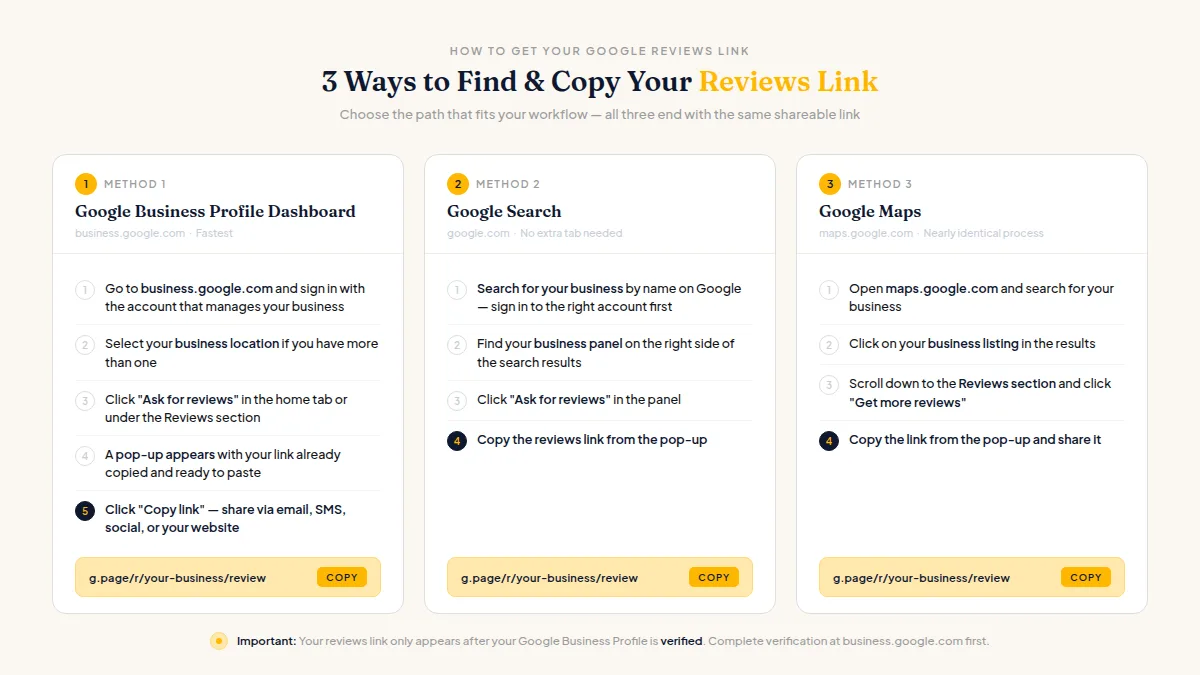
Getting a google review link for my business is the single most impactful step you can take to grow your review count — and it's completely free. Instead of hoping customers will search for your business and find the reviews tab on their own, you send them a direct URL — they click once and land straight on the five-star rating screen. Below are the four ways to get yours.
Method 1: Google Business Profile Dashboard (Fastest)
Your google reviews link lives inside your Google Business Profile dashboard. Here's how to grab it:
- Go to business.google.com and sign in with the Google account that manages your business.
- Select your business location if you have more than one.
- Click "Ask for reviews" in the home tab (or find it under the Reviews section).
- A pop-up appears with your google reviews link already copied and ready to paste.
- Click "Copy link" and share it anywhere — email, SMS, social media, or your website.
Tip: Your google reviews link only appears after your Google Business Profile is verified. If you haven't verified your profile yet, complete that step first at business.google.com.
Method 2: Google Search
You can also get your google reviews link straight from the search results page:
- Search for your business by name on Google (make sure you're signed into the right account).
- Find your business panel on the right side of the results.
- Click "Ask for reviews" in the panel.
- Copy the google reviews link from the pop-up.
This method is handy when you're already in a browser and don't want to open another tab.
Method 3: Google Maps
If you prefer Google Maps, the process is nearly identical:
- Open maps.google.com and search for your business.
- Click on your business listing.
- Scroll down to the Reviews section and click "Get more reviews."
- Your google reviews link appears in the share dialog — copy it.
Method 4: Build It with Your Place ID
Every Google Business listing has a unique Place ID — a string of letters and numbers that permanently identifies your location. Building your google reviews link manually from this ID gives you a URL that won't break even if your business name changes.
- Go to the Google Maps Place ID Finder.
- Type your business name and city into the search box.
- Your Place ID appears on the map pin (it looks like:
ChIJN1t_tDeuEmsRUsoyG83frY4). - Paste it into this URL format:
https://search.google.com/local/writereview?placeid=YOUR_PLACE_ID
Replace YOUR_PLACE_ID with the actual ID. That full URL is your permanent, functional google reviews link.
You can shorten any of these links with a free tool like Bitly to create a cleaner URL that's easier to include in print materials or text messages.
How to Get Your Google Reviews Link on Mobile (iPhone & Android)
Many business owners manage their Google Business Profile from a smartphone. The mobile flow is slightly different from the desktop steps — here is exactly how to get your google reviews link on any device.
Getting Your Google Reviews Link on iPhone (iOS)
Via the Google Maps app:
- Open the Google Maps app and tap your profile picture in the top-right corner.
- Tap "Your Business Profiles" from the menu.
- Select your business listing.
- Scroll down and tap "Get more reviews" (or look for the Reviews card on the profile screen).
- A share sheet appears with your google reviews link — tap "Copy" to save it to your clipboard.
Via Safari or any mobile browser:
- Open Safari and go to business.google.com.
- Sign in with the Google account linked to your business.
- Tap your business name to open the dashboard.
- Tap "Ask for reviews" on the Home tab.
- Copy the link from the pop-up — it's your complete google reviews link, ready to paste anywhere.
Getting Your Google Reviews Link on Android
Via the Google Maps app:
- Open Google Maps and tap your profile icon.
- Tap "Your Business Profiles."
- Select your business.
- Tap "Get more reviews" from the profile menu or the Reviews section.
- Your google reviews link appears in the share dialog — tap "Copy link."
Via Chrome or any mobile browser:
- Open Chrome and navigate to business.google.com.
- Sign in and tap your business name.
- Find and tap "Ask for reviews" on the Home tab.
- Copy the link from the dialog that appears.
Pro tip: After copying your google reviews link on mobile, paste it into a note-taking app (Apple Notes, Google Keep, or a WhatsApp message to yourself) so you always have it ready without opening Google Business Profile again.
Finding the "Link for My Google Reviews"
Many business owners search for "link for my google reviews" when they first set up review collection — and what they're looking for is the same URL described above. The phrase just reflects how naturally people describe what they need: the link that takes customers to my reviews page.
Here is the fastest path to find the link for my google reviews in under two minutes:
- Open a browser and go to business.google.com.
- Sign in with the Google account attached to your Google Business Profile.
- Click your business name in the dashboard.
- Look for the "Ask for reviews" button — it's on the Home tab, usually near the top.
- A dialog box appears containing your review link. Click "Copy."
That copied URL is the link for my google reviews — specific to your location, usable anywhere, and ready to send immediately.
What if I manage multiple locations? Each location has its own separate google reviews link. After step 3, make sure you select the specific location before clicking "Ask for reviews." Send customers the link that matches the location they visited, or their review may appear on the wrong profile.
What if my business isn't showing the "Ask for reviews" button? Your Google Business Profile may not be fully verified yet. Verification typically takes 1–7 days by postcard or 1–3 days by phone or video. Once verified, the button appears automatically.
How to Find a Google Reviews Link for Any Business
Not all searches for "google reviews link" come from business owners. Customers often search for a direct link to leave a review for a restaurant, contractor, salon, or other local business they've visited. Here's how to find a review link for any business — no dashboard access needed.
Via Google Search
- Search for the business by name and city (for example: "Blue Bottle Coffee San Francisco").
- Find the Knowledge Panel — on desktop, it appears on the right side; on mobile, it appears at the top.
- Click or tap the star rating or the "[number] reviews" link.
- A reviews panel opens. Click or tap "Write a review" — this opens the Google review form directly.
- To share this link with others, copy the URL from your browser's address bar once the review dialog is open.
Via Google Maps
- Open Google Maps or the Google Maps app.
- Search for the business.
- Tap the business listing to open its profile.
- Scroll to the Reviews section and tap "Write a review."
- You're taken directly to the star-rating screen — no additional navigation needed.
On Mobile (Quickest Method)
Search Google for "[Business Name] reviews" and tap the star rating in the result card. On most smartphones, this takes you directly into the Google Maps review flow within one or two taps.
Note: You must be signed into a Google account to submit a review. If you're not signed in, Google will prompt you before displaying the review form.
| Who You Are | Best Method | Where to Go |
|---|---|---|
| Business owner — want MY link | Google Business Profile dashboard | business.google.com → "Ask for reviews" |
| Customer — want to LEAVE a review | Google Search + Knowledge Panel | Search the business name → tap star rating |
| Business owner — want link for a different location | Google Maps | Search your specific location → Reviews → "Get more reviews" |
How to Create a Short, Custom Google Reviews Link
The raw google reviews link (especially the Place ID format) can be 80+ characters — awkward to include in SMS, print, or social bios. Shortening it makes sharing easier.
Option 1: Use Bitly. Go to bitly.com, paste your google reviews link, and click Shorten. Bitly's free tier gives you a short URL like bit.ly/abc123. Paid plans let you brand it as links.yourbusiness.com/review.
Option 2: Use your Google Business Profile short name. If you've set a short name for your Google Business Profile, your google reviews link automatically shortens to:
https://g.page/r/YOUR_SHORT_NAME/review
To set your short name: go to business.google.com → Edit profile → Business information → Advanced settings → Profile short name.
Option 3: Use HiFiveStar. HiFiveStar generates a short link for your google reviews link and shows you how many review requests you've sent. Unlike generic URL shorteners, HiFiveStar's links connect directly to your review request automation on Pro.
Google Reviews Link Generator
A Google reviews link generator is a tool that creates your review URL automatically — without manually navigating menus or constructing Place ID URLs from scratch. You provide your business name or location, and the generator identifies your Google Business Profile and outputs a ready-to-share google reviews link in seconds.
Strictly speaking, you don't need a third-party generator. Google already builds one into your Business Profile dashboard — the "Ask for reviews" button outputs your google reviews link in under two minutes. But dedicated generators go further by adding tracking, automation, and multi-location management that the native Google tool doesn't offer.
When a Google Reviews Link Generator Is Worth Using
| Scenario | Why a generator helps |
|---|---|
| Multiple locations | Retrieve a separate link for every location in one session |
| Tracking results | See which channels and campaigns drive the most reviews |
| Automated requests | Send the link by SMS or email automatically when a customer pays or orders (Pro), or by WhatsApp yourself |
| Print materials | One-click QR code generation from the same link |
| Client reporting | Branded short links look professional in shared dashboards |
Free vs. Paid Google Reviews Link Generators
Free generators (including Google's own "Ask for reviews" button) give you the raw link instantly. The trade-off: no click tracking, no send automation, no branded URL, and no performance data.
Paid or freemium generators — like HiFiveStar's review request platform — wrap your google reviews link in a short URL, send it automatically to every customer after their visit (on Pro), and show you how many requests you've sent and how many reviews came in. That data loop converts a static link into a measurable review-collection system.
How HiFiveStar Works as Your Google Reviews Link Generator
HiFiveStar finds your public Google listing when you type your business name, and keeps your short review link and QR code in your dashboard — no copy-pasting required. From there you can:
- Send your google reviews link by WhatsApp yourself, or by automated SMS or email after every sale or appointment (on Pro)
- Generate a print-ready QR code from the link in one click
- See how many requests you sent this month and how many new reviews came in
- Manage separate review links for every location from a single screen
- Get an AI-drafted reply to incoming reviews that you can edit and send
Most businesses that switch from manually sharing a raw link to using HiFiveStar's generator see a meaningful jump in monthly review volume within the first two weeks — because automation (on Pro) eliminates the single biggest obstacle: forgetting to ask.
Generate and automate your Google reviews link free →
How to Share Your Google Reviews Link
Getting your google reviews link is only half the job. The other half is putting it in front of customers at the moment they're most likely to act.
Send It by SMS or WhatsApp
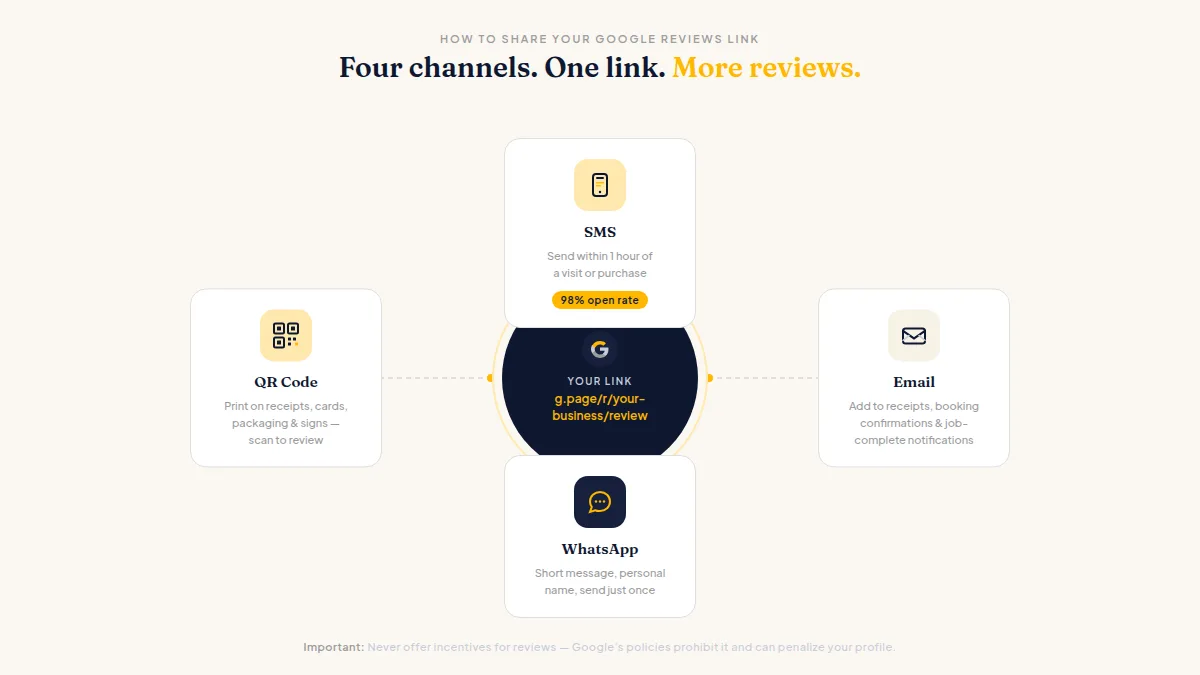
SMS has a 98% open rate — far higher than email. A simple text message sent within an hour of a customer's visit or purchase works best:
"Hi [Name], thanks for choosing us! If you have a moment, we'd love a quick Google review: [your google reviews link]. It really helps!"
Keep it short, add their name, and send it once. Never offer incentives for reviews — Google's policies prohibit it and can penalize your profile.
Include It in Follow-Up Emails
Add your google reviews link to every post-transaction email — receipts, booking confirmations, job-complete notifications. A one-sentence ask ("Mind leaving us a Google review?") followed by your link converts well because the visit is fresh and the customer is already thinking about you. See review request email templates for copy you can use today.
Add a QR Code to Physical Materials
Print a QR code that encodes your google reviews link on:
- Receipts and invoices
- Table tents or counter signs
- Business cards and packaging
- Appointment reminder cards
Customers scan the code with their phone camera and land directly on the review form. This is especially effective in retail, restaurants, and service businesses where customers visit in person.
Put It on Your Website and Social Media
Add a "Review Us on Google" button or badge to your website footer, contact page, and thank-you pages. Post the link in your social media bios and in posts that highlight positive customer experiences. The more places your google reviews link appears, the more reviews you'll collect over time.
Troubleshooting: When Your Google Reviews Link Stops Working
Google reviews links can occasionally break. Common reasons include:
| Problem | Likely Cause | Fix |
|---|---|---|
| Link shows "Page not found" | Place ID changed after listing merge | Get a fresh link from Business Profile dashboard |
| Link opens business but no review form | Customer not signed into Google | Ask them to sign in and try again |
| Reviews submitted but not appearing | Google's spam filter removed them | Collect naturally over time; no manual fix |
| "Ask for reviews" button missing | Profile not fully verified | Complete verification at business.google.com |
For a full diagnosis checklist, see why your Google review link stops working and how to fix it.
Automate Your Google Reviews Link with HiFiveStar
Sharing your google reviews link manually works, but it doesn't scale. If you serve dozens or hundreds of customers a week, manually sending review requests takes real time — and easy tasks get skipped when business gets busy.
HiFiveStar automates the entire process:
- Connects to your CRM or POS through Zapier or Make (on Pro) so a review request goes out automatically after every sale or appointment.
- Sends your google reviews link by SMS or email on your behalf, and gets WhatsApp messages ready for you to send.
- Generates a QR code for your google reviews link, ready to print or embed in receipts.
- Tracks how many requests you've sent and what reviews came in — all in one dashboard.
- Drafts AI replies to reviews so you can send a timely, personal response fast.
Instead of remembering to send a link, you set it up once and reviews come in automatically. Most businesses using HiFiveStar see a measurable increase in review volume within the first week.
Start collecting more reviews today — HiFiveStar is free to get started.
Tips to Get More Clicks on Your Google Review Link for My Business
Getting customers to actually click your google reviews link comes down to timing, context, and simplicity:
| Tip | Why it works |
|---|---|
| Send within 24 hours of the experience | Memory and emotion are fresh — customers are most likely to review soon after |
| Use the customer's first name | Personalisation increases response rates significantly |
| Keep the ask to one sentence | Long requests feel like a chore; short ones feel like a quick favour |
| Shorten your URL | A branded short link looks professional and gets more clicks than a long Google URL |
| Test your link first | Open your google reviews link in a private browser tab to confirm it shows the review form |
| Follow up once if no response | A single follow-up 3–5 days later can recover 15–25% of non-respondents |
| Add the link to your email signature | Passive exposure every time you email anyone |
How to Test Your Google Reviews Link Before You Send It
Before sharing your google reviews link with customers, take 60 seconds to confirm it works correctly. A broken link costs you reviews and looks unprofessional.
Step 1: Open a private (incognito) browser window. Your google reviews link is designed for customers who may or may not be signed into Google. Testing in private mode simulates exactly what most customers see.
Step 2: Paste your google reviews link and press Enter. A working link opens one of two views:
- The "Write a review" dialog directly overlaid on your Google Business Profile, or
- Your Google Maps listing with the review panel already open.
If you see the star-rating selector and a text box, your link is working correctly.
Step 3: Verify the business name in the review form. Confirm the form shows YOUR business — not a similarly named competitor. This matters especially for businesses with common names or those in high-density markets.
Step 4: Check on mobile too. Most customers will tap your google reviews link from a smartphone. Open the link on your own phone to confirm the review form loads without requiring an app install or extra sign-in steps.
Step 5: If the link fails, generate a fresh one. Log into business.google.com, click "Ask for reviews," and copy the updated link. Links most often break after Google merges two listings, updates your Place ID, or temporarily suspends your profile.
Step 6: Shorten, then re-test. Once confirmed working, pass the link through Bitly or your HiFiveStar dashboard for a shorter, trackable URL. Test the shortened link separately — a redirect misconfiguration can silently break it after shortening.
This 60-second test prevents sending hundreds of customers to a broken page. Repeat it any time you make major edits to your Google Business Profile.
Google Reviews Link by Industry: Where and When to Share It
No two businesses collect reviews the same way. Here is how to put your google reviews link to work depending on your industry — with message templates you can copy today.
Restaurant and Food Service
Restaurants have a natural review moment: the end of the meal. Your highest-converting touchpoints for the google reviews link are:
- Table tent or receipt QR code — A QR code printed on the bill folder or a small table card. Customers scan it while waiting for change, eliminating any extra effort.
- Text follow-up the same evening — If you collect phone numbers at reservation, send: "Hi [Name], thanks for dining with us tonight! We'd love a quick Google review: [google reviews link]. It makes a real difference."
- Google Business Profile post — Post a monthly "We'd love to hear from you" update with your google reviews link embedded. Regulars who follow your profile see it organically.
Pro tip for restaurants: Send the SMS within two hours of the reservation end time. Review submission rates drop sharply after 24 hours as the dining experience fades from memory.
Home Services (Plumbers, Electricians, HVAC, Landscapers)
For home service businesses, the highest-converting moment is immediately after the job is completed and the customer has seen the result with their own eyes.
- Technician sends a text on departure — Train your tech or crew to send a personal text as they leave: "Hi [Name], it was great working on your [service] today. When you have a moment, a Google review helps us a lot: [google reviews link]. Thanks!"
- Invoice email with a P.S. line — Add a P.S. to your invoice email: "P.S. If we did a good job, please consider leaving us a Google review — it takes under a minute: [google reviews link]."
- Leave-behind card — Print your QR code on a small card you leave at the property. Homeowners who find it later often scan it while thinking about the completed work.
Pro tip for home services: Reviews mentioning specific services (drain repair, HVAC installation, lawn edging) outperform generic reviews for local SEO. Your request can include: "Feel free to mention what we did — it helps others find us."
Healthcare and Medical Practices
Medical and dental practices must tread carefully — patient privacy means you cannot reference any specific treatment in your message. Keep review requests generic and opt-in only.
- Front desk verbal ask — Train staff to say at checkout: "Thanks for coming in today — we'd really appreciate a Google review, and here's a card with a QR code that makes it quick."
- Appointment follow-up email — Send a general email 24–48 hours after an appointment: "We hope you're feeling great. If you'd like to share your experience, here is a direct link to leave us a Google review: [google reviews link]."
- Waiting room signage — A tasteful poster or tabletop display with your QR code and "Love our care? Share your experience on Google" converts patients who are already in-office.
Pro tip for healthcare: Never pre-screen patients by asking "How was your experience?" before sending the link. Google's policies require you to give all patients an equal opportunity to review, regardless of their satisfaction level.
Hotels and Hospitality
Hotels have a rich sequence of touchpoints across the guest journey, each suited to a different version of your google reviews link outreach.
- Check-out email — Send a post-stay email within 24 hours: "Hi [Name], thank you for staying with us. A quick Google review means the world to our team: [google reviews link]."
- In-room card — A small card on the pillow or at check-in with your QR code and a personal note from the manager converts well because it feels individual, not mass-produced.
- Wi-Fi welcome page — Configure the guest Wi-Fi login page to display a "How's your stay? Leave us a review" banner with your google reviews link. This reaches every guest mid-stay, while the stay is fresh.
Pro tip for hotels: Responding to every review — positive or negative — signals to Google and future guests that your team is attentive. Pair your google reviews link outreach with a response habit (or speed it up with AI reply drafts from HiFiveStar) for a compounding effect on local ranking.
Retail and E-commerce
For brick-and-mortar retail, the transaction receipt is your highest-reach touchpoint. For online stores, post-purchase emails are your main lever.
- Printed receipt — Add "Loved your purchase? Review us on Google" with a QR code to every receipt. Most point-of-sale systems allow a custom footer message.
- Packing slip or package insert — An insert card in every shipped order: "You just made our day — make ours by leaving a quick Google review: [QR code or short link]."
- Post-purchase email at day 7–14 — Give the customer time to use the product, then send: "How is your [product name] working out? A quick Google review helps us reach more customers like you: [google reviews link]."
Pro tip for retail: Timing the request after product use (not just after delivery) produces more detailed, credible reviews — and detailed reviews convert better in local search results than one-liners.
Professional Services (Accountants, Lawyers, Consultants)
Professional service businesses build long-term client relationships, and reviews often reflect those ongoing engagements. The best moments to share your google reviews link are:
- After a milestone — Project completion, tax filing, case resolution. Send: "Working with you was a pleasure. A Google review would help our firm tremendously: [google reviews link]."
- Annual review or check-in — For ongoing clients, a year-end note: "We're grateful for another year of partnership. A few minutes of your time on Google would mean a great deal to our team: [google reviews link]."
- Email signature — A one-line footer link ("Leave us a Google review") converts passively over time without requiring a direct individual ask.
Pro tip for professional services: Client confidentiality means reviews often stay vague ("great firm, highly recommend"). That is fine — for local ranking, volume and recency matter more than review specificity.
Frequently Asked Questions
What does a Google reviews link look like?
A google reviews link typically starts with g.page/r/ or search.google.com/local/writereview?placeid=. When clicked, it opens directly to the "Write a review" dialog for your business on Google — no extra navigation required. The raw URL can be long; use a URL shortener or your Google Business Profile short name to create a cleaner version.
What is the "link for my google reviews" and how do I find it?
"Link for my google reviews" is simply another way to describe your google reviews link — the direct URL that takes customers to your review form. Find it by logging into business.google.com, selecting your business, and clicking "Ask for reviews." The link that appears in that dialog is the link for my google reviews, ready to copy and share.
Can I use the same google reviews link for multiple locations?
No. Each business location has its own unique google reviews link tied to its specific Google Business Profile. If you manage multiple locations, collect a separate link for each one and send the correct link to customers of that location. A review submitted via the wrong location's link will appear on the wrong profile.
Do I need a verified Google Business Profile to get a google reviews link?
Yes. You must claim and verify your Google Business Profile before Google will generate a google reviews link for your business. Verification typically takes a few days and can be done by postcard, phone, email, or video. Once verified, the "Ask for reviews" button appears in your dashboard and your link is ready to use.
Is it against Google's rules to ask for reviews?
No — asking customers for reviews is perfectly fine. What Google prohibits is incentivising reviews (offering discounts, gifts, or payments), asking only happy customers, and posting fake reviews. Sharing your google reviews link and politely asking every customer to leave feedback is encouraged and is the recommended way to grow your review count.
What is the fastest way to get my google reviews link?
Log in to business.google.com, click "Ask for reviews" on your home dashboard, and copy the link from the pop-up. The entire process takes under two minutes. If you want a shorter version, paste that link into Bitly or use HiFiveStar's built-in link generator to get a tracked, branded short URL.
Can I shorten my google reviews link?
Yes. Use a free URL shortener like Bitly or Rebrandly to create a shorter, branded version of your google reviews link. A shortened link is easier to include in print materials, text messages, and social media bios. You can also set a short name for your Google Business Profile, which automatically creates a short g.page/r/ version of your link.
How do I add a Google reviews link to my website?
To add your google reviews link to your website, create a clearly labelled button or text link — something like "Leave us a Google review" or "Review us on Google" — and point it to your link. The best placements are your contact page, thank-you pages after a purchase or booking, and your site footer. In plain HTML the code is simply <a href="YOUR_GOOGLE_REVIEWS_LINK" target="_blank" rel="noopener">Review us on Google</a>. For a polished result, use a contrasting button color and keep the label action-oriented. HiFiveStar's embeddable review widget can display your live star rating alongside the link for even stronger social proof.
How do I send my Google reviews link by text message?
Copy your google reviews link from the Google Business Profile dashboard, then paste it into a personal text message — for example: "Hi [Name], thanks for visiting us! A quick Google review would mean a lot: [your link]." Send it within 24 hours of the customer's visit while the experience is still fresh. Keep the message short (under 160 characters so it stays one SMS) and include the customer's first name to boost open and click rates. Never send multiple follow-up texts — one polite message is all it takes. For businesses serving many customers daily, HiFiveStar automates the send on Pro so no one falls through the cracks.
Does my Google reviews link ever change or expire?
Your google reviews link is stable as long as your Google Business Profile stays active and unchanged. The link can break if Google merges two listings, if your Place ID updates after a significant profile edit, or if your account is suspended. If your link stops working, log back into business.google.com, click "Ask for reviews," and copy the fresh link from the pop-up — the process takes under a minute. As a backup strategy, save both the short g.page/r/ link and the full Place ID version: if one breaks, the other is a reliable fallback you can start sharing immediately.
What is a direct Google reviews link?
A direct Google reviews link goes straight to the review form for your specific business — customers click it and immediately see the star-rating selector with nothing else to navigate. "Direct" distinguishes it from a general Google Maps link or a link to your full business profile. Your direct google reviews link typically starts with https://g.page/r/ (the short-name format) or https://search.google.com/local/writereview?placeid= (the Place ID format). Both take customers to the same write-a-review screen.
How do I create a Google reviews link for free?
Your google reviews link is completely free. Log into business.google.com, click "Ask for reviews," and copy the link from the pop-up dialog. Google provides this link at no cost to any verified Google Business Profile owner — you don't need a paid account, a third-party tool, or any subscription. Tools like HiFiveStar add tracking, automation (on Pro), and QR-code generation on top of the free link, but the base google reviews link itself costs nothing.
What is a Google reviews link generator and do I need one?
A Google reviews link generator is a tool that automatically creates the direct URL for your business's Google review form. You can get your google reviews link for free directly from business.google.com in under two minutes — no third-party generator required. However, dedicated generators like HiFiveStar go further: they wrap your link in a short URL, embed it in SMS and email review requests (automatic on Pro), generate a print-ready QR code, and show you how many review requests you've sent and how many reviews came in. If you're manually sending review requests to dozens of customers a week, a generator with those tracking and automation features saves significant time and consistently produces more reviews than copy-pasting a raw link.
Can I share my Google reviews link on Instagram or TikTok?
Yes — with one limitation: links are not clickable in Instagram feed posts or TikTok captions. For Instagram, add your google reviews link to your bio ("Link in bio") and reference it in your post copy or Stories using the link sticker. For TikTok, add the link to your profile bio. Facebook posts, email newsletters, WhatsApp, and SMS all support fully clickable google reviews links. For print materials and in-person use, generate a QR code from your link so customers can scan and review on the spot.
How do I get my Google reviews link on my iPhone or Android?
On iPhone: open the Google Maps app, tap your profile picture → "Your Business Profiles" → select your business → tap "Get more reviews" → copy the link from the share sheet. Alternatively, go to business.google.com in Safari, tap "Ask for reviews," and copy the link. On Android: the process is identical in the Google Maps app — tap your profile icon → "Your Business Profiles" → select your listing → "Get more reviews" → "Copy link." If you prefer a browser, Chrome on Android works the same way as the desktop: business.google.com → "Ask for reviews" → copy.
How do I find a Google reviews link for a specific business I want to review?
You don't need any special link — just search for the business by name on Google, find the Knowledge Panel (the info box with star ratings), and tap or click the star rating or review count. Then tap "Write a review." On Google Maps, search the business, open its profile, scroll to Reviews, and tap "Write a review." You'll need to be signed into a Google account to submit your review.
What should I include in a message when sharing my Google reviews link with customers?
The most effective review request messages include: (1) the customer's first name to personalise the ask, (2) a brief, genuine thank-you for their business, (3) a single clear reason why reviews matter — something like "it helps other people find us," (4) your google reviews link, and (5) no pressure or incentives. Keep the entire message under 160 characters for SMS (so it sends as one message), and send it within 24 hours while the experience is fresh. Example: "Hi [Name], thanks for coming in! A quick Google review would mean a lot to us: [link]. Thank you!" That format gets 3–5× more responses than a generic bulk message.
How many review requests should I send before stopping?
Best practice is one initial message followed by one follow-up 3–5 days later if there's no response. Sending more than two messages for the same transaction risks feeling spammy and can get your number or email flagged. With HiFiveStar, you can set up this two-touch sequence on Pro by switching on the reminder after 3 days — you get a meaningful recovery rate from the follow-up (typically 15–25% of eventual responses come from it) without damaging your relationship with the customer. After two touchpoints with no response, move on. Focus on the volume of requests rather than re-contacting the same customers.
What happens when a customer clicks my Google reviews link?
When a customer clicks your google reviews link, they go directly to the "Write a review" dialog for your specific business on Google. If they are already signed into a Google account on their device, the five-star rating selector and a text box appear immediately — ready to fill in. If they are not signed in, Google first prompts them to sign in before the review form loads. Reviews typically go live within a few minutes of submission, though Google occasionally holds some reviews for quality screening before publishing them. The entire experience — from tap to submitted review — takes most customers under two minutes.
How do I copy my Google reviews link on an iPad or tablet?
On an iPad, open Safari and go to business.google.com, sign in with your Google account, and tap "Ask for reviews" on the Home tab. A dialog appears containing your google reviews link — tap "Copy link" to save it to your clipboard. You can also open the Google Maps app on iPad, tap your profile icon, select "Your Business Profiles," find your listing, and tap "Get more reviews" to retrieve the same link. The process is identical on Android tablets — use Chrome or the Google Maps app following the same steps as the phone instructions above.
How do I get a Google review link for my business?
Getting a Google review link for my business takes under two minutes. Go to business.google.com and sign in with the Google account that manages your business. On the Home tab, click "Ask for reviews" and a pop-up appears with your unique google review link for my business — click "Copy link" and you're done. You can share it immediately by SMS, email, WhatsApp, or display it as a QR code on receipts and signage. If the button doesn't appear, your Google Business Profile may still be pending verification — complete verification first, then the link becomes available automatically. For multiple locations, repeat the process for each separate listing to get a unique google review link for my business at every location.
Does a Google reviews link work without the Google Maps app installed?
Yes — your google reviews link works in any web browser on any device without requiring the Google Maps app. When a customer clicks the link, it opens in their default browser (loading the Google Maps website) or launches the Google Maps app if it is installed. Either route takes them to the same review form for your business. Since the link is a standard HTTPS URL, it works across Safari, Chrome, Firefox, and all other mobile and desktop browsers — no app download needed for the customer to leave a review.
Why can't I find my Google review link for my business?
The most common reason you can't find your Google review link for my business is that your Google Business Profile has not yet been verified. The "Ask for reviews" button — which contains your review link — only appears after Google has confirmed your listing through its verification process. To verify, go to business.google.com, select your business, and follow the verification steps (typically a postcard, phone call, or email code). Once verified, your google review link for my business appears in the dashboard immediately. If your profile is already verified but you still don't see the button, try signing out and back in, clearing your browser cache, or opening the dashboard in an incognito window to rule out a display issue. A second common cause is managing your profile through Google Search or Maps rather than the main Business Profile dashboard — try accessing business.google.com directly, as the "Ask for reviews" button is most reliably found there.
Is my Google review link for my business the same on all devices?
Yes — your Google review link for my business is a single URL tied to your specific business listing and works identically on any device or browser. Whether a customer clicks it on an iPhone, an Android phone, a desktop computer, or a tablet, they land on the same review form for your business on Google. The only difference is how the link opens: on mobile, it typically launches in the Google Maps app if installed, or in the default browser if not. On desktop, it opens directly in a browser tab. The link itself does not change based on who is viewing it — copy it once from your Google Business Profile dashboard and share it everywhere without needing separate versions for different devices.
Can I track how many people clicked my Google review link for my business?
Google Business Profile does not display a native click count for your review link directly. However, you can track clicks easily by wrapping your link in a free URL shortener such as Bitly (bitly.com), which gives you a custom short link and a dashboard showing click volume, date, geography, and referral source — all for free. If you share your google review link for my business through a platform like HiFiveStar, the system logs every review request you send and shows you how many new reviews came in, so you can see whether your outreach is working. Tracking clicks helps you understand which sharing channels — SMS, email, QR code, website button — perform best for your specific customer base.



Ready to Take Control of Your Online Reputation?
Join thousands of local businesses using HiFiveStar to get more reviews and grow faster.