Negative Review Removal Software: What Actually Works
Can negative review removal software really delete bad reviews? Learn what works, what doesn't, and what to do instead to protect your business reputation.
TL;DR: No software can remove a negative review from Google, Yelp or any major site — only the platform itself can take one down, and only for clear policy violations. What actually moves the needle is responding to every bad review promptly and professionally, which shows potential customers you take problems seriously. Focusing on getting more reviews from every customer is the most reliable way to raise your overall star rating over time.
What Negative Review Removal Software Actually Does
Most tools marketed as negative review removal software don't remove reviews — they can't. No software has backdoor access to Google, Yelp, or any other platform to delete a review someone legitimately posted. What these tools actually do varies widely: some automate the process of flagging reviews that may violate platform policies, some help you build enough new reviews that the bad ones shrink in influence, and some are outright scams charging a monthly fee for something you can file yourself in five minutes. Knowing which is which saves you real money.
The short answer to "can you delete negative reviews" is: only the platform can, and only when a review breaks their specific rules.
When You Can Flag a Google Review for Removal
You have a real path to removal when a review violates Google's content policies — and only then. Google will consider removing a review that is spam or fake, contains hate speech or offensive content, includes a conflict of interest (such as a competitor reviewing your business), or was posted by someone who was never your customer.
A one-star review from a real customer who had a bad experience is almost certainly staying up.
To flag a Google review for removal: open your Google Business Profile, find the review, click the three-dot menu next to it, and select "Report review." Choose the violation type that applies. Google reviews the report — this can take days or longer, with no guarantee of removal even for borderline cases. If your first report fails, you can appeal through the Google Business Profile Help Center.
No software automates the actual removal decision. Some tools help you organize multiple flagging requests or track their status across locations, which is marginally useful if you're managing a dozen storefronts. For a single location, the reporting process is straightforward enough to handle directly.
Other platforms work similarly. Yelp, Indeed, and Glassdoor each have reporting tools accessible from the review itself. The criteria differ by platform, but the principle is consistent: fake reviews, clear policy violations, and demonstrable conflicts of interest may qualify for removal. A negative review from a real customer with a real complaint does not.
Do this faster
HiFiveStar drafts a reply to any review in seconds — so your profile always looks cared for.
What "Removal Services" Are Actually Selling
Some agencies and software products charge significant fees to "remove" bad reviews. Here's what you're actually buying:
Legitimate flagging assistance — They submit reports on your behalf and follow up with the platform. If you're managing flagging requests across multiple locations, outsourcing this is reasonable. Otherwise, it's not worth the cost.
Reputation suppression — They generate new content (blog posts, directory listings, social profiles) to push the negative review down in search results for your business name. This does nothing to your star rating on Google Maps.
Fake-review flooding — Some services bury a bad review by generating fake positive ones. This violates Google's policies and can result in your listing being suspended. It's also a violation of FTC guidelines on endorsements. No reputable business should consider it.
"Guaranteed removal" scams — These take your money and either file the same report you could submit yourself or disappear entirely. No third party can guarantee Google removes a review, and any service claiming otherwise is misrepresenting what the process allows.
If you're evaluating tools and want to understand how review management software differs from removal services, the breakdown in customer satisfaction rating software vs review tools is worth reading before you spend anything.
How to Handle Negative Reviews Effectively
Since removal is rarely possible, your real advantage is how you respond and what you do next. Responding well to a bad review can turn a skeptical reader into a customer — and it signals to every future reader that you take problems seriously.
How to respond to bad reviews without making things worse:
- Respond quickly. Replying within a few hours reads as attentive; waiting several days signals indifference.
- Drop the defensiveness. Acknowledge the customer's experience even when you disagree with their account.
- Move the resolution offline. Include a phone number or email. This shows future readers you're willing to fix problems, not just argue about them.
- Stay brief. One paragraph is enough. Long defensive replies consistently look worse than the original review.
Google encourages responding to reviews, and review engagement is widely considered a local-ranking signal. Every reply you write is visible to everyone reading your listing, not just the person who complained.
For specific language you can adapt by industry, negative review response examples for 6 industries has concrete templates worth bookmarking.
The Move That Actually Improves Your Star Rating
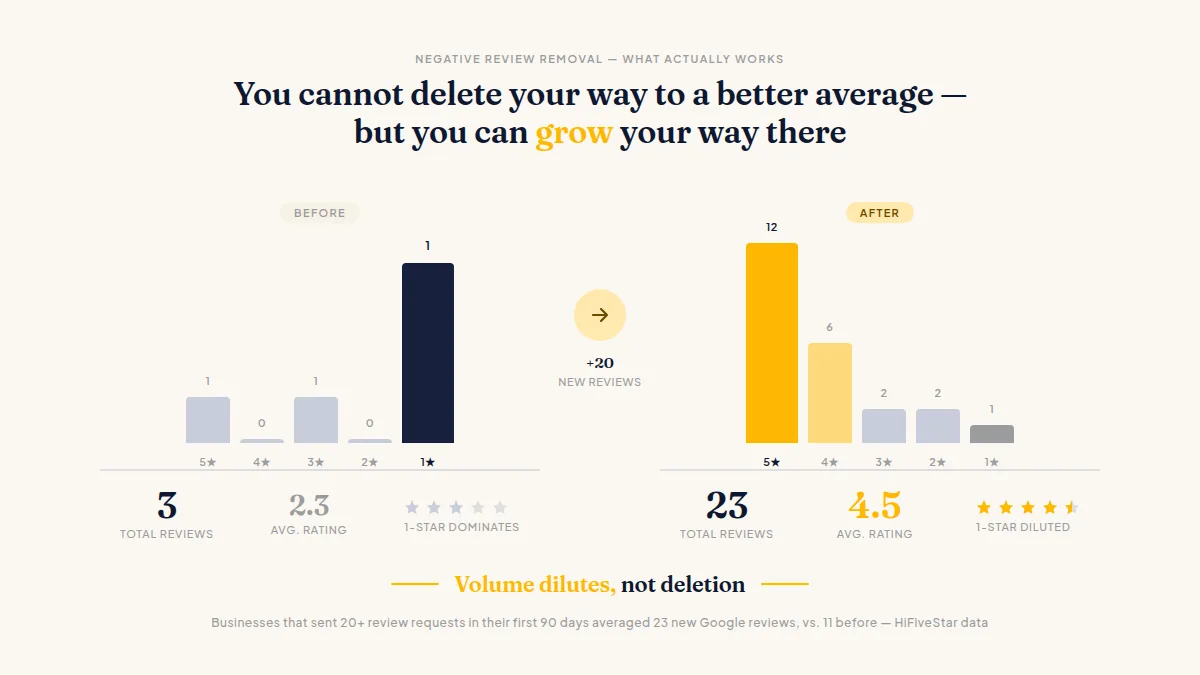
You cannot delete your way to a better average — but you can grow your way there. A business sitting at 3.8 stars with 40 reviews needs roughly 15 to 20 new five-star reviews to move meaningfully toward 4.2. The math works in your favor once you have a system for asking every customer, not just the ones who volunteer.
Ask every customer right after the job or visit. Send the request by text, email, or WhatsApp — whichever channel your customers actually respond to. One important constraint: Google's review policies prohibit selectively inviting only customers you expect to rate you positively. Ask everyone, every time. Cherry-picking who receives a request violates platform terms and, over time, produces a skewed sample that doesn't reflect your actual customer base.
A review page that gives customers a one-tap path to Google and 30-plus other platforms removes the friction that stops happy customers from following through. An optional private feedback button lets dissatisfied customers tell you directly — but it sits after the review links, not in front of them, so the default path for every customer remains a public review.
Businesses that sent 20 or more review requests in their first 90 days using HiFiveStar averaged 23 new Google reviews, compared to 11 before. That kind of volume dilutes old negatives and moves your rating in a direction no removal tool can match.
Frequently Asked Questions
Can software automatically remove negative reviews from Google?
No. Only Google can remove a review, and only when it violates their policies. Software can help you identify and report policy-violating reviews, but no tool can guarantee removal or bypass Google's process.
What qualifies a Google review for removal?
Fake or spam reviews, content that violates Google's policies (hate speech, irrelevant content, conflicts of interest), or reviews from people who were never your customers. A negative review from a real customer describing a real experience does not qualify.
How do I flag a Google review for removal?
Open your Google Business Profile, find the review, click the three-dot menu, and select "Report review." Choose the policy violation that applies. If the first report is rejected, you can appeal through the Google Business Profile Help Center.
Is it worth paying a service to remove bad reviews?
Rarely. Legitimate services can submit flagging requests on your behalf, but this process is free and straightforward to handle yourself. Any service promising guaranteed removal is overpromising — no third party can force Google to act.
What's the fastest way to improve my star rating without removing reviews?
Ask every customer for a review right after the visit or job, and ask consistently — not just the customers you expect to rate you well. A steady flow of new reviews raises your average over time.
Does responding to bad reviews actually help my business?
Yes, in two ways. It shows potential customers that you're responsive and willing to fix problems. Review engagement is also widely considered a positive signal in local search, though Google doesn't publish exact ranking weights.
Ready to Take Control of Your Online Reputation?
Join thousands of local businesses using HiFiveStar to get more reviews and grow faster.