Customer Satisfaction Rating Software vs Review Tools
Compare customer satisfaction rating software with review management tools to see which helps you measure feedback, answer reviews, and win customers.
TL;DR: Customer satisfaction rating software measures how customers feel through surveys and scores, while review management tools help you collect, monitor, and answer public reviews. Choose satisfaction software to understand service problems, review management software to improve your online reputation, or both if you need feedback alongside public review tracking.
What customer satisfaction rating software measures
Customer satisfaction rating software measures how customers rate a particular experience, such as a repair, appointment, delivery, or checkout. Use it when you need to identify service problems and track whether changes help. Review management tools focus on public reviews: requesting them where allowed, monitoring published feedback, and helping you respond to people whose comments prospective customers can read.
The distinction is the job you need done. A salon owner asking, “Are appointments starting on time?” needs structured feedback. An owner asking, “Why do our recent Google reviews go unanswered?” needs a public-review workflow.
Customer satisfaction survey software usually collects answers to specific questions. A simple post-visit survey might ask:
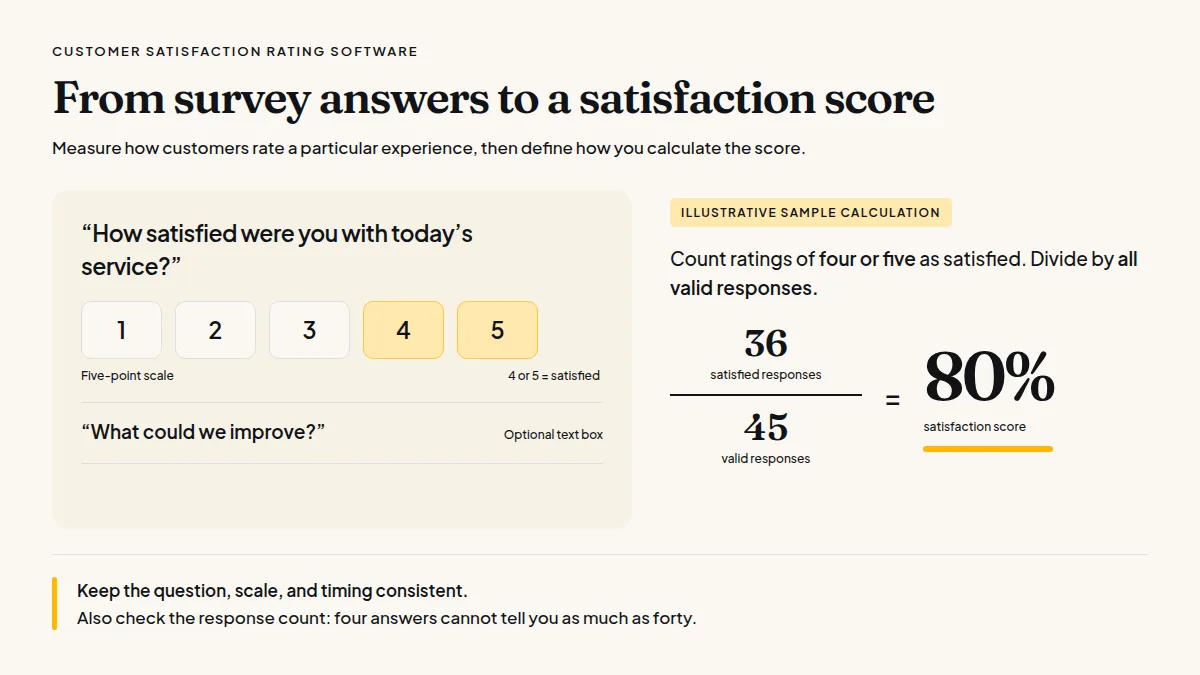
- “How satisfied were you with today’s service?” on a five-point scale.
- “What could we improve?” with an optional text box.
If you use a customer satisfaction score, define the calculation before comparing results. For example, count ratings of four or five as satisfied, then divide those responses by all valid responses. In an illustrative sample, 36 satisfied responses out of 45 equals 80%.
Keep the question, scale, and timing consistent. Otherwise, a change in the score may reflect a different survey rather than better service. Also check the response count: four answers cannot tell you as much as forty.
What review management tools do differently
Review management tools help you manage the public feedback people read when choosing a local business. Depending on the product and plan, they may collect reviews into one inbox, send review requests, support replies, or display reviews on your website. Choose them when your main problem is missed review opportunities, unanswered comments, or checking several sites manually.
A public review has a different audience from a survey response. The reviewer is describing an experience for other customers, not simply answering your operational questions.
That difference changes what you should measure. For surveys, watch satisfaction scores, recurring issues, and completed follow-ups. For reviews, track new reviews, unanswered reviews, and how long your team takes to respond. Don’t combine survey scores and public star ratings into one number; they come from different questions and groups of respondents.
A satisfaction score helps you decide what to fix; a public review helps someone else decide whether to choose you.
When comparing review management software for small businesses, check which sites it reads, how often it checks them, and where you can actually publish replies. “Manage replies” might mean drafting and copying, not posting directly.
For a broader shortlist, use this guide to reputation management software for businesses, then verify the features against your daily workflow rather than choosing by feature count.
Do this faster
HiFiveStar drafts a reply to any review in seconds — so your profile always looks cared for.
When you need surveys, reviews, or both
Choose survey software when you need consistent answers to specific service questions. Choose review software when you need a repeatable way to request, monitor, and answer public reviews. Use both when you have separate operational and reputation problems—and enough staff time to act on the feedback rather than simply collect more of it.
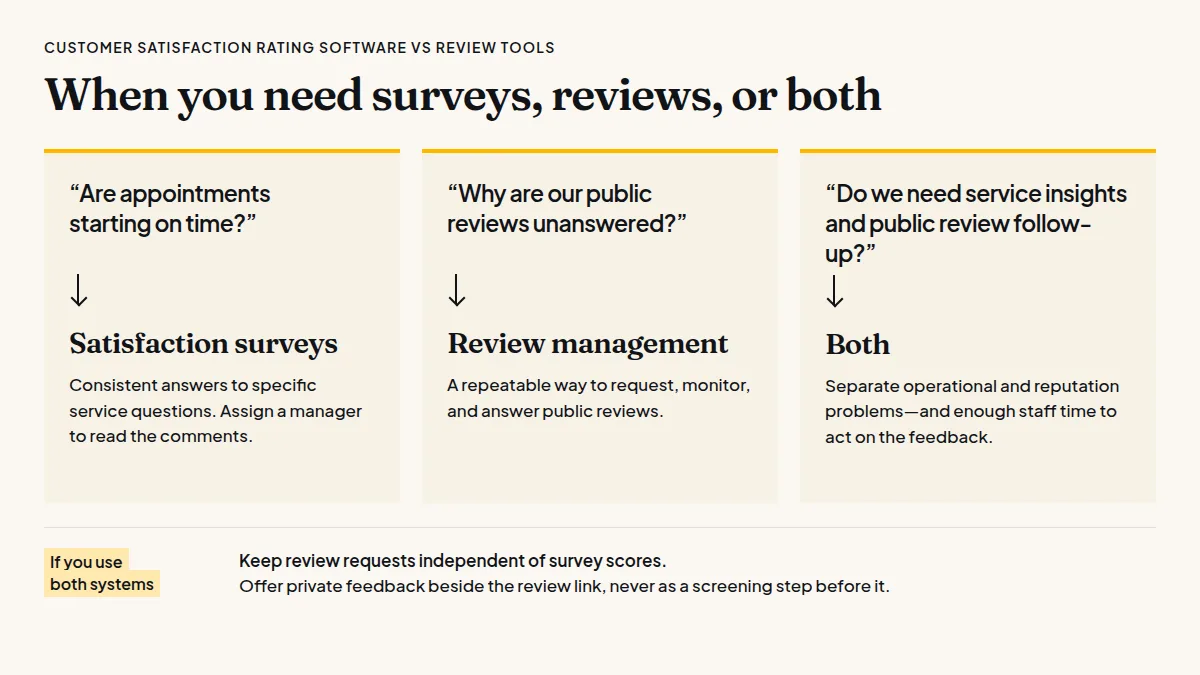
The practical question behind customer satisfaction vs online reviews is: who needs the information, and what should happen next?
An auto shop investigating unclear estimates could ask every customer the same question about price explanations. Assign a manager to read the comments and revise the estimate handover if confusion keeps appearing.
A dental practice with unanswered public reviews needs a different process: someone checks for new reviews, drafts responses, and avoids discussing patient details publicly. Practices comparing tools should include access controls and privacy procedures in their evaluation; this guide to review software for medical and dental clinics offers an industry-specific starting point.
If you use both systems, keep review requests independent of survey scores. Google and Yelp prohibit selectively soliciting positive reviews or discouraging negative ones; Yelp also asks businesses not to request reviews at all.
For sites that allow requests, ask every customer right after the visit or job. Offer private feedback beside the review link, never as a screening step before it.
Use survey answers to improve service, not to decide who gets a review request.
How to evaluate software before committing
Evaluate customer feedback software by running one ordinary customer journey through it, from a completed visit to a staff follow-up. Test the actual steps, permissions, and plan limits. The best fit is the tool your team can operate consistently, with clear responsibility for sending requests, reading responses, and acting on recurring problems.
Start with one location or service type. Give each task an owner and test these four points:
- Collection: Can customers answer on their phones without unnecessary steps? For surveys, can you keep the wording consistent?
- Coverage: Does the review inbox include the sites your customers use? How frequently does it refresh?
- Action: Can staff assign follow-up, export feedback, or publish replies—or must they switch tools?
- Cost: Which features require payment? Check message allowances, extra-location costs, and what remains after a trial.
HiFiveStar fits the public-review side: its free-forever plan brings reviews from nine supported sites into one Reviews inbox, with collection schedules that vary by site. Paid plans add review requests by text, email, and WhatsApp, plus AI reply drafts and Analytics; WhatsApp opens a prepared message in your own WhatsApp, and you press send.
Don’t assume a review tool replaces structured surveys. Likewise, a survey dashboard doesn’t necessarily help you answer a Google review. Ask vendors to demonstrate your specific workflow before you commit.
Frequently Asked Questions
The right category depends on the information you need and the work your team can sustain. Before buying, decide whether your immediate priority is measuring service quality, managing public reviews, or both. These answers cover the distinctions that matter when comparing tools for a local business.
Is a customer satisfaction score the same as a Google star rating?
No. A satisfaction score follows your survey’s question and calculation, while a Google star rating reflects published Google reviews; compare each against its own history.
Can survey software replace review management software?
Only if it also supports the review tasks you need. Collecting private survey answers does not automatically provide public-review monitoring, requests, or reply tools.
Should I send a survey and a review request after every visit?
You can, but avoid making customers complete a survey to reach a review link. Keep the messages brief and consider the total number of messages each customer receives.
Which should a small business buy first?
Start with the unresolved job: structured surveys for specific service questions, or review tools for missed requests and unanswered public feedback. Write down that job and test it in a demo before choosing a subscription.



Ready to Take Control of Your Online Reputation?
Join thousands of local businesses using HiFiveStar to get more reviews and grow faster.