Turn Google Review Management Into a Local SEO Advantage
Learn how smart Google review management boosts your local SEO rankings, builds trust, and helps your business stand out from nearby competitors.
TL;DR: Actively managing your Google reviews — requesting them from every customer, responding to every one, and resolving complaints quickly — sends trust signals that Google's local ranking algorithm rewards with higher visibility. Businesses that treat review management as an ongoing system consistently outrank competitors who leave it to chance. The right tools make it easy to request, reply to, and showcase reviews without adding hours to your week.
Why Google Reviews Directly Affect Local Search Rankings
Google Business Profile reviews are one of the clearest signals in local search. According to Whitespark's Local Search Ranking Factors survey (2023), review signals — including review count, recency, and responses — rank among the top factors influencing Google's local pack results. Your star rating and how actively you manage reviews isn't just a reputation issue; it's a visibility issue.
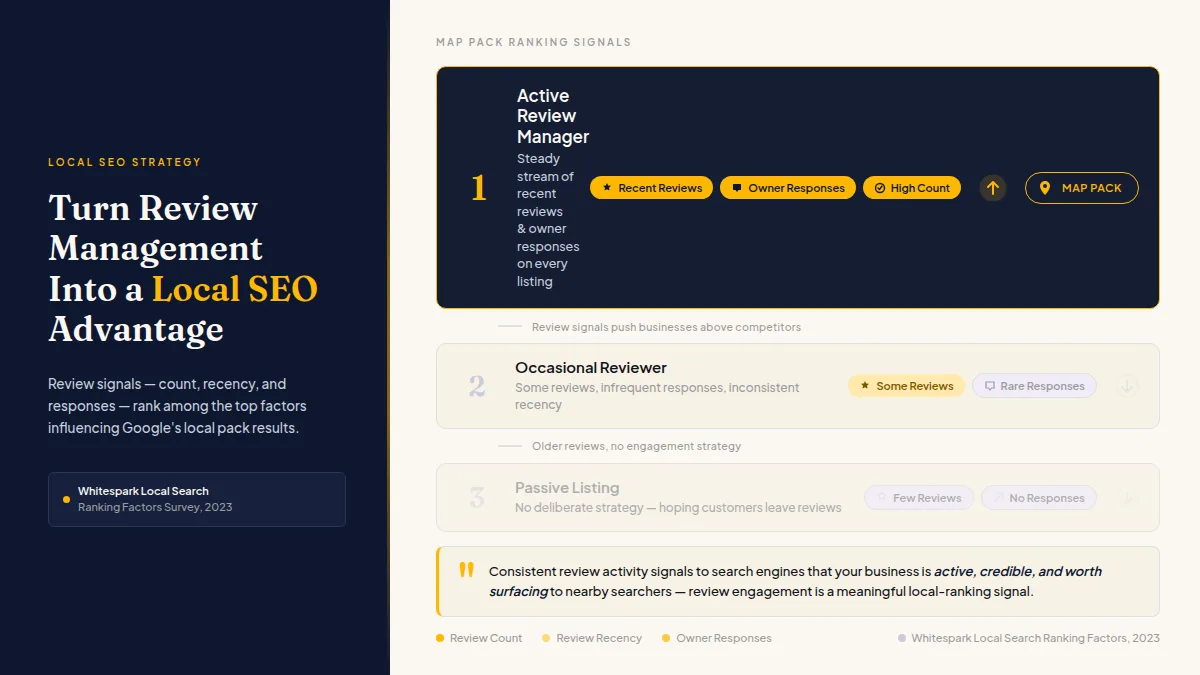
The businesses that show up first in the map pack for "dentist near me" or "best pizza in [city]" aren't always the oldest or the biggest. They're often the ones with a steady stream of recent, authentic reviews and owner responses on every listing. Google rewards engagement, and review engagement is widely considered a meaningful local-ranking signal — consistent enough across practitioner research that it's safe to act on, even without a definitive statement from Google.
Consistent review activity signals to search engines that your business is active, credible, and worth surfacing to nearby searchers.
If you haven't treated Google review management for local SEO as a deliberate strategy — separate from simply hoping customers leave reviews — this is where to start.
How to Get More Google Reviews Without Feeling Pushy
The most effective way to get more Google reviews is to ask every customer while the visit is fresh: right after an appointment, a delivered order, or a completed job — not three days later when the details have faded.
Approaches that work in practice:
- SMS or email requests sent within 15–30 minutes of service completion. Response rates drop noticeably when requests go out more than a day later. Strike while the experience is fresh.
- A direct link to your Google Business Profile review form. Every extra click loses you a portion of willing reviewers. Shorten the path.
- A brief, plain-English ask. "If you have a moment, a Google review helps other [city] residents find us" converts better than corporate language about "sharing your feedback on our platform."
One thing you should never do: ask only the customers you think will rate you five stars. Google's guidelines prohibit selectively soliciting positive reviews, and Yelp has similar rules. Ask everyone. If a customer had a bad experience, the goal is to resolve it privately — not to prevent them from posting publicly. Every customer retains the right to leave a public review on any platform, and that right must be respected.
Tools like HiFiveStar automate request timing via SMS and email (on Pro) and add an optional private feedback button after the review sites — while keeping the public review option available to everyone. That way you can catch problems early without stopping anyone from posting.
Do this faster
HiFiveStar drafts a reply to any review in seconds — so your profile always looks cared for.
Responding to Google Reviews as an SEO and Trust Signal
Responding to Google reviews is one of the highest-return, lowest-cost activities in local SEO. Google encourages owner responses, and doing so consistently is widely considered a positive local-ranking signal. Beyond rankings, BrightLocal's Consumer Review Survey (2024) found that 88% of consumers would use a business that replies to all reviews, compared to 47% who would use one that doesn't respond to any.
Responses do two things simultaneously: they show Google the listing is actively managed, and they show prospective customers that you take service seriously.
Practical response habits that hold up at scale:
- Reply within 24–48 hours. A quick response signals attentiveness. A week-old reply reads as damage control.
- Use the customer's first name and reference a specific detail from their review. Generic "Thanks for your feedback!" replies are worse than no response — they read as automated.
- For negative reviews, acknowledge, apologize briefly, and move the conversation offline. Including a phone number or email in the reply shows you want to fix the problem, not argue publicly.
- For positive reviews, add a natural mention of your service or location. "Glad you enjoyed the cut at our downtown location" places keyword-relevant context into indexed text without stuffing.
For a deeper look at how all of this fits together, the guide on why Google review management is crucial for business success walks through the full business case.
Building a Repeatable System for Review Management for Local Businesses
The difference between businesses that win in local search and those that plateau isn't talent — it's process. Online reputation management for a local business falls apart when it depends on someone remembering to do it manually. The businesses that accumulate 300 reviews while a competitor sits at 40 built a repeatable system, not a one-time campaign.
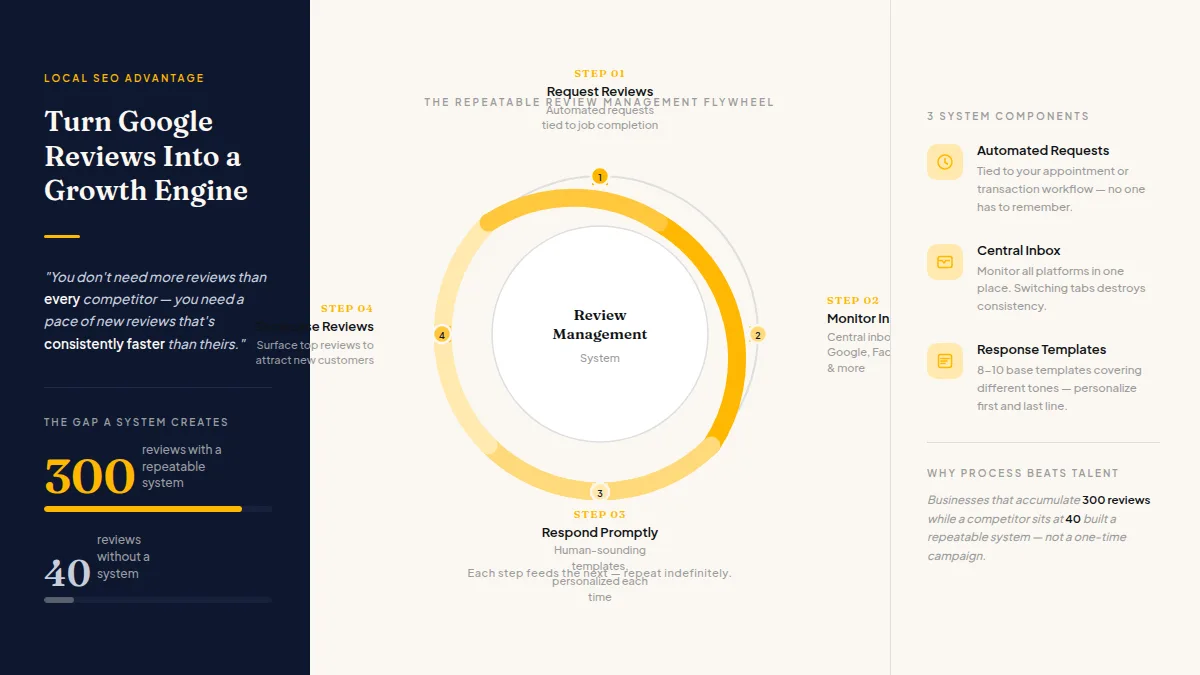
You don't need more reviews than every competitor — you need a pace of new reviews that's consistently faster than theirs.
A workable system has three components:
- Automated review requests tied to your appointment or transaction workflow. When a job completes, a request goes out automatically. No one has to remember.
- A central inbox for monitoring reviews across Google, Facebook, Yelp, and any other platforms you care about. Switching between tabs for each platform destroys consistency.
- Response templates that sound human. Write 8–10 base templates covering different service types and tones — appreciative, apologetic, brief — then personalize the first and last line of each before posting.
If you're evaluating tools to support this, top Google Business Profile review management tools for 2026 covers the current landscape with specifics worth reading before you decide.
HiFiveStar handles all three components — automatic requests on Pro, a multi-platform inbox, and AI-drafted responses — if you'd rather not stitch together separate tools. There's a free plan if you want to try the dashboard before committing to a paid tier.
Frequently Asked Questions
Does responding to Google reviews actually help with local SEO?
Google encourages responding to reviews, and review engagement is widely considered a local-ranking signal in practitioner research. There's no published guarantee, but consistent responses correlate with stronger local pack performance and demonstrably improve conversion rates from prospective customers reading your listing.
How many Google reviews do I need to rank in the local pack?
There's no published threshold from Google. In practice, recency and consistency matter as much as total count — a business with 40 reviews posted over the last six months often outranks one with 200 reviews that stopped accumulating two years ago.
Is it against Google's rules to ask customers for reviews?
No — asking customers for reviews is allowed. What Google prohibits is review gating: selectively asking only customers you expect to rate you positively, or discouraging unhappy customers from posting publicly. Ask everyone, and let every customer decide whether to post.
What's the fastest way to recover from a bad Google review?
Respond publicly within 24 hours: acknowledge the issue, apologize briefly, and offer a direct contact to resolve it offline. Then focus on generating a steady flow of authentic positive reviews from real customers. Platforms do not allow removal of legitimate negative reviews, and attempting to suppress them violates guidelines.
Can I manage reviews from Google, Yelp, and Facebook in one place?
Yes — HiFiveStar brings Google, Yelp and six other sites into a single inbox so you can monitor them without logging into each separately, and new Facebook reviews join them once you connect your Facebook Page. Once you connect Google, you send Google replies straight to Google from HiFiveStar; on the other sites, you post your reply there. That's the practical answer to staying consistent across platforms without adding hours to your week.
How often should I send review requests to customers?
Send one request per transaction or visit, ideally within 15–30 minutes of service completion. Don't send follow-up reminders more than once, and never ask the same customer repeatedly across unrelated interactions — that reads as spam and produces the opposite of the goodwill you're after.
If you want professional help beyond reviews, our roundup of the top local SEO companies near you covers agencies that handle keyword research, Google Business Profile optimization and local map placement.

Ready to Take Control of Your Online Reputation?
Join thousands of local businesses using HiFiveStar to get more reviews and grow faster.