How Replying to Every Review Boosts Your Google Ranking
Replying to every review signals activity to Google and builds trust with customers. Learn how consistent review responses can improve your Google Business ranking.
Replying to Reviews Does More Than Make You Look Polite
Most local business owners treat review responses as a courtesy — something you do when you have a spare five minutes. But your Google Business Profile is a living document, and every response you post adds fresh content, signals activity, and shapes how potential customers perceive your business before they ever walk through your door. Ignore that, and you're leaving a free optimization lever untouched.
This isn't about gaming an algorithm. It's about doing something genuinely useful — acknowledging your customers — and picking up real profile benefits as a side effect.
How Replying to Reviews Helps Google Ranking
Understanding how replying to reviews helps Google ranking requires a small but important distinction: Google has not publicly confirmed that review responses are a direct ranking factor. What Google has done is explicitly encourage businesses to respond. Their Help documentation states that replying to reviews helps "build your customers' trust" and is part of managing a Business Profile well. The reasonable inference — supported by what Google says about active, well-managed profiles performing better in local search — is that consistent engagement contributes to the overall health signals Google evaluates.
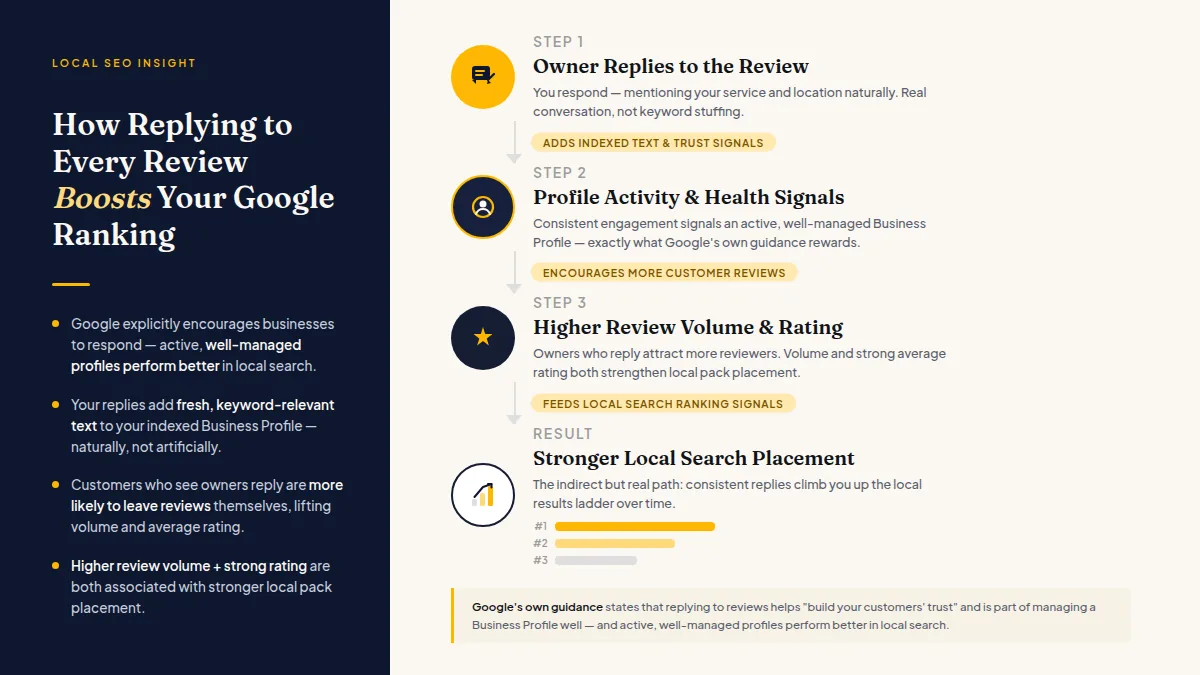
Beyond any ranking mechanics, your responses add fresh, keyword-relevant text to your profile. When you reply to a review about a patient's experience at your dental practice and naturally mention "emergency dental care in Austin," that language becomes part of your profile's indexed content. You're not stuffing keywords — you're having a real conversation that reinforces what your business does and where it does it.
A consistent response habit can also improve your review volume over time. Customers who see that owners actually read and reply are more likely to leave feedback themselves. Higher review volume and a strong average rating are both associated with stronger local pack placement, according to local SEO research from sources like Moz's Local Search Ranking Factors survey.
Do this faster
HiFiveStar drafts a reply to any review in seconds — so your profile always looks cared for.
The Practical Case for Responding to Negative Reviews Too
Skipping your bad reviews is a common mistake, and it's a costly one. When you reply thoughtfully to a 1- or 2-star review, you're not writing for the person who left it — you're writing for every future customer who reads it. A calm, solution-focused response to a complaint often does more for your reputation than ten five-star reviews sitting unanswered.
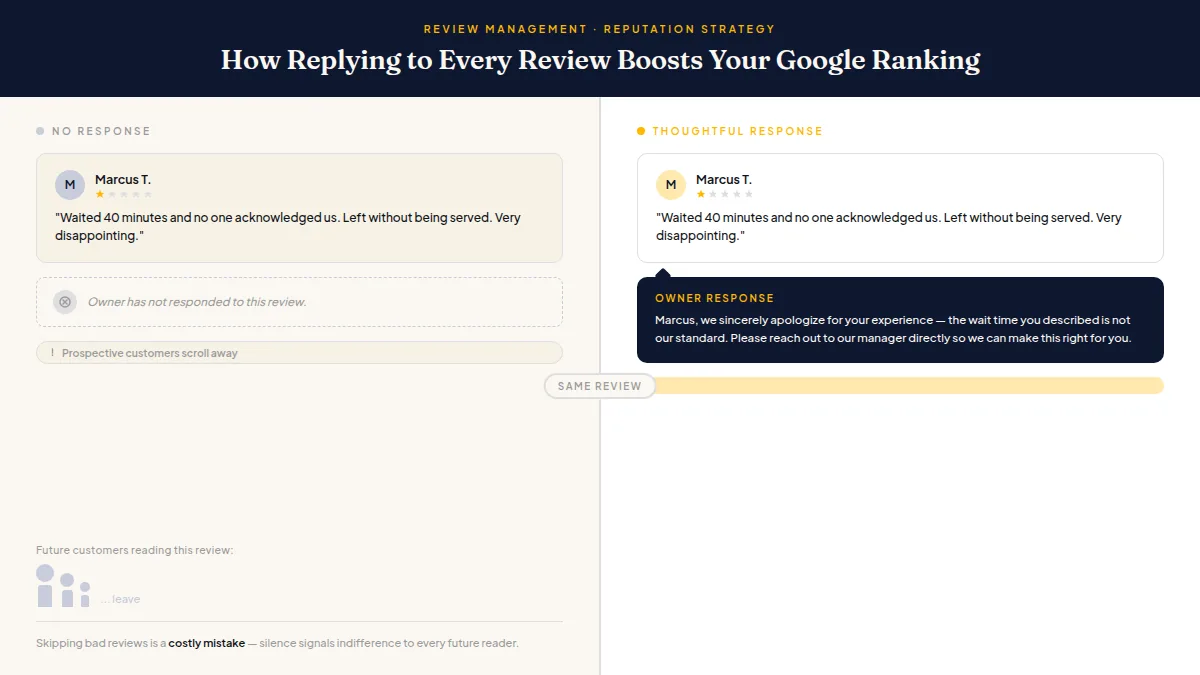
Here's the approach that works:
- Acknowledge the specific issue — don't copy-paste a generic apology.
- Apologize where appropriate without admitting fault if facts are disputed.
- Offer a direct path to resolution — a phone number, email, or manager's name.
- Keep it short — two to four sentences is enough.
One important compliance note: every customer must be free to leave a public review if they choose to. Offering a private feedback option beside the review link, never in front of it, is a reasonable service practice, but no business should prevent or discourage anyone from posting publicly. Google's policies explicitly prohibit selectively suppressing negative reviews. Any review management strategy for local businesses should invite all customers to share feedback — not just the ones you expect to be happy.
How to Respond to Google Reviews Without Burning Hours
The most common reason owners don't respond is time. Writing thoughtful responses sounds manageable until you're staring at an inbox with two dozen new reviews across Google, Facebook, and Yelp.
The solution is a system, not more willpower.
Set a response window. Responding within 24–48 hours keeps replies feeling timely. Same-day responses to reviews that arrived overnight tend to read as more genuine than replies that sit for a week.
Draft templates for your most common review types. If you run a restaurant and a large share of your reviews mention wait times, have a starting-point response ready. Personalize one specific detail per reply so it doesn't read as automated.
Use AI drafting carefully. Tools like HiFiveStar can draft a reply based on the review itself, for you to edit and send. The key word is "draft" — read it, adjust it, and make sure it sounds like you before posting. An obviously robotic response is worse than a short, plain human one.
Centralizing your reviews in one inbox — rather than logging in and out of Google, Yelp, TripAdvisor, and Facebook separately — saves real time. If you want to see how review activity fits into your broader local presence, pairing it with effective on-site SEO practices is worth the time.
Build a Local SEO Review Strategy Around Consistency
A local SEO review strategy isn't about a burst of activity in January and then silence until summer. Google's local algorithm rewards consistent signals — steady review volume, steady response rates, regular profile updates.
If you ask customers for reviews sporadically, you'll get sporadic results. A more reliable approach: ask every customer right after their experience, through SMS or email. Timing matters more than channel — a request sent while the experience is still fresh gets a far better response than one sent three days later. A QR code linked to your Google review page placed at checkout or on a receipt is one of the simplest, lowest-friction tools available.
The goal is a steady drumbeat: new reviews coming in regularly, every review getting a response within a day or two, and your profile looking like an active, attentive business to anyone — human or algorithm — who checks.
Pick a day this week to respond to every unanswered review on your Google Business Profile. That's the whole action item. Build the habit, and the profile benefits follow naturally.
Frequently Asked Questions
Does responding to reviews help SEO for local businesses?
Google hasn't confirmed review responses as a direct ranking factor, but it explicitly encourages responses as part of good profile management. Active, well-managed profiles tend to perform better in local search, and responses add keyword-relevant content to your listing while encouraging more customers to leave reviews.
How quickly should I respond to a Google review?
Responding within 24 hours reads as more genuine and keeps the conversation relevant. There's no hard cutoff, but letting reviews sit unanswered for weeks signals an inattentive business to prospective customers.
Should I respond to negative Google reviews?
Yes — every time. A calm, specific response to a complaint shows prospective customers how your business handles problems. Ignoring bad reviews leaves the negative narrative unchallenged.
Can I only ask happy customers for Google reviews?
No. Google's policies prohibit selectively soliciting reviews only from customers you expect to be satisfied. Ask all customers for feedback and give unhappy ones a fast private path to resolve issues — but anyone must still be free to leave a public review.
What should I include in a Google review response?
Use the customer's name if you have it, acknowledge the specific thing they mentioned, and keep it to two to four sentences. For negative reviews, add a direct contact so the conversation can move offline.
How does responding to reviews affect my Google Business Profile ranking?
Consistent responses signal that your profile is actively managed, which aligns with what Google says it looks for in quality local listings. The text in your responses also reinforces your business's relevance for local queries — making it a practical, low-effort part of any local SEO review strategy.



Ready to Take Control of Your Online Reputation?
Join thousands of local businesses using HiFiveStar to get more reviews and grow faster.