Best Reputation Management Software for Restaurants
Compare the best reputation management software for restaurants in 2026—review automation, AI replies, and feedback tools built for how restaurants actually run.
What Reputation Management Software for Restaurants Actually Does
The right reputation management software for restaurants does something generic tools can't: it's timed to the rhythm of a meal, not a sales pipeline. Most restaurant owners discover they need it the hard way — a slow Tuesday, a Google search of their own name, and a one-star review from six months ago sitting unanswered at the top of the results. That review is costing you covers right now.
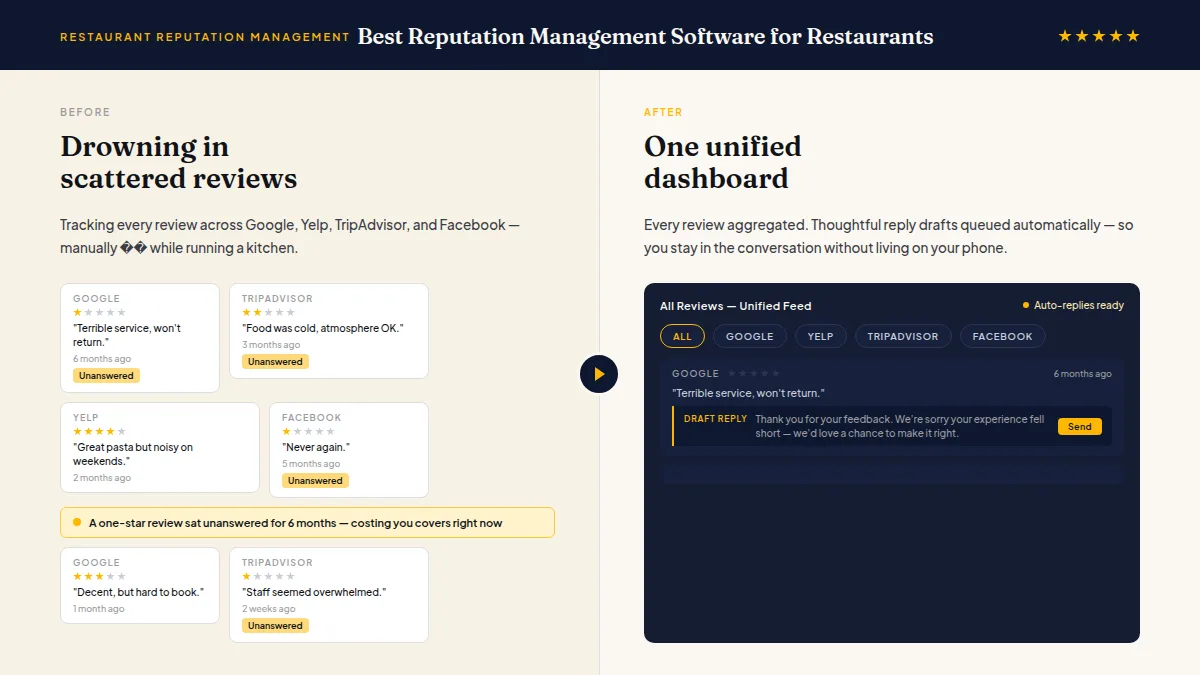
Restaurant review management software solves a specific problem: you have food to cook, staff to manage, and tables to turn. You cannot manually track every review across Google, Yelp, TripAdvisor, and Facebook, draft thoughtful replies, and still run a kitchen. The right tool automates the grunt work so you can stay in the conversation without living on your phone.
This article names the real contenders, what each is genuinely good at, and where each falls short — so you can pick the one that fits how your restaurant actually operates.
Reputation Management Software for Restaurants: How Needs Differ by Format
Not every restaurant has the same problem to solve. The right reputation management software for restaurants depends on how your operation is structured — and a tool that works perfectly for a food truck can be the wrong fit for a 10-location casual-dining chain.
Quick-service and fast-casual restaurants have high transaction volume and fast customer turnover. The review request needs to fire within minutes of the visit, triggered by a POS receipt or loyalty app event, before the customer forgets. AI-drafted replies need to be fast and short. Volume matters more than customization.
Full-service independent restaurants get fewer visits per night but each visit is high-value. A single bad experience documented publicly does more damage, and a thoughtful personal reply does more good. The software should draft replies that sound specific to the dining experience, not generic. A private feedback option earns its keep here — an unhappy diner who had a special occasion ruined is exactly who you want to hear from directly.
Multi-location restaurant groups need one inbox across locations, location-level reporting, and the ability to filter performance by site. The critical question for this format: does the per-location pricing model still make economic sense at scale, or does the cost per location make you leave reviews unmanaged at newer or lower-traffic sites?
Food trucks and pop-ups need software that works from a mobile device, ties review requests to cash or card transactions, and handles the irregular operating schedule. Complexity kills compliance in this format — simplicity wins. Fine dining and upscale restaurants manage reputation under the highest stakes in the category. A special-occasion dinner — an anniversary, a business celebration, a milestone birthday — shapes how guests feel about a restaurant for years. Reviews in this tier tend to be longer, more detailed, and read carefully by future diners in the consideration phase. Reputation management software for restaurants at this level needs to support longer, more personal reply drafts rather than quick acknowledgments. A two-sentence template reply to a poor fine dining review signals that nobody is paying attention; a thoughtful, specific response can repair the relationship and often earns visible appreciation from other readers who encounter it.
Ghost kitchens and delivery-only concepts face the most fragmented review landscape in the industry. Ratings exist simultaneously on DoorDash, Uber Eats, Grubhub, and Google, and each delivery platform's algorithm surfaces listings partly based on star rating — meaning a low score on DoorDash suppresses visibility inside that app regardless of your Google rating. Effective reputation management software for restaurants in this format aggregates delivery-platform reviews into a unified inbox alongside Google and Yelp, and ideally flags delivery-specific complaints (packaging, wrong items, wait time) separately from dine-in experience issues, since the operational fix for each is different.
The comparison below focuses on how each platform fits these formats rather than listing every feature. What the software does in practice matters more than the feature checklist.
Do this faster
HiFiveStar drafts a reply to any review in seconds — so your profile always looks cared for.
Top Reputation Management Software for Restaurants Compared
These are the platforms restaurant operators actually use and compare. None of them are identical, and the best fit depends on your size, budget, and how much you want to handle yourself.
Birdeye is a full-featured platform built for multi-location businesses. It aggregates reviews from dozens of sources, runs surveys, and includes a webchat widget. If you own a restaurant group with five or more locations and need enterprise-level reporting, Birdeye is worth evaluating. For a single-location owner, the pricing and complexity tend to be overkill.
Podium started in messaging and built reputation features on top of that foundation. Its strength is two-way text conversations — payment via text, appointment reminders, and review requests in one thread. Restaurants that already use text-based customer service find it familiar. The tradeoff: the plan structure is built around that broader messaging suite, so you're often paying for features a restaurant doesn't need.
Grade.us and NiceJob both focus on automated review generation — good at sending follow-up sequences after a visit and nudging customers to post publicly. NiceJob in particular has a clean interface and honest positioning. If your only goal is review volume and you're comfortable handling replies manually, either can work.
Reputation.com targets enterprise and franchise brands. The reporting and competitive benchmarking are sophisticated. For an independent restaurant or small group, the onboarding overhead and contract structure rarely make sense.
Broadly and Swell sit in a similar mid-market space, combining messaging, reviews, and payments. Both work, both are priced for small businesses, and both handle the basics adequately without excelling at any single thing.
| Software | Best For | Price Range | AI Replies | Free Plan |
|---|---|---|---|---|
| HiFiveStar | Single and multi-location restaurants | Free + paid tiers | Yes | Yes |
| Birdeye | Restaurant groups (5+ locations) | Enterprise (custom) | Yes | No |
| Podium | Text-focused restaurant operators | Mid-market | Yes | No |
| NiceJob | Review volume-focused single locations | Mid-market | No | No |
| Reputation.com | Enterprise and franchise chains | Enterprise (custom) | Yes | No |
| Broadly / Swell | Small to mid-size restaurants | Mid-market | Partial | No |
The category is crowded, but most tools are either built for enterprise clients or built for one narrow job. Very few are designed specifically around how a restaurant earns and manages trust.
For a wider comparison across business types, the best reputation management software for small businesses in 2025 covers the full field with more detail on pricing tiers.
Reputation Management Software for Restaurants: POS and Delivery Platform Integrations
The most effective reputation management software for restaurants connects to the tools already running the operation — eliminating the manual steps that kill consistency. POS integration is where the system becomes automatic: rather than relying on staff to hand out a review card or remember to send a follow-up, the request fires the moment a transaction closes.
Toast POS — used by more than 100,000 restaurant locations in the US — integrates directly with review management platforms so that requests trigger on receipt send, within the 15–30 minute post-meal window that consistently drives the highest completion rates. Staff never have to think about it.
Square is common in fast-casual operations, food trucks, and independent restaurants. Integration allows the review request to attach to the digital receipt email or SMS — reaching guests who pay contactlessly or without engaging staff directly.
Clover and Lightspeed serve mid-market and table-service environments. Integration enables the same post-transaction trigger with the ability to segment by location, server section, or shift — useful for a multi-location group that wants to identify which sites or service periods are underperforming on review volume.
Beyond POS, the delivery platform layer matters for any restaurant where takeout or delivery makes up a significant portion of orders. Some reputation management tools aggregate Google and Yelp reviews but leave DoorDash, Uber Eats, and Grubhub as separate tabs to check manually. If delivery represents 20–30% or more of your volume, that's a meaningful blind spot — delivery platform reviews affect in-app algorithm ranking and conversion in ways that Google reviews do not capture.
What to Actually Look for in a Restaurant Review Response Tool
Google review management for restaurants is non-negotiable: Google is where most diners decide whether to book. According to BrightLocal's 2024 Local Consumer Review Survey, 81% of consumers use Google to evaluate local businesses — more than any other platform. But a restaurant also lives on Yelp, TripAdvisor, and Facebook, so single-platform tools create dangerous blind spots.
Beyond platform coverage, here's what separates useful from annoying in this category:
- Review request timing. Asking for a review three days after a meal is too late. The best tools let you trigger a request via SMS or email within 15–30 minutes of a visit — when the experience is still fresh.
- Reply drafting, not just alerts. A notification about a new review is table stakes. A draft reply — one that sounds like your actual voice, not a corporate template — saves 10 minutes per review and dramatically increases how many you actually respond to.
- A private channel beside the review link. Every guest gets the same review link, with a fast, private way to reach you beside it, so a guest who had a bad experience can tell you directly. This is not about suppressing negative reviews. Every customer still has the freedom to post publicly, and that must always be the case. It's about hearing from unhappy diners while you can still put things right.
- Showcase capability. A widget that pulls your best reviews onto your own website converts hesitant visitors. It's a simple feature many platforms charge extra for or omit entirely.
For a feature-by-feature breakdown across the broader market, the best online reputation management software for businesses review goes deeper on how these capabilities compare across platforms.
Why HiFiveStar Fits Restaurants Specifically
HiFiveStar is built around the exact workflow a restaurant needs: ask real customers at the right moment, handle the response, and hear about problems in private feedback, while guests can still post publicly. It monitors Google, Yelp, TripAdvisor, and more from one inbox — so you're not toggling between tabs during a lunch rush.
The AI reply drafting is worth calling out specifically. It drafts a reply in the reviewer's own language for you to edit or keep. Once you connect Google, you send a Google reply straight to Google; for other sites, you copy it and post it on that site. That's the practical difference between actually responding to reviews and meaning to respond to reviews.
Private feedback works the right way: every customer gets asked, and every customer can still leave a public review on any platform they choose. Unhappy guests also get a private message option to reach you directly — which often turns a complaint into a resolved situation.
There's a free-forever plan that lets you get started without a credit card conversation, and paid plans add review requests, AI reply drafts and, from Pro, automations as you grow. For a single-location restaurant deciding whether this category is worth it, starting free is the obvious move.
To see how HiFiveStar is specifically configured for restaurant workflows, the restaurant-focused page walks through the use case in detail.
How to Get More Restaurant Reviews Without Gaming the System
The most reliable way to get more restaurant reviews is to ask — promptly, personally, and every time. According to BrightLocal (2024), 57% of consumers say they would leave a review if asked. Most restaurants ask nobody, or ask inconsistently, which is why their review counts stagnate while a competitor who installed a request tool six months ago now has three times the volume.

A few things that work in practice:
- Tie the request to a specific moment. The best trigger for a restaurant is the point-of-sale interaction or the few minutes after the check is paid. An SMS sent within 15–30 minutes of a visit consistently outperforms one sent the next day.
- Make it one tap. Any friction — logging in, creating an account, hunting for the review page — kills completion. A direct link to your Google review page is the only approach that works at scale.
- Respond to the reviews you already have. Replying to existing reviews signals to new customers that the owner is present and cares. It also signals engagement to search algorithms — review engagement is widely considered a local-ranking factor, even if Google hasn't documented the exact mechanics publicly.
Restaurant feedback management is not a one-time project. It's a system you set up once and run in the background — which is precisely what this software category exists to support. The restaurants pulling ahead on Google right now aren't doing anything mysterious: they're asking more customers, responding faster, and fixing what the complaints point to.
Frequently Asked Questions
Does reputation management software work for single-location restaurants?
Yes, and it's often more impactful for a single location than for a chain. One location has one reputation to protect, and a handful of unanswered negative reviews can meaningfully hurt your search visibility. Most tools, including HiFiveStar's free plan, are practical for a single location from day one.
Is it against Google's rules to route unhappy customers away from leaving a public review?
Yes. Google explicitly prohibits "review gating" — selectively discouraging or blocking customers from posting public reviews based on whether their experience was positive. The compliant approach is to ask every customer for a review with the same link, and offer a private way to reach you beside it, while ensuring every customer can still post a public review freely.
What platforms should a restaurant focus on for review management?
Google is the highest priority for most restaurants because it directly influences local search visibility. Yelp matters heavily in urban markets and for certain cuisine categories. TripAdvisor is important if you get tourist traffic. Facebook still drives referrals in community-based markets. The right tool covers all of them from one place.
How quickly should a restaurant respond to a negative review?
Faster is better. Many owners find that responding within 24 hours is the window where resolution is still possible and the public perception of the reply is most favorable. A calm, specific response that acknowledges the issue and offers to make it right does more for your reputation than a defensive reply sent instantly.
Can I use AI to reply to reviews without sounding like a robot?
Yes, if the tool is trained on your actual voice and you spend 30 seconds editing the draft. The failure mode is using a generic template and posting without review. AI that drafts from your prior responses and your restaurant's personality sounds like you; AI that outputs the same paragraph for every business sounds like every business.
What's the difference between a review request and a survey?
A review request directs a customer to a public platform — Google, TripAdvisor, Facebook — to post a visible review. A survey collects structured feedback internally. Both are useful, but only public reviews affect your search visibility and what a prospective diner sees when they look you up. Effective restaurant feedback management uses both: public requests for visibility, private surveys for operational insight.
What is the difference between reputation management software and a reputation management service?
Reputation management software is a tool you operate yourself — it automates review requests, drafts replies, and monitors your review profiles, but the work is done by you or your team. A reputation management service is a managed offering where an agency or team handles everything on your behalf. Software is lower cost and gives you control; services cost more but remove the work entirely. Most independent restaurants do well with software once it's set up, especially tools with strong AI-reply capabilities that reduce the active time required.
How much does reputation management software for restaurants cost?
Most tools aimed at independent restaurants or small groups run between $30 and $300 per month per location. Enterprise platforms like Birdeye and Reputation.com are priced on custom contracts and typically cost several hundred dollars per location. HiFiveStar offers a free-forever plan and paid plans starting at a lower tier — making it accessible for a single-location operator who wants to test the category before committing.
Setting Up Reputation Management Software for Restaurants: What to Expect
Most restaurant owners expect a complex IT project. In practice, setup takes an afternoon, not a week. Here's the realistic sequence for getting a reputation management tool running in a restaurant context:
Step 1: Connect your review profiles. Link your Google Business Profile, Yelp, TripAdvisor, and Facebook pages. Most platforms authenticate these in minutes with a Google or Facebook login — no API keys or developer access required.
Step 2: Set your review request trigger. For restaurants, the best trigger is post-transaction: a POS sale or a loyalty app event (through Zapier or Make, on Pro), or a manual send after the meal. Set it to send right away or one hour after the visit ends. Requests sent the next day consistently underperform.
Step 3: Decide your reply tone. Think about how you'd naturally respond to a happy customer — casual or formal, first names or not, whether you thank the team or respond personally. AI Reply drafts a response for each review that you can edit to match. Edit any draft that doesn't sound like you before you post it.
Step 4: Set up the private feedback channel. This is the step most restaurants skip and then regret. A Private Feedback button after the review-site buttons gives any guest with a problem a direct line to you, so you hear about it while you can still fix it. Every customer gets the same review page and can still post publicly.
Step 5: Add the review showcase widget to your website. Paste the embed code onto your homepage or a dedicated "Reviews" page. A live feed of your best recent reviews is among the highest-converting social proof a restaurant can display.
The full setup, done carefully, takes two to three hours. Once running, the active time required drops to five to ten minutes a day — reviewing AI-drafted replies, scanning the unified inbox, and occasionally adjusting the request trigger.
For a restaurant-specific walkthrough of how HiFiveStar handles each of these steps, the restaurant page covers the configuration in detail.
Ready to Take Control of Your Online Reputation?
Join thousands of local businesses using HiFiveStar to get more reviews and grow faster.