Why Customers Review Your Competitors, Not You
Find out why your best customers leave reviews for competitors instead of you—and what to do to get more Google reviews for your own business.
TL;DR: Most happy customers don't leave reviews because nobody asked them to—and if a competitor makes it easier, that's where their review goes. The fix is simple: ask every customer right after the visit or job, and give them a one-tap link straight to your review page. Remove the friction and the reviews start coming to you.
You Made It Easy to Do Good Work — Not Easy to Leave a Review
Your competitor down the street has 340 Google reviews. You have 47. The work you do is just as good — maybe better. So why are customers leaving reviews for competitors instead of you?
It almost never comes down to satisfaction. The gap usually comes down to one thing: your competitor asked, and you didn't. According to BrightLocal's 2024 Local Consumer Review Survey, 34% of customers say they'd leave a review if asked — but only a small fraction of businesses actually ask every customer, every time. The ones pulling ahead on review counts have simply built the ask into their process.
This post breaks down the real reasons why customers leave reviews for competitors, not you — and what to change starting today.
The Friction Gap: Why Customers Review Your Competitors
The number-one reason why customers leave reviews for competitors is that those competitors made it easier. Happy customers don't skip reviews out of indifference — they skip them because the process takes more effort than their goodwill can sustain. When a competitor sends a one-tap link right after the visit, the customer acts quickly. When you don't send anything, that same customer moves on with their evening.
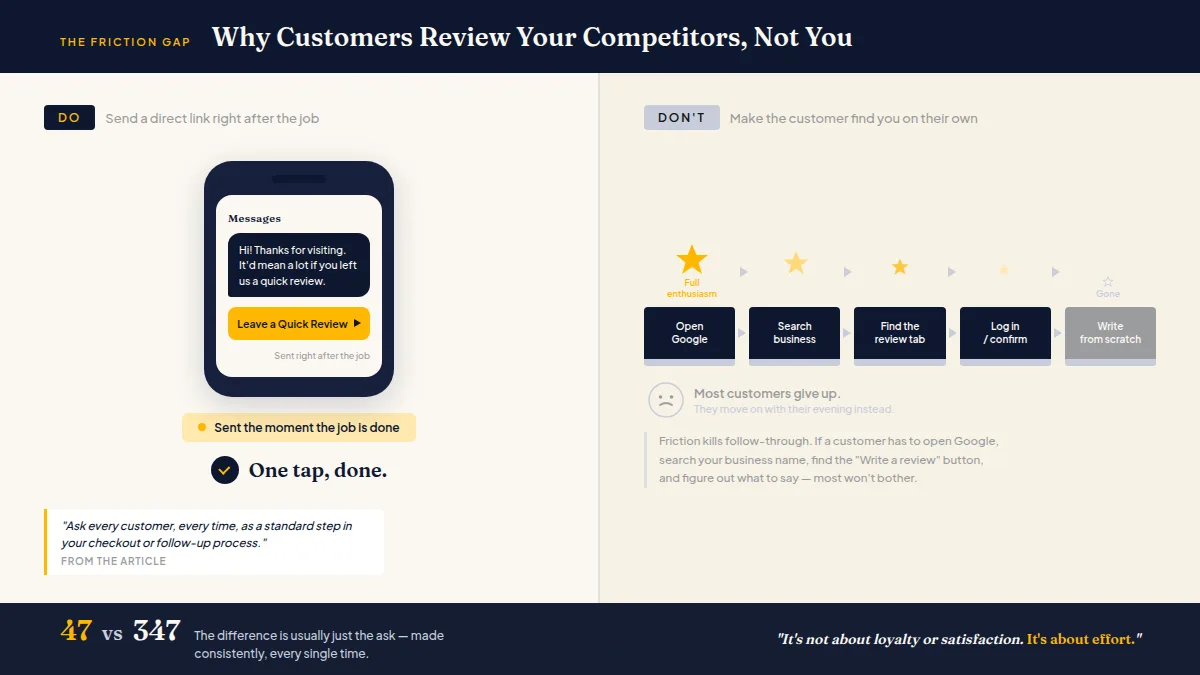
The difference between 47 reviews and 347 reviews is usually just the ask — made consistently, made every single time.
Friction kills follow-through. If a customer has to open Google, search your business name, find the "Write a review" button, and figure out what to say — most won't bother. Meanwhile, the shop up the road texted a direct link. That's the gap. It's not about loyalty or satisfaction. It's about effort.
Look at your own process right now. Do you have a direct review link you hand to every customer? A QR code on the counter or on a receipt? If someone wanted to leave you a review in the next 30 seconds, could they do it without Googling you first?
Do this faster
HiFiveStar asks every customer after their visit — so more of the happy ones actually leave a review.
Timing: Build It Into Your Process, Not Your Instincts
A lot of businesses ask for reviews sporadically — after a particularly good job, or at the end of the week in a batch. The stronger approach is structural: ask every customer, every time, as a standard step in your checkout or follow-up process.
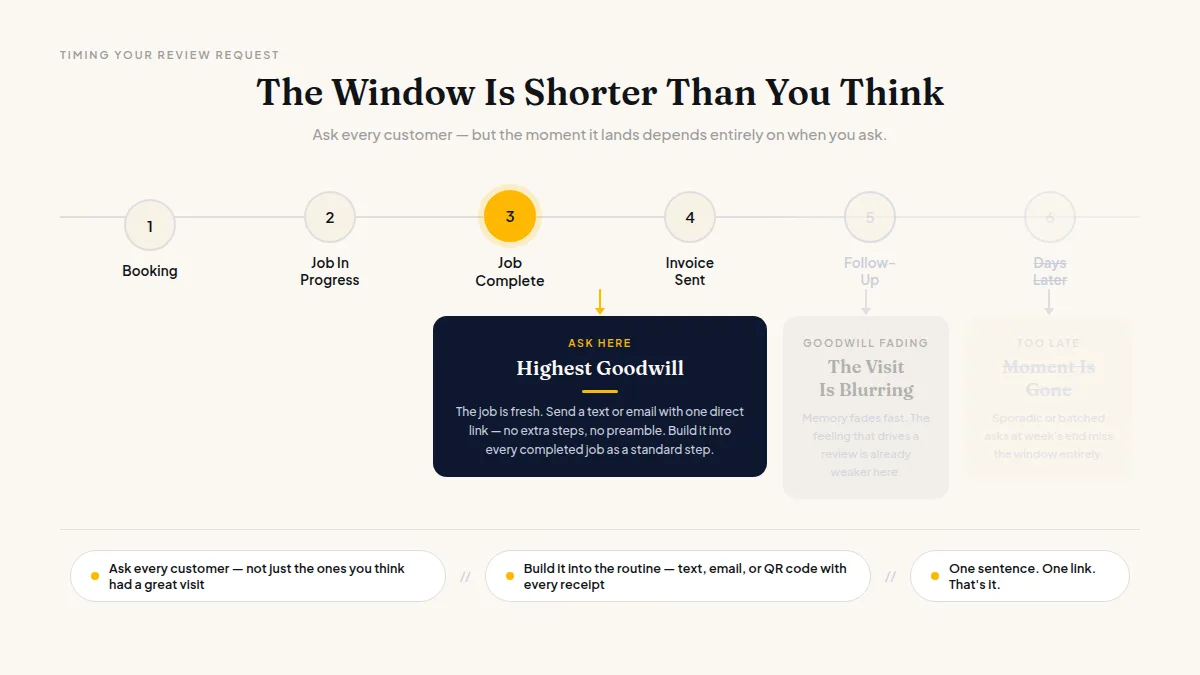
This matters most for high-frequency businesses like coffee shops, salons, and auto repair shops, where visits blur together quickly. When the ask is built into the routine — a follow-up text after a completed job, a QR code handed with every receipt — it doesn't depend on staff remembering, or on anyone judging which customers seem happy enough to ask.
One important note: Google's guidelines prohibit selectively timing or targeting review requests based on expected sentiment. Ask all customers through the same consistent process — not just the ones you think had a great experience. If you're using review request software, set it to send to every completed transaction, not to a filtered segment.
You're Not Asking Everyone — Or You're Asking the Wrong Way
Many business owners either don't ask at all, or they ask in a way that gets ignored. Verbal asks at the counter almost never convert — the customer says "sure!" and then never follows through. An email buried in a newsletter performs about the same.
The ask that works is specific, brief, and low-effort to act on. One sentence. One link. That's it.
Review request approaches that consistently improve response:
- Send a text or email with a direct link — no login required, no searching
- Keep the message short: tell them you'd appreciate a review and give them the link
- Ask every customer through the same process — Google prohibits selectively requesting reviews only from customers you expect to rate you positively
- Never offer a reward. Google and Yelp both prohibit incentivized reviews, and it puts your profile at risk
That last point matters. If you've considered a "leave us a review and get 10% off your next visit" promotion — skip it entirely. It violates Google's policies and Yelp's terms of service. The straightforward ask, sent to every customer without conditions, is both more effective and compliant.
Your Review Page Is Buried or Missing
Even motivated customers give up when they can't find where to leave a review. If your Google Business Profile is unclaimed, or your review link drops customers on your homepage, you're losing reviews to inertia every day.
Knowing which review sites matter most for your type of business is worth sorting out before you start driving traffic. For most local businesses, Google is the priority — review count and engagement are widely considered factors in how Google ranks local results. Restaurants and hotels will also care about Tripadvisor. Service businesses may want HomeAdvisor or Thumbtack. Clinics need to consider Healthgrades.
The practical fix: create a short, shareable review link or QR code that lets customers choose where to post. Put it everywhere — follow-up texts, email signatures, printed receipts, the front desk. When you increase Google reviews and build presence across other platforms, you make a stronger impression on every potential customer who searches for what you do.
HiFiveStar generates a review link and QR code for each location, then routes customers to Google and 30+ other review sites from one page — so the ask is one tap, wherever you send it.
Replies Signal Whether It's Worth Posting
Here's a detail most owners miss: customers look at whether a business responds to its reviews before they decide to leave one. A competitor with 200 reviews and thoughtful replies looks more engaged — and more worth writing for — than a business with 50 reviews and total silence.
Google encourages businesses to respond to reviews, and review engagement is widely considered a local-ranking signal. Beyond ranking, a replied-to review tells future customers that someone at this business actually reads what people write.
If you want to get more reviews, start by answering the ones you already have. Even a short, specific reply — "Thanks for mentioning the front desk team — glad we could help on short notice" — does more than a generic "Thanks for the great review!" Your reply is public. Every person reading it is deciding whether to trust you.
Frequently Asked Questions
Why do customers leave reviews for competitors but not me?
Most of the time, the competitor asked — directly, consistently, with a one-tap link. Customers who had a good experience with you are willing to review; they just didn't get a prompt, or the process was too hard.
How do I ask customers for reviews without sounding pushy?
Keep it short and genuine: one sentence, one link, sent after the job. Don't offer a reward and don't ask selectively — Google's guidelines require that you invite all customers through the same process, not just the ones you expect to rate you highly.
How often should I send review requests?
Ask every customer, every time, as a standard step in your process. Consistency matters more than any other variable. Businesses that build it into checkout or follow-up texts see the most reliable results.
Does responding to reviews help me get more Google reviews?
Responding doesn't directly generate new reviews, but it signals that you read and care about feedback. Many owners find that a business with active, specific replies attracts more reviews over time — and Google encourages responding as part of maintaining an active profile.
What's the fastest way to increase Google reviews starting this week?
Claim your Google Business Profile if you haven't, create a direct review link, and start texting or emailing it to every customer after their visit. No elaborate system required at the start — the consistent ask itself is what moves the number.
Is it okay to ask every customer, even ones who had a minor complaint?
Yes — Google's guidelines specifically require that you ask all customers, not just the ones you expect to rate you highly. If a customer had a problem, resolve it first if you can; then ask. Selectively filtering who receives a review request is a policy violation, regardless of intent.



Ready to Take Control of Your Online Reputation?
Join thousands of local businesses using HiFiveStar to get more reviews and grow faster.