Turn Google Reviews Into Website Testimonials
Learn how to turn Google reviews into customer testimonials for your website and build instant trust with every visitor who lands on your page.
TL;DR: Your best Google reviews don't have to live on Google alone — you can repurpose them as testimonials directly on your website. An embeddable review widget lets you automatically showcase verified customer feedback without copying and pasting anything manually. This keeps your social proof fresh, credible, and working for you around the clock.
Why Google Reviews Belong on Your Website
Your Google Business Profile is not the only place those reviews should live. Your customers already wrote the words — detailed, specific, genuine words about your business — and most owners leave that content sitting on a third-party platform where they control nothing: not the layout, not the design, not whether a competitor's ad appears right beside it.
Knowing how to turn Google reviews into website testimonials means taking content you already earned and moving it where it influences decisions — on your own site, in front of visitors who are actively deciding whether to hire you.
According to a BrightLocal survey (2023), 98% of consumers read online reviews for local businesses. Those same people visit your website. Give them what they're looking for the moment they land there.
Three Ways to Showcase Reviews on Your Website
You have practical options here. The right one depends on how much control you want over presentation and how hands-on you're willing to be with ongoing updates.
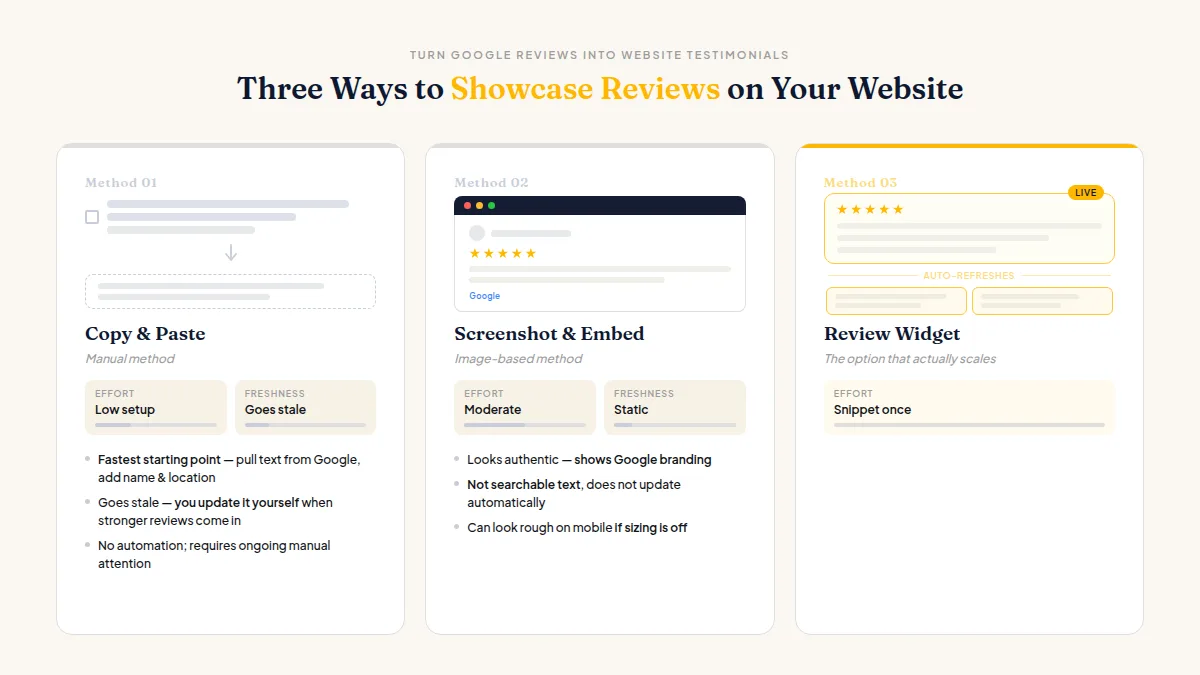
Copy and paste (manual). Pull the exact text from Google, include the reviewer's first name and general location if they shared it, and paste it into a testimonials section on your site. This is the fastest starting point. The downside: it goes stale. You have to update it yourself when stronger reviews come in.
Screenshot and embed as an image. Some businesses screenshot a glowing review and drop it onto a landing page. It looks authentic and shows the Google branding, but it's not searchable text, it doesn't update automatically, and it can look rough on mobile if you're not careful with sizing.
Use a review widget for local business sites. This is the option that actually scales. A widget pulls your reviews in automatically, updates over time as your review list grows, and lets you control which ones display. HiFiveStar's embeddable review-showcase widget does exactly this — place a snippet of code on your site and it surfaces your strongest reviews without requiring you to touch the page every time a new one comes in.
The best testimonials page is one that updates itself.
For any of these methods, check Google's terms of service first. Google permits businesses to share their own reviews in marketing materials, but don't alter the review text or remove the attribution.
Do this faster
HiFiveStar asks happy customers at exactly the right moment — so more of them actually leave a review.
Which Reviews to Feature as Customer Testimonials for Your Website
Not every five-star review makes a good testimonial. "Great service!" is three words — it tells a visitor nothing they couldn't already assume. The reviews worth featuring are the ones with specifics.
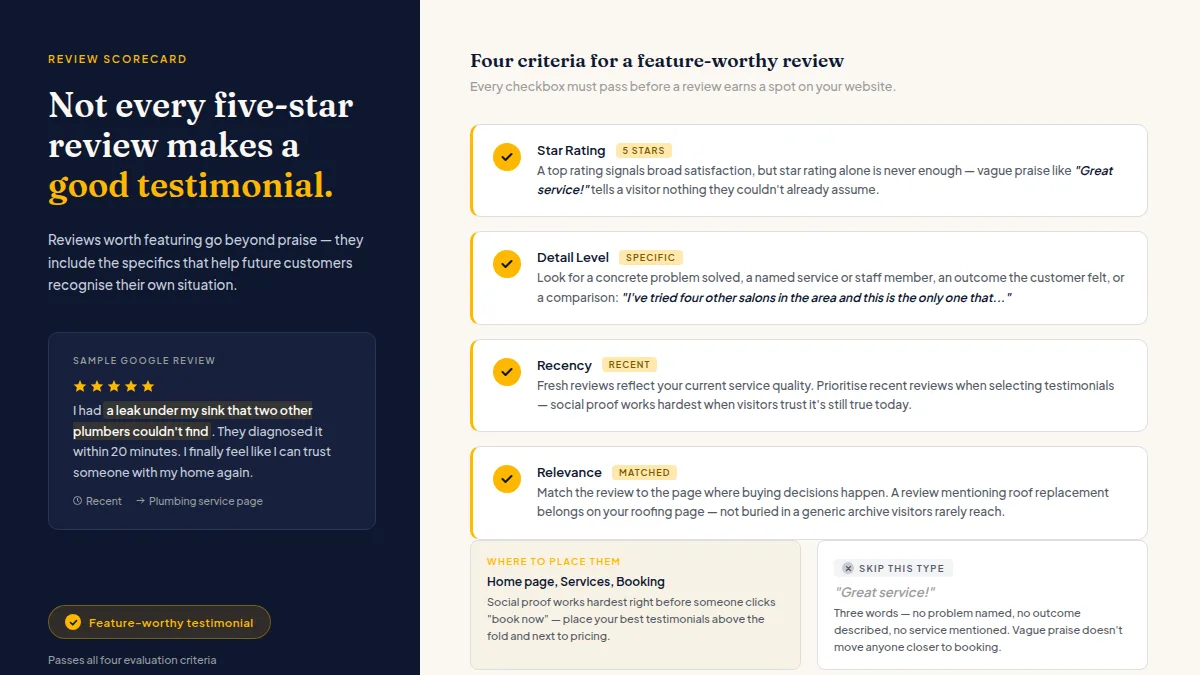
Look for reviews that mention:
- A concrete problem you solved ("I had a leak under my sink that two other plumbers couldn't find")
- A named service or staff member ("the deep-tissue massage with Elena")
- An outcome the customer felt ("I finally feel confident smiling again")
- A comparison or context ("I've tried four other salons in the area and this is the only one that…")
Prioritize those. If you're thinking about how to turn Google reviews into case studies that close more deals, the same specificity rule applies — vague praise doesn't move anyone closer to booking.
Place your best testimonials on the pages where buying decisions actually happen: your home page above the fold, your services pages next to pricing, and your contact or booking page. Social proof for small business websites works hardest right before someone clicks "book now."
How to Repurpose Google Reviews Beyond a Single Testimonials Page
A dedicated testimonials section is a solid start, but there's more mileage in those reviews.
On individual service pages. Match the review to the service it mentions. A review about your roof replacement belongs on your roofing page, not buried in a generic archive visitors rarely reach.
In email footers and proposals. A one-line quote from a real customer, attributed by first name, adds instant credibility to every message you send a new prospect.
In social posts. Screenshot a strong review with attribution, post it to your Facebook or Instagram, and link back to your website. That's one review working in three places simultaneously.
As structured data. If you embed reviews as visible text — not just images — your web developer can mark them up with schema.org Review structured data. This signals to search engines what the content is and can generate star snippets in search results. Worth asking about if you're already investing in website optimization for local search.
Each review is a reusable asset. Treat it like one.
Getting a Steady Supply of Reviews to Feature
None of this works without a fresh, growing pool of reviews to draw from. A testimonials page populated with reviews from 2021 signals neglect, not quality.
The practical answer is to ask after every positive interaction — consistently, not just when you remember. SMS and email review requests sent shortly after a job, appointment, or visit generate far better response rates than asking in person or hoping customers think of it on their own.
A tool like HiFiveStar can automate those requests (on Pro) and routes reviews from eight sites, plus private feedback, into one inbox. Happy customers get a prompt toward Google, Facebook, or TripAdvisor. With Review Gating on, customers who give a low rating get a private channel to reach you, and it still offers a public review. To be clear: that private channel is about resolving issues quickly, not about steering anyone away from leaving a public review. Every customer retains that right, and that's exactly how it should work under Google's and Yelp's guidelines.
If you want to make sure your Google review link is working and easy to share, get that right before launching any outreach campaign.
The testimonials you display on your website are only as strong as your pipeline for earning new ones. Build that pipeline first, then let the words your customers write do the rest of the selling.
Frequently Asked Questions
Can I legally copy Google reviews onto my website?
Yes. Google's terms allow businesses to reproduce their own reviews in marketing materials, including on their websites. Don't edit the review text, and keep the reviewer's name attached exactly as it appears.
Do I need a plugin or widget to embed Google reviews on my website?
Not necessarily — you can copy and paste reviews manually. But a review widget for your local business site automates updates and saves time, especially once you're collecting reviews regularly.
Will adding testimonials to my website help with Google rankings?
Structured review markup can generate star snippets in search results, which may improve click-through rates. Review engagement is widely considered a local-ranking signal, though Google hasn't published exact weighting. The more immediate benefit is conversion — visitors who see real testimonials are more likely to contact you.
How many testimonials should I display on my homepage?
Three to five strong, specific testimonials outperform a wall of twenty generic ones. Visitors skim, and a compelling three-sentence review gets read; a faded grid of fifty short quotes gets scrolled past.
What if my best reviews are on Yelp or Facebook, not Google?
The same principles apply. Most review widgets — including HiFiveStar's — pull from multiple platforms, so you can showcase reviews from Google, Yelp, and TripAdvisor together without favoring one source.
Should I ask customers for permission before putting their review on my website?
Since reviews are already public, no explicit permission is legally required in most cases. That said, some businesses send a quick thank-you message and mention they'd like to feature the review — customers generally appreciate the acknowledgment, and it tends to strengthen the relationship.
Once your Google reviews are live on your site, the next step is choosing which sentences to highlight. Our guide on picking the best review quotes walks through how to turn full reviews into short, punchy quotes that convert visitors into customers.



Ready to Take Control of Your Online Reputation?
Join thousands of local businesses using HiFiveStar to get more reviews and grow faster.