Review Request Emails That Don't Land in Spam
Learn how to craft a review request email that bypasses spam filters and gets more customers to respond with a real, authentic review.
TL;DR: A review request email avoids spam folders when it comes from an authenticated sending domain, uses a recognizable sender name, keeps the subject line natural, and sends at the right moment, soon after the visit or purchase. Timing and personalization matter more than most business owners realize — a request sent within 24 hours of a visit can dramatically lift open and response rates. Tools like HiFiveStar (on Pro and up) automate the send at that moment, so customers actually see and act on your request.
Why Your Review Request Email Goes to Spam Before Anyone Reads It
Spam filters don't hate you personally — they hate patterns. A review request email sent from a free Gmail account, in bulk, with a subject line like "Please leave us a review!" hits three red flags before a single customer sees it. The good news: most deliverability problems local businesses face are fixable in an afternoon, without hiring an IT consultant.
The core issue is sender reputation. Gmail and Outlook score every sending domain. If your domain is new, has no authentication records, or has never sent email before, your messages start life with a low trust score. Add a vague subject line and a bare link to Google Reviews, and spam filters treat it like phishing — because phishing emails look exactly like that.
Set Up Your Sending Domain Correctly First
Before you write a single word of copy, get your technical foundation right. This means three DNS records: SPF, DKIM, and DMARC. Without them, even a well-crafted review request email can fail deliverability checks silently — dropped into spam, no bounce, no indication anything went wrong.
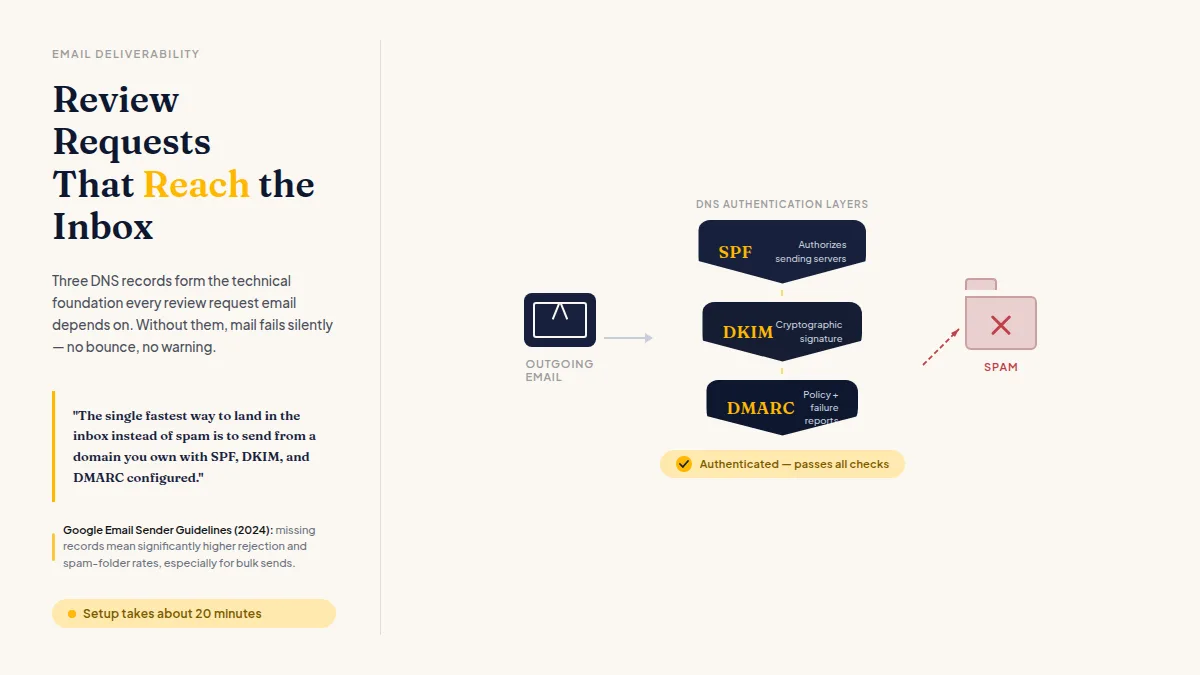
- SPF tells receiving servers which mail servers are authorized to send on behalf of your domain.
- DKIM adds a cryptographic signature proving the email wasn't altered in transit.
- DMARC tells receiving servers what to do if SPF or DKIM fail, and sends you reports when something breaks.
Your email host — Google Workspace, Microsoft 365, Zoho — walks you through adding these as DNS TXT records at your domain registrar. It takes about 20 minutes. According to Google's Email Sender Guidelines (updated 2024), senders missing these records face significantly higher rejection and spam-folder rates, especially for bulk sends.
Once the records are live, use a dedicated sending address for review requests: reviews@yourbusiness.com or feedback@yourbusiness.com. If you need help structuring a professional address, this guide on choosing a good email address covers naming conventions that read as trustworthy rather than generic.
The single fastest way to land in the inbox instead of spam is to send from a domain you own with SPF, DKIM, and DMARC configured. Every other tactic is secondary.
Do this faster
HiFiveStar asks every customer after their visit — so more of the happy ones actually leave a review.
How to Write a Review Request Email That Actually Gets Opened
Once deliverability is sorted, response rate becomes the problem. Most review request emails fail because they're written for the business, not the customer. "We'd love your feedback" is about you. "How was your visit on Tuesday?" is about them.
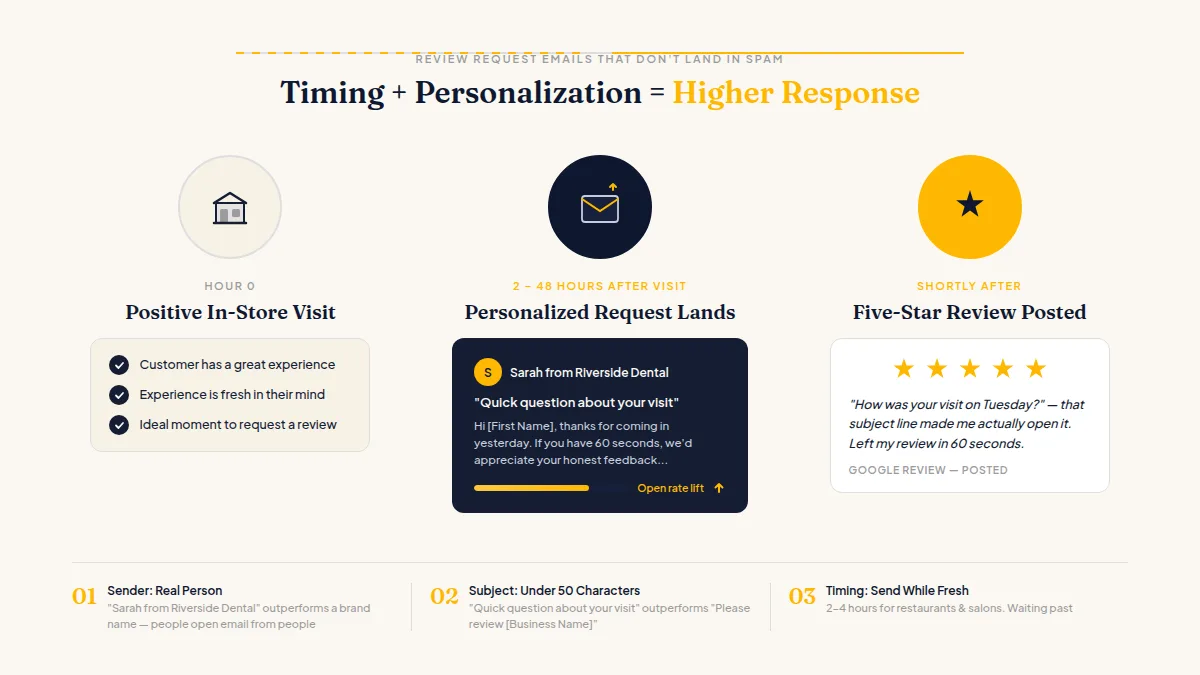
Here's what actually moves open and click rates:
Subject line: Keep it under 50 characters and make it feel personal, not transactional. "Quick question about your visit" consistently outperforms "Please review [Business Name]." Avoid all-caps, excessive punctuation, and the word "free" — those alone can trigger filters.
Sender name: Use a real person's name. "Sarah from Riverside Dental" gets opened more than "Riverside Dental Reviews." People open email from people, not brands.
Timing: Send while the experience is still fresh. For a restaurant or salon, 2–4 hours after the visit. For a contractor job or medical appointment, same day or the following morning. Waiting more than 48 hours drops response rates sharply — the customer has already moved on.
Body copy — a working example:
Hi [First Name],
Thanks for coming in yesterday. As a small business, reviews make a real difference in how new customers find us — and yours would mean a lot.
If you have 60 seconds, we'd appreciate your honest feedback: [Leave a Google Review]
Thanks again, Sarah at Riverside Dental
That's it: one sentence of context, one sentence explaining why it matters to a small business, one link. No service menu, no discount offer, no social media row at the bottom. Every extra element is a reason not to click the main one.
For additional structures across different business types, these review request email examples and templates show how the format adapts from restaurants to contractors to medical practices.
Avoid the Spam Triggers Hidden in Your Email Copy
Even with perfect authentication, certain copy patterns flag filters. Here's what to watch:
- Too many links: One or two maximum. A wall of hyperlinks looks like a phishing attempt.
- Image-heavy emails with little text: Spam filters read text. An email that's 90% image is suspicious by default.
- Trigger words in the subject line: "Winner," "urgent," "act now," "free," "guaranteed" — avoid these even in innocent contexts.
- Old or unverified lists: Emailing customers from three years ago who've never engaged produces high bounce rates and spam complaints, both of which damage sender reputation fast. Send only to recent customers and remove bounced addresses immediately.
- No plain-text version: Professional email tools send both HTML and plain-text versions automatically. Spam filters check for this. If yours doesn't handle it, dig into the settings and turn it on.
The through-line: deliverability rewards email that looks like a real person sending a genuine message — because that's exactly what you're doing.
Offer Private Feedback Alongside the Public Review
A smart review request workflow gives every customer a channel. Every customer gets directed to your Google or Facebook page to leave a public review, and anyone unhappy also gets a private form to tell you what went wrong — so you can resolve the issue.
Critical compliance note: This only works correctly if you ask all customers for feedback, not just the ones you think are satisfied. Google, Yelp, and other platforms explicitly prohibit selectively soliciting reviews from happy customers or discouraging unhappy customers from posting publicly. Every customer must remain free to leave a public review regardless of what they share privately. The private channel is for resolution, not suppression.
HiFiveStar's review page opens on your review sites, with an optional Private Feedback button after them, so every customer can leave a public review and anyone unhappy can also tell you privately and give you the chance to make it right.
If you're already following up but not getting enough responses, review reminder emails covers how to send a second-touch message without pushing people to unsubscribe.
Fix the sending domain first. Then write like a human. Then time it right. Getting a review request email into the inbox — and getting a response — is mostly about removing friction: technical friction that kills deliverability before anyone reads a word, and copy friction that kills action once they do. Both are solvable this week.
Frequently Asked Questions
What email address should I use to send review requests?
Use a domain-based address like reviews@yourbusiness.com or feedback@yourbusiness.com. Free addresses from Gmail or Yahoo carry lower deliverability and signal lower credibility than a branded domain.
How soon after a customer visit should I send a review request email?
Same day is usually best — within 2–4 hours for quick-turnaround services like restaurants or salons, and within 24 hours for larger jobs. The longer you wait, the less vivid the experience and the lower the response rate.
Why is my review request email going to spam even though it's not spam?
The most common causes are missing SPF, DKIM, or DMARC records; sending from a free email address; or using subject-line trigger words like "free" or "urgent." Fixing your DNS authentication records is the highest-impact first step.
Is it against Google's rules to only send review requests to happy customers?
Yes. Google's review policies prohibit selectively asking satisfied customers for reviews or discouraging unhappy customers from posting publicly. Every customer must be free to share an honest, public review.
How many links should a review request email include?
One primary link to your review platform, and at most one secondary link such as a private feedback form. More than two links increases spam risk and dilutes the single action you want the customer to take.
What's the best subject line for a review request email?
Short, personal, and low-pressure performs best — "Quick question about your visit" or "How did we do, [First Name]?" Avoid generic phrases like "Please leave a review" and anything that sounds promotional or urgent.

Ready to Take Control of Your Online Reputation?
Join thousands of local businesses using HiFiveStar to get more reviews and grow faster.