Review Reminder Emails That Get Responses (Not Unsubscribes)
Learn how to write review reminder emails that feel helpful, not spammy — and actually get customers to leave a review for your local business.
TL;DR: The best review reminder emails are short, personal, sent at the right moment, and make it effortless for the customer to act. Timing matters more than most businesses realize — reaching out within 24 hours of a positive experience dramatically improves response rates. One well-timed, genuine message beats a drip campaign full of generic follow-ups every time.
Why Most Review Request Emails Get Ignored
Most review reminder emails fail before they're even opened. The subject line reads like a mass marketing blast, the body sounds like a corporate template, and the customer — who genuinely liked your business — hits delete without a second thought. That's not a deliverability problem or a timing problem. It's a trust problem.
The fix isn't a clever subject line trick. It's writing like a person who actually served that customer, not like a software platform sending its 10,000th email of the day. When the ask feels human, customers respond. When it feels automated, they don't.
How to Write Review Reminder Emails That Actually Convert
Knowing how to write review reminder emails comes down to one rule: write to one person, not a list. Your email should read like you personally noticed this customer, remembered their visit, and genuinely want their opinion. Everything else follows from that.
Start with a specific, personal subject line. "Share your feedback, John" outperforms "We'd love a review!" every time. If you can reference the service — "How did your color appointment go?" — even better. Specificity signals that this isn't a bulk blast.
Lead with a thank-you, not the ask. Open by acknowledging what they did: visited, purchased, booked a service. One sentence. Then make the ask.
Make the ask direct and singular. Don't give them three options or explain how reviews "help small businesses." Just ask: "Would you mind leaving us a quick review on Google?" One link, one action. Every extra sentence between them and the button is friction.
Keep the body under 100 words. Long emails don't get read. Short emails that feel personal do.
Here's a template that works for most local service businesses:
Subject: How was your visit, [First Name]?
Hi [First Name], thanks so much for coming in on [Day]. We really appreciate it. If you have 60 seconds, an honest Google review would mean a lot to us — it helps other [locals / families / patients] know what to expect. [Leave a Review →] Thanks again. — [Your name], [Business Name]
That's it. No marketing copy. No four-paragraph explanation. Just a real message from a real person.
Try it today: copy that template into your email tool right now, drop in your Google review link, and send it to the last five customers you served. That's a faster start than any automated platform.
Do this faster
HiFiveStar asks happy customers at exactly the right moment — so more of them actually leave a review.
Timing and Frequency: The Levers Most Owners Ignore
Send your review request email while the experience is still fresh — many businesses find that sending within 24 hours of the visit gets meaningfully better responses than waiting several days. The customer still remembers the details, which makes them more likely to write something specific rather than skip the request entirely.
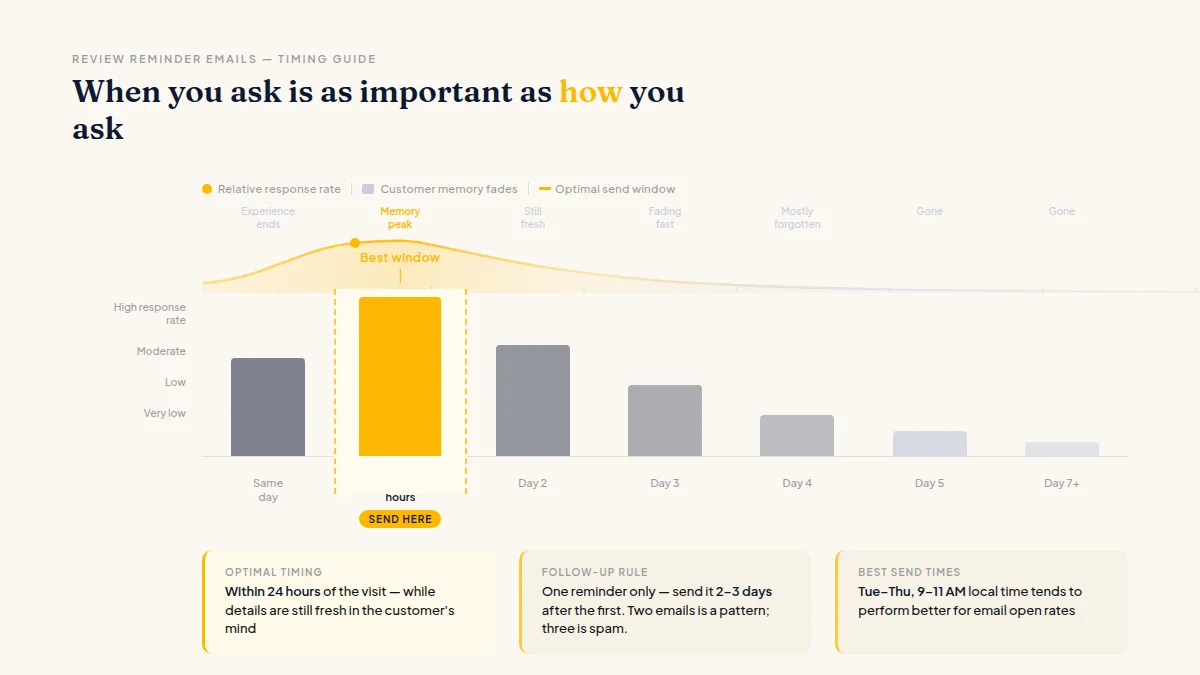
The best time to ask for a review is the moment your customer still remembers why they liked you.
For follow-ups, one reminder is enough. Send it two to three days after the first email if they didn't click through. After that, leave it alone. Two unopened emails is a pattern; three is spam. And if you're comparing channels, it's worth reading how review requests by text vs email perform differently — for some business types, SMS gets faster responses, while email works better for higher-consideration purchases.
On send time: Tuesday through Thursday, mid-morning (around 9–11 AM local time) tends to perform better for email open rates, though this varies by your customer base. Test your own list before treating any benchmark as gospel.
What Makes an Email Feel Spammy (Avoid These)
Avoiding spammy review emails isn't just about what you say — it's about what you remove. These patterns kill response rates:
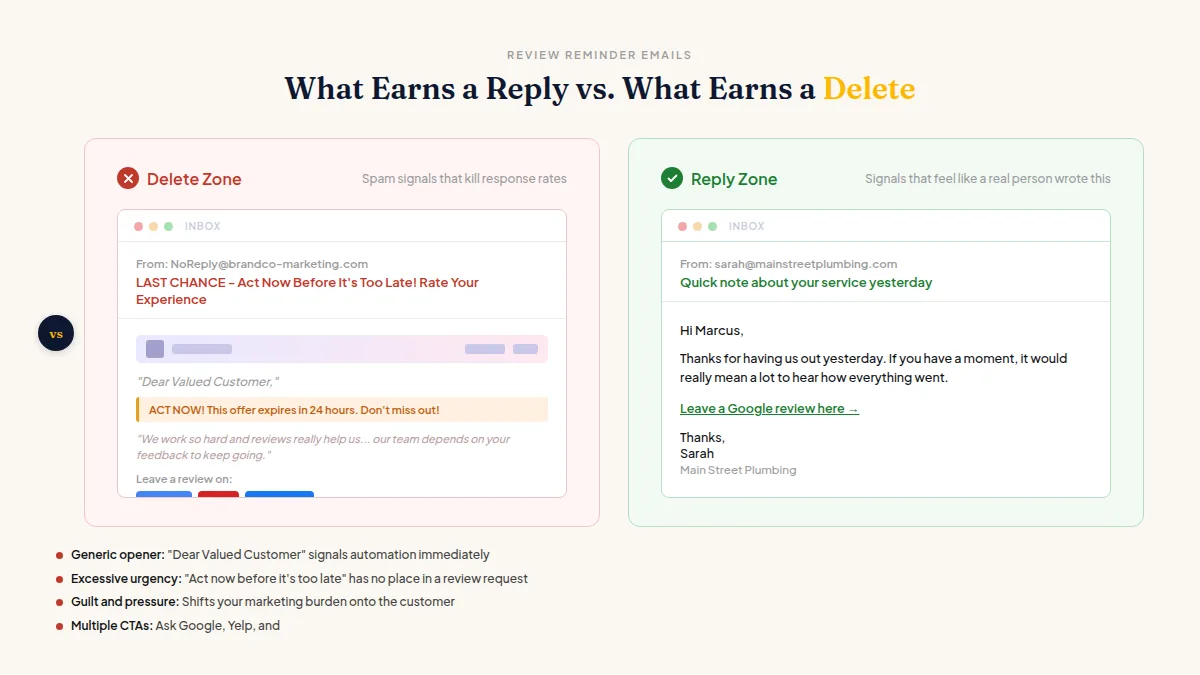
- Generic openers. "Dear Valued Customer" signals automation immediately. Use their first name.
- Excessive urgency. "Act now before it's too late!" has no place in a review request.
- Guilt or pressure. "We work so hard and reviews really help us..." shifts your marketing burden onto the customer. They didn't sign up for that.
- Multiple links and CTAs. One platform, one link, one ask. Send them to choose between Google, Yelp, and Facebook in the same email, and most will choose nothing.
- Over-designed templates. Heavy HTML emails with brand banners look like newsletters. Plain text or near-plain looks like a real email from a real person.
- Filtering by expected sentiment. Only requesting reviews from customers you think will respond positively is review gating — it violates Google's and Yelp's terms of service. The right approach is to ask every customer for feedback and give anyone with a complaint a fast, private way to reach you. Never block anyone from leaving a public review if they choose to.
If your email review requests for local businesses are generating responses but you're not sure how to handle what comes in, building a system to reply consistently matters just as much as the request itself.
Building a System So You Don't Rely on Memory
Manually sending customer review follow-up emails after every transaction doesn't scale past about 10 customers a week. After that, it either falls apart or becomes a part-time job. A simple automated trigger — connected to your booking system, point-of-sale, or job-completion workflow — is what separates businesses with 50 reviews from businesses with 500.
The trigger point matters: your request should go out the moment a job closes, not when someone remembers to send it. Platforms like HiFiveStar handle this automatically on Pro — the email goes out after the job closes, under your business's name, with a single link to the platform you care about most.
If you're newer to this process, the guide on getting your first online reviews for a new business covers the foundational steps before you build out any automated flow.
The System in Four Steps
Here's the complete picture for how to write review reminder emails that consistently generate responses without annoying anyone:
- Write like a person. Use their name, reference their visit, keep it under 100 words.
- Send fast. Within 24 hours while the experience is still sharp in their memory.
- Follow up once. Two to three days later, then stop.
- Automate the trigger. Connect your request to the moment a job or appointment closes so it actually goes out every time — not just when you remember.
That's the whole system. Start with the template above, send it manually to your last five customers today, and build the automation once you've confirmed the message works. Small volume, real feedback, then scale.
Frequently Asked Questions
How soon after a visit should I send a review request email?
Send it within 24 hours if you can. The experience is fresh, the customer is more likely to remember specific details, and your message doesn't feel like it came from a dusty CRM queue.
How many follow-up emails should I send if they don't respond?
One follow-up, sent two to three days after the first. Beyond that, you risk annoying someone who was otherwise happy with you — which is the opposite of what you want.
Is it okay to only ask customers who seemed happy for a review?
No — and it's against Google's and Yelp's terms of service. You can give every customer a private feedback channel to resolve issues quickly, but you can't selectively filter who gets a public review request based on how positive you expect their response to be.
What subject line works best for review request emails?
Personalized and specific beats clever every time. "[First Name], how was your appointment?" or "Quick question about your visit" tend to get opened because they don't look like broadcast marketing.
Should I ask for Google reviews specifically or let the customer choose the platform?
Pick one platform per email — ideally Google, since it has the broadest impact on local search visibility. Multiple options create decision fatigue and lower your response rate overall.
Can I use the same email template for every customer?
A template is fine; personalization tokens (name, service, date) are what make it feel individual. A blank first name field or the wrong service referenced will tank trust instantly, so make sure your data is clean before you automate.
Ready to Take Control of Your Online Reputation?
Join thousands of local businesses using HiFiveStar to get more reviews and grow faster.