Review Requests by Text vs Email: Which Gets More Responses
Wondering whether to send review requests by text or email? Compare open rates, timing, and real-world results to pick the right channel for your local business.
How SMS Review Requests and Email Review Requests Actually Perform
Most business owners assume email is the "professional" choice for review requests. In practice, texts get read almost immediately while emails often sit unopened for days — or disappear into a promotions tab entirely. When comparing review requests by text vs email, the right channel depends on your business type, your customers, and how you ask. Here's the breakdown.
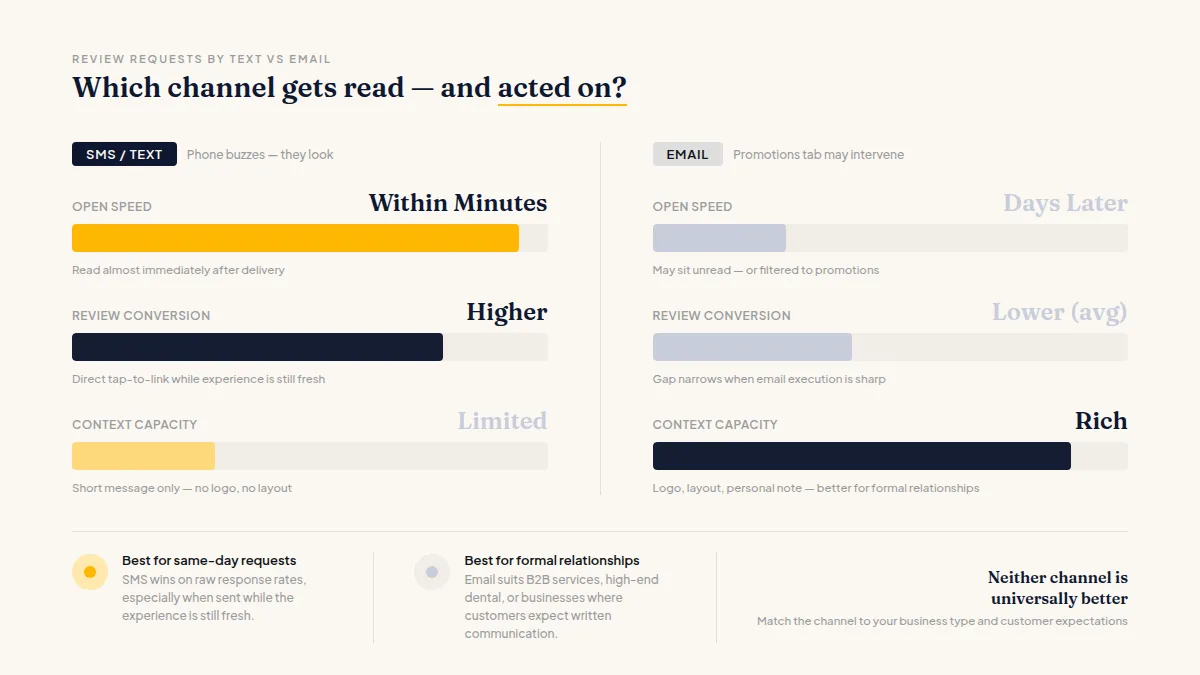
SMS review requests tend to get opened far faster than email — most people read a text within minutes of receiving it because their phone buzzes and they look. Email inboxes, by contrast, are crowded. Promotional filters, newsletter overload, and sheer volume mean your carefully written review request might not surface until the customer has already forgotten about their visit.
That said, "opened" isn't the same as "acted on." A text gives someone a direct link they can tap immediately. An email can carry more context, a logo, a personal note from the owner, and a cleaner layout — which helps for certain audiences and certain asks.
In practice, many local businesses find that SMS review requests outperform email on raw response rates, particularly for same-day requests sent while the experience is still fresh. Email tends to perform better when the relationship is more formal — think B2B services, high-end dental practices, or businesses where the customer expects written communication. Neither channel is universally better, and the gap narrows when your email execution is sharp.
The Timing Factor: When You Send Matters as Much as the Channel
Send a review request within a few hours of the customer's visit and you're catching them while the experience is still top of mind. Wait 48 hours or more and response rates drop noticeably — the customer has moved on, the memory has faded, and the motivation to act is gone.
For SMS, same-day timing is straightforward. The text arrives, they're still thinking about the haircut or the meal or the appointment, and tapping a link takes ten seconds. For email, you're competing with whatever else landed in their inbox that afternoon, so timing requires more precision — mid-morning or early evening tends to work better than midday, though results vary by industry and customer habits.
One concrete tip: if you use a tool that lets you automate your review requests based on appointment completion or point-of-sale triggers, both channels become dramatically easier to time correctly. Manual follow-up almost always gets delayed.
Do this faster
Turn customer visits into review requests that actually get answered — automatically on Pro.
How to Ask Customers for Reviews Without Feeling Pushy
The best way to ask for a review — by text or email — is to keep it short, specific, and human. A wall of text asking someone to "please take a moment to share your experience across our platforms" gets ignored regardless of channel.
For SMS, something like: "Hi [Name], thanks for coming in today! If you have 30 seconds, we'd love a quick Google review: [link]. — Sarah at Maple Street Dental" works because it's personal, brief, and the ask is clear.
For email, you have a bit more room — a short paragraph, maybe a thank-you line referencing the specific service they received, and a single clear call to action. One link, one platform. Giving someone five platforms to choose from doesn't get you five reviews; it produces decision paralysis and zero.
Worth knowing: to stay compliant with Google, Yelp, and other platforms, you should ask all your customers for feedback — not just the ones you think had a great experience. A good feedback approach gives unhappy customers a fast private channel to raise an issue directly, which often resolves problems before they escalate — but it must never prevent anyone from posting a public review if they choose to. Every customer retains that right, and platform guidelines require it.
If you're figuring out how to ask customers for reviews in a way that fits naturally into your workflow, the piece on how to streamline your review requests covers the operational side well.
When to Use Text, When to Use Email, and When to Use Both
Choose SMS when your customers are comfortable with text communication from your business, the service was in-person and same-day, and you want maximum speed-to-response. Restaurants, salons, home service businesses, and medical practices where patients already text to confirm appointments are natural fits.
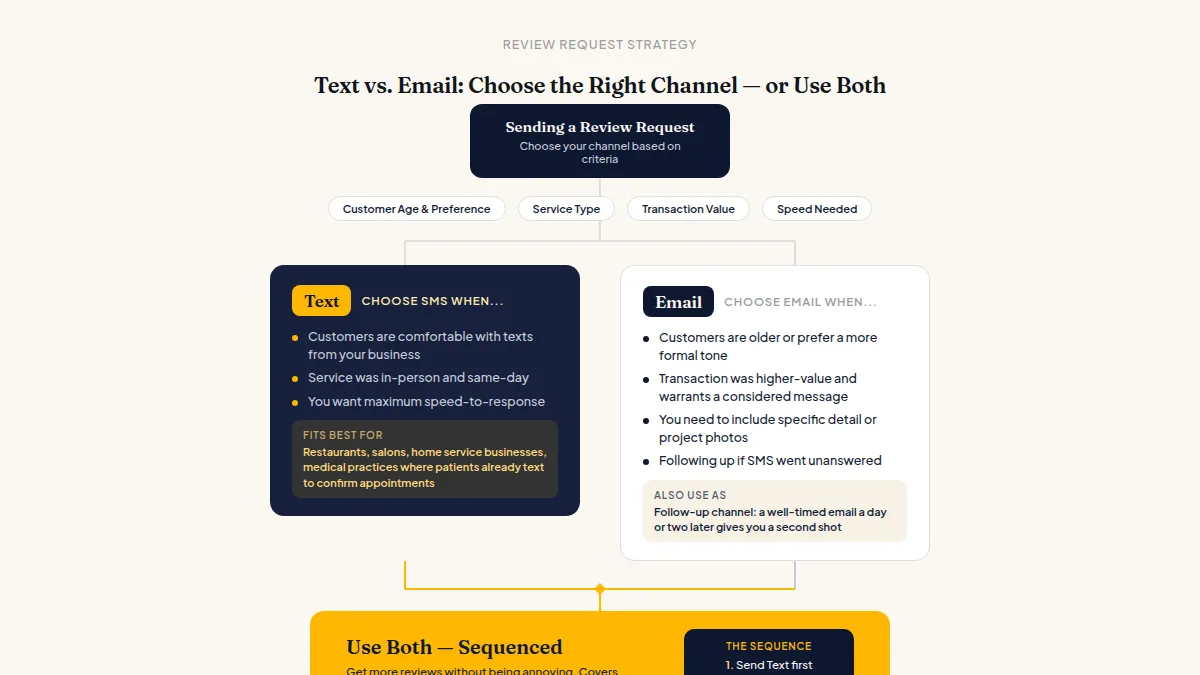
Choose email when your customers are older or more formal, when the transaction was higher-value and warrants a more considered message, or when you need to include specific detail — a photo of their completed project or a summary of their visit. Also use email as a follow-up channel: if someone didn't respond to your SMS request, or you only have their email address, a well-timed email a day or two later gives you a second shot.
Use both — sequenced — when you want to get more online reviews without being annoying: text first, email follow-up only if there's no response after a couple of days. This covers different preferences without doubling up on customers who already responded.
HiFiveStar handles both channels from one place, so you're not managing two separate tools or manually tracking who got what.
For businesses that also want in-person collection points, pairing digital requests with a QR code at the counter or front desk gives you a third channel for customers who prefer to act on the spot.
Frequently Asked Questions
Which gets a higher review request response rate — text or email?
Most local businesses find SMS gets faster responses because texts are opened almost immediately, while emails face inbox competition and filtering. However, email can close the gap when it's well-written, well-timed, and sent to an audience that expects that kind of communication.
How soon after a visit should I send a review request?
As soon as reasonably possible — ideally within a few hours while the experience is fresh. Many businesses send requests automatically upon appointment completion or checkout, which removes the delay that kills response rates.
Is it legal to send SMS review requests to customers?
Yes, but you need prior consent. In most jurisdictions, customers must have opted in to receive texts from your business. Always check your local regulations and include an easy opt-out option in every message.
Can I send both a text and an email asking for a review?
Yes, and a sequenced approach — text first, email follow-up a day or two later if no response — is a practical way to reach more customers without feeling repetitive to those who already responded.
Does Google care whether the review request came from text or email?
No. What matters to Google is that the review is genuine — from a real customer expressing their actual experience. Google's guidelines prohibit incentivizing or fabricating reviews, not choosing a delivery channel.
What's the best way to ask for a review without sounding scripted?
Use the customer's name, reference the specific service or visit, keep the message short, and include a direct link. Even minimal personalization consistently outperforms generic templates.



Ready to Take Control of Your Online Reputation?
Join thousands of local businesses using HiFiveStar to get more reviews and grow faster.