Review Request Emails That Don't Feel Like Spam
Learn how to write a review request email customers actually open and act on, plus 5 ready-to-use templates for local businesses.
TL;DR: A review request email stops feeling like spam when it's sent at the right moment, sounds like a real person, and makes leaving a review genuinely easy. Timing, a personal tone, and a single clear call-to-action do most of the heavy lifting. The five templates below give you a proven starting point you can adapt to your own voice.
Most review request emails get deleted in three seconds. Not because customers are stingy with their opinions — according to BrightLocal (2024), 50% of consumers say they would leave a review if asked — but because the email feels like it was written by a form letter generator and sent to 10,000 strangers. The fix isn't a fancier template. It's understanding why the email feels impersonal and correcting that first.
Why Most Review Request Emails Feel Like Spam
The core problem is timing and specificity. An email that arrives three weeks after a haircut, references nothing about the actual visit, and opens with "Dear Valued Customer" has already lost. It feels like spam because it is spam — a bulk message dressed up with a first name.
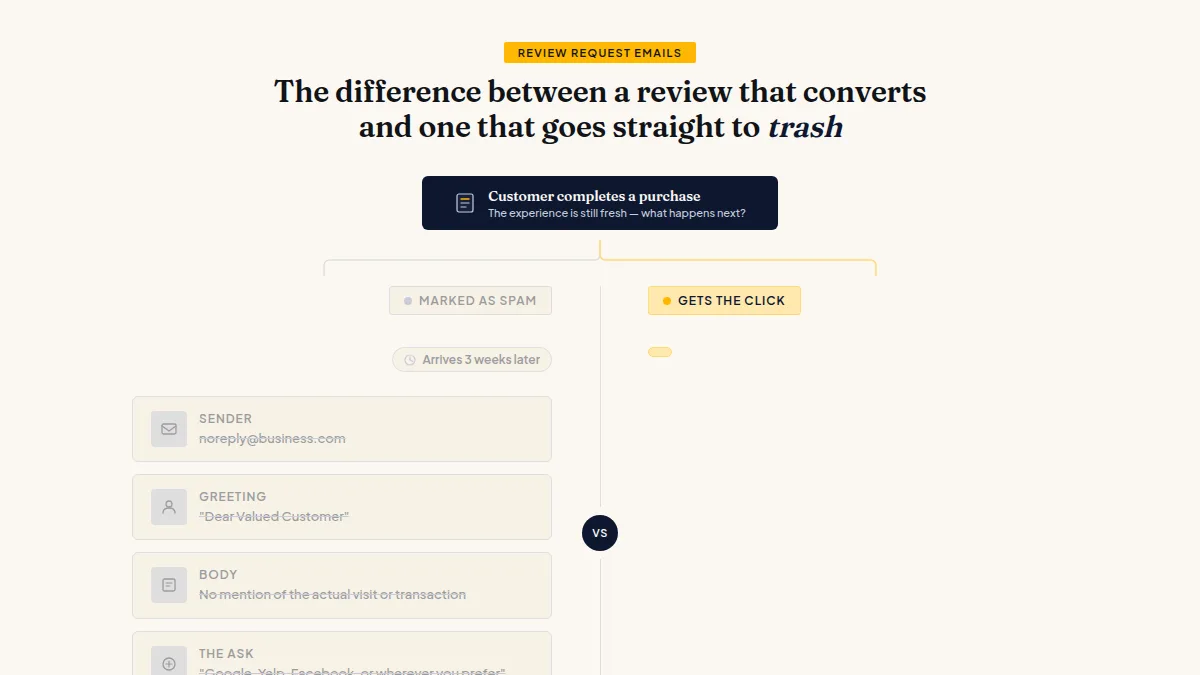
The emails that actually get clicks share three traits: they arrive while the experience is still fresh (many businesses find that sending within 24–48 hours performs better, though the right window varies by industry), they mention something specific about the transaction, and they come from a real person's name rather than a "noreply@" address. That last point matters more than most owners realize — choosing a professional sender name signals that a human sent it, not a robot.
The difference between a review request that converts and one that gets marked as spam is specificity — a generic ask costs nothing to ignore.
One more thing: keep the ask singular. "A quick Google review" outperforms "please leave us a review on Google, Yelp, Facebook, or wherever you prefer." More choices create more friction.
How to Write a Review Request Email That Actually Works
Start with the subject line — it's the only thing standing between your email and the trash folder. Good review request subject lines are short, personal, and low-pressure. They don't beg, and they don't oversell. The framework is simple: acknowledge the recent interaction, then make a small ask.
Examples that tend to work:
- "How was your visit yesterday, [First Name]?"
- "Quick question about your [service] appointment"
- "Did we do a good job? Honest feedback welcome"
- "Your experience at [Business Name] — 30 seconds?"
The body follows the same logic. Open with a one-sentence reference to their specific visit or purchase. Then make the ask — one sentence, one link. Close with a real name and a real role (not "The Team"). Total word count: under 100 words. If you're writing paragraphs, you've already lost them.
When you ask customers for reviews by email, resist the urge to explain why reviews matter to your business. The customer doesn't owe you a review; you're asking for a favor. Frame it as such.
Do this faster
HiFiveStar asks happy customers at exactly the right moment — so more of them actually leave a review.
5 Review Request Email Templates That Work
These are built on the principles above. Customize the bracketed fields — don't send them verbatim.
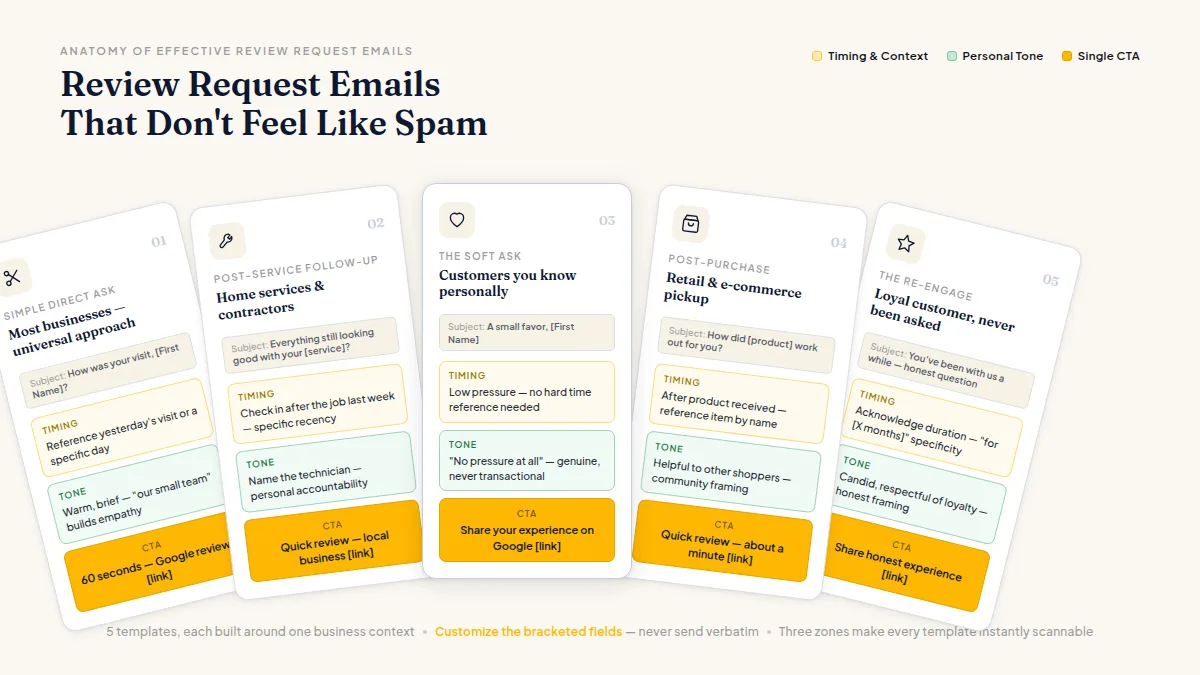
Template 1 — The Simple Direct Ask (works for most businesses)
Subject: How was your visit, [First Name]?
Hi [First Name], thanks for coming in [yesterday / on Tuesday]. We hope everything went smoothly. If you have 60 seconds, an honest Google review helps our small team a lot: [link]. Thanks either way — [Your Name], [Role]
Template 2 — Post-Service Follow-Up (home services, contractors)
Subject: Everything still looking good with your [service]?
Hi [First Name], just checking in after [the job last week]. If [Name of Tech] and the team took care of you, would you mind leaving a quick review? It goes a long way for a local business: [link]. — [Your Name]
Template 3 — The Soft Ask (customers you know personally)
Subject: A small favor, [First Name]
Hey [First Name] — your support means a lot to us. If you've got a moment, sharing your experience on Google helps new customers find us: [link]. No pressure at all. — [Your Name]
Template 4 — Post-Purchase (retail, e-commerce pickup)
Subject: How did [product] work out for you?
Hi [First Name], hope you're enjoying [product name]. If you're happy with it, a quick review helps other shoppers make the call: [link]. Takes about a minute. Thanks — [Your Name]
Template 5 — The Re-Engage (loyal customer, hasn't been asked before)
Subject: You've been with us a while — honest question
Hi [First Name], you've been a customer for [X months / years] and we really value that. If you've never left us a review and feel like our service has earned one, here's where to do it: [link]. Either way, thank you. — [Your Name]
For more fully developed variations, the best review request email examples for 2026 covers additional scenarios including appointment-based businesses and multi-location operators.
How to Write a Review Request Email: Best Practices That Separate Good From Great
Timing is critical — but so is the sender address and how you handle replies. If someone responds to your review request with a complaint, you need to be ready to act fast. This is actually a feature, not a bug: catching an unhappy customer privately before they post publicly gives you a chance to fix the problem. Tools like HiFiveStar offer an optional star filter, giving frustrated customers a direct private feedback form that still offers a public review, while directing satisfied ones toward Google or Facebook. Critically, this only works if all customers are contacted — not just the ones you expect to be happy. Every customer retains the right to post a public review regardless, and that's exactly how it should be.
Sending review requests only to customers you think are happy isn't just ethically questionable — it violates Google's and Yelp's guidelines.
A few email review request best practices worth building into your process:
- Personalize at minimum two fields: name and service or product. Anything less reads as bulk mail.
- One link, one platform: pick the platform where you most need reviews (usually Google) and link directly to your review form, not your homepage.
- Mobile-optimize the link destination: most customers will tap from a phone. A Google Maps review page works; a broken redirect doesn't.
- Don't automate an apology away: if your system sends a review request and the customer had a bad experience, a canned follow-up makes it worse. Have a human check replies.
If you want to go deeper on how to get more customer reviews through systematic follow-up, pairing email with SMS tends to increase total response volume — different customers respond to different channels, and you can't predict which is which ahead of time.
Frequently Asked Questions
How to write a review request email: how soon should I send it?
Most businesses find that sending within 24 hours of a completed service or delivery gets the best response, while the experience is still top of mind. For longer-term services like contracting work, waiting until the job is fully complete and confirmed is better practice.
What's the best subject line for a review request email?
Short, personal, and low-pressure works best. Something like "How was your visit, [First Name]?" or "Quick question about your appointment" consistently outperforms vague or salesy subject lines. Avoid "Please leave us a 5-star review" — it signals a canned ask.
Is it against the rules to only send review requests to happy customers?
Yes. Google, Yelp, and most major platforms prohibit selectively soliciting reviews only from customers you expect to rate you well — a practice often called "review gating." You should contact all customers and give unhappy ones a fast private path to resolve their issue, but you cannot block anyone from leaving a public review.
How many times should I follow up if someone doesn't leave a review?
One follow-up after 3–5 days is reasonable. Two follow-ups maximum. After that, continued reminders tend to irritate customers more than they convert them, and some email clients will start flagging your domain as spam.
Does the "from" name on a review request email matter?
It does. Emails from a real person's name — for example, "Maria at Riverside Dental" — consistently outperform emails from "The Team" or "noreply@." Customers are more likely to open and respond to something that looks like a human sent it.
Can I ask for reviews by email and SMS at the same time?
You can, though sending both simultaneously can feel aggressive. Many businesses stagger them — email first, then an SMS follow-up a few days later if there's been no response. Effective review request templates for both channels can help you match the right format to each medium.
Ready to Take Control of Your Online Reputation?
Join thousands of local businesses using HiFiveStar to get more reviews and grow faster.