Review Request Emails Customers Actually Trust & Reply To
Learn how to craft a review request email address and message that builds trust, gets opened, and drives real replies from happy customers.
TL;DR: Customers ignore review request emails that look spammy or come from a no-reply address. Use a recognizable sender name tied to your business, a friendly from-address customers have seen before, and a short personal message — those three changes alone dramatically improve open and reply rates. Timing matters too: send within 24 hours of the visit while the experience is still fresh.
Most review request emails get deleted before the customer reads a single word. Not because the copy is bad — because the sender address fails a three-second gut check, and nothing else gets a chance. Fix that first, then fix everything else.
Why Your Sender Address Determines Whether Customers Trust Your Review Request Email
Your sender address is the first thing a customer sees — before the subject line, before the preview text. According to the Radicati Group (2023), the average business professional receives over 100 emails per day and makes delete-or-open decisions in under three seconds. Your address has to pass that gut check before any other element of your email gets a chance.
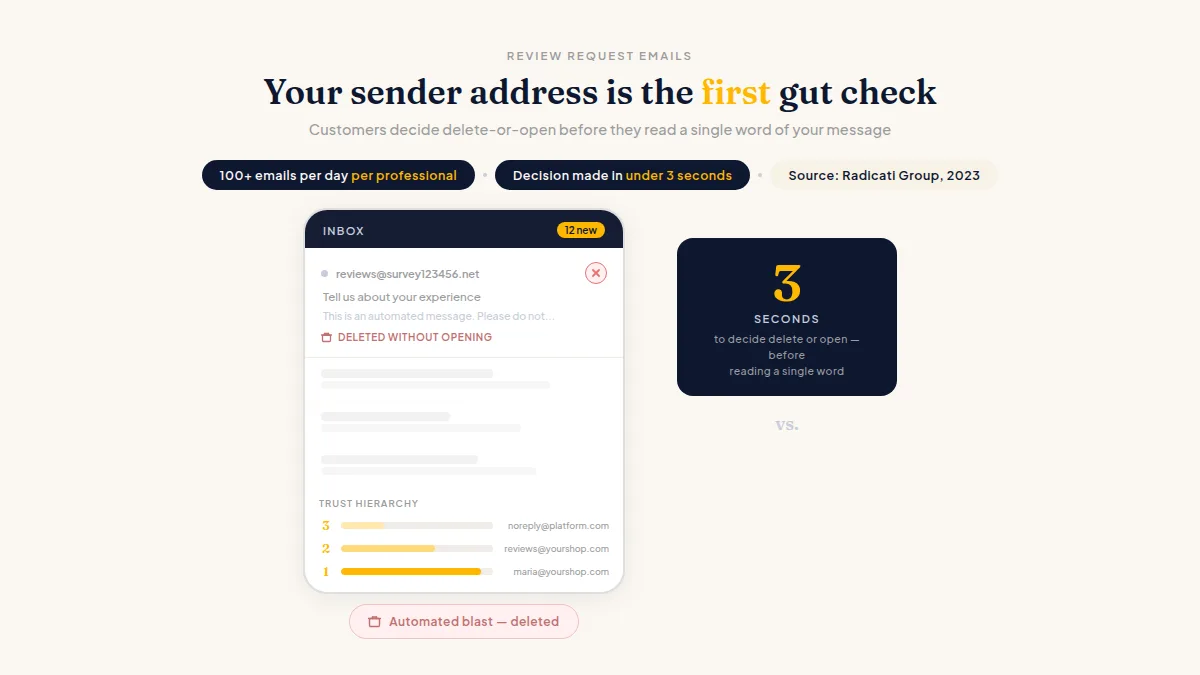
A review request sent from noreply@bigplatform.com or reviews@survey123456.net signals "automated marketing blast." Customers don't reply to those because they know no real person will read the response. They don't leave reviews either, because the brand feels anonymous.
The fastest way to get a customer to ignore your review request is to send it from an address that looks like it came from a software company, not you.
What actually works: an address on your own domain, tied to a real person or a real role. maria@greatlakesdental.com outperforms reviews@greatlakesdental.com, which still outperforms anything at a third-party domain. If you're a solo operator, use your first name. If you have a team, use the staff member who last served that customer — the stylist, the technician, the front-desk person they spoke with. That specificity is what makes asking customers for reviews by email feel human rather than automated.
For the mechanics of building a credible address format, these professional email address rules and examples cover the naming conventions that hold up across industries.
How to Write a Review Request Email That Actually Gets Opened
Write the email as if you're typing it yourself, not publishing a campaign. Short subject lines that reference the customer's actual transaction beat generic ones every time. "How was your visit with us on Tuesday?" lands differently than "We'd love your feedback!" — because it proves you know who they are.
Body copy should be three to five sentences maximum. Here's the structure that works:
- A specific thank-you. Name what they actually did — not just "thank you for your business." ("Thanks for coming in for your oil change on Wednesday" beats "Thanks for choosing us.")
- One clear ask. Tell them exactly what you want: an honest review.
- A direct link. Send them straight to your Google or Facebook page — not a landing page in between. Every extra click cuts your conversion.
- A real sign-off. First name, title, and optionally a phone number. This alone separates you from the automated blasts your customers are used to deleting.
That's the whole email. Resist the urge to add a second ask, a discount offer, or bullet points about your services. One email, one action.
On timing: Send within 24 hours of the visit or completed job. Same-day or next-morning sends consistently outperform requests that go out days later, after the customer has mentally moved on. A dentist's patient might need a day or two to reflect; a restaurant guest is ready the same evening. One follow-up sent three to five days after the original is reasonable. A second follow-up pushes into territory that generates spam complaints instead of reviews. Avoid Friday afternoon and Sunday sends for most service businesses — mid-week mornings tend to see stronger open rates, though your own list is the only data that matters, so test it.
For copy you can adapt today, these review request email examples and templates show exactly how to structure the message for different business types, including service businesses, restaurants, and healthcare practices.
Do this faster
HiFiveStar asks every customer after their visit — so more of the happy ones actually leave a review.
Email Sender Trust for Small Business: The Technical Setup You Can't Skip
A credible-sounding address still fails if your domain isn't configured correctly. Email sender trust for small business comes down to three technical records: SPF, DKIM, and DMARC. Together, they tell receiving mail servers that your domain is legitimate and that you authorized the sending server to act on your behalf. Without them, your carefully written review request looks great in your drafts folder and lands in spam everywhere else.
Your domain registrar or hosting provider can walk you through the setup — most offer one-click configuration now. If you're on Google Workspace or Microsoft 365, these records are largely handled for you, but verify them with a free tool like MXToolbox before sending a single request.
One more factor: your domain needs some sending history before you push out a batch of review requests. A brand-new domain sending 50 emails in a week looks like spam to Gmail's filters. Warm it up by sending normal business correspondence for a few weeks first.
Review Request Best Practices That Hold Up Over Time
The fundamentals of how to write a review request email don't shift much, but a few practices separate businesses that build a steady review pipeline from ones that spike and stall.
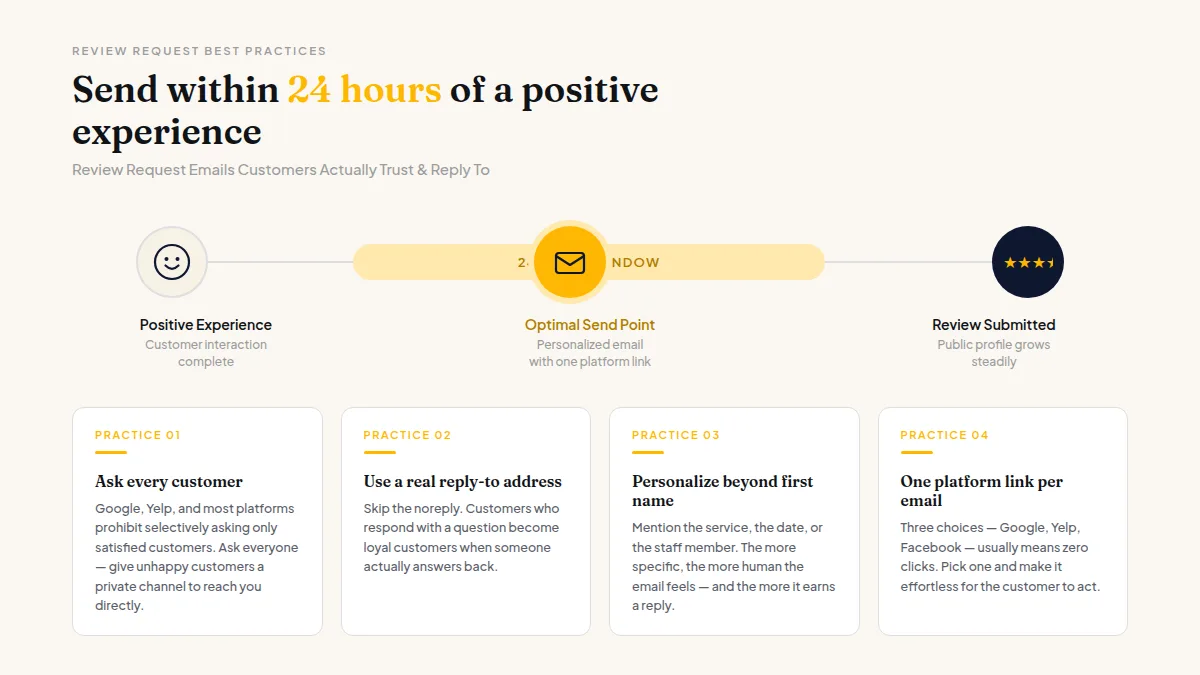
Ask every customer, not just the ones you're confident were happy. This is both the ethical approach and the compliant one — Google, Yelp, and most major platforms prohibit selectively asking only satisfied customers to review (sometimes called "review gating"). The right approach is to ask everyone the same way and put a private way to reach you beside the review link, never in front of it. Customers keep full ability to post a public review whenever they choose; you've simply given anyone with a concern a direct line to you.
HiFiveStar's review page opens on your public review profiles, with an optional Private Feedback button after them, so anyone who had a problem can reach you directly — with no one blocked from posting publicly.
A few other practices worth keeping:
- Use a real reply-to address, not
noreply. Customers who respond with a question become loyal customers when someone actually answers. - Personalize beyond first name. Mention the service, the date, or the staff member they worked with. The more specific you are, the more human the email feels.
- One review platform link per email. Giving customers three choices — Google, Tripadvisor, and Facebook — usually means they click none. Pick the platform that matters most to your business right now.
Frequently Asked Questions
What email address should I use to send review requests?
Use an address on your own business domain tied to a real person's name — sarah@yourbusiness.com, not noreply@yourbusiness.com or anything at a third-party domain. Both kill open rates before your subject line gets a chance.
How do I get customers to actually reply to review request emails?
Keep the email short, reference their specific visit, and sign with a real name. Make the single ask obvious and link directly to your review page — no intermediate landing pages.
Is it against the rules to ask only happy customers for a review?
Yes. Google, Yelp, and most major platforms prohibit selectively soliciting reviews only from customers you know are satisfied. Ask everyone the same way, and put a private way to reach you beside the review link, so a customer with a problem can tell you directly.
When is the best time to send a review request email?
Within 24 hours of the service or purchase, while the experience is fresh. Same-day or next-morning sends typically get the strongest response, though this varies by industry — test your own list to confirm.
Why are my review request emails going to spam?
Almost always a technical problem: missing or misconfigured SPF, DKIM, or DMARC records. Check your DNS setup with MXToolbox, and confirm you're sending from a domain with an established sending history before pushing out bulk requests.
How many follow-ups should I send before moving on?
One initial request and one follow-up three to five days later is the standard. Beyond that, you risk spam complaints that hurt your overall deliverability — which makes every future email harder to land.



Ready to Take Control of Your Online Reputation?
Join thousands of local businesses using HiFiveStar to get more reviews and grow faster.