Reputation Management Software Pricing Compared
Compare reputation management software pricing and plans so you know what you're paying for before you buy. What local businesses actually get at each tier.
TL;DR: Reputation management software pricing varies widely — from free plans with a reviews inbox and QR code to paid tiers that add review requests by text, email, and WhatsApp, AI reply drafts, and analytics. Higher paid plans layer on automations, reminders, and customer insight themes. The right tier depends on how many locations you run and how hands-on you want the follow-up to be.
What Reputation Management Software Actually Costs
Here's the trap: you sign up for a reputation management software pricing plan that looks reasonable, then discover the one feature that actually gets you more reviews — sending review requests — sits a tier above what you paid for. The free plan watches. The paid plan works. Knowing exactly where that line falls, before you buy, is what this guide covers.
Local business reputation software plans fall into three tiers: free tools that read reviews but send nothing, entry paid plans that add review requests and AI reply drafts, and higher paid plans that layer in automations, reminders, and deeper analytics. Getting clear on which tier solves your actual problem stops you paying for features you'll never use.
How Reputation Management Software Cost Breaks Down by Feature
The price gap between plans almost always comes down to four things: whether you can send review requests, how many, whether replies get drafted for you, and whether the whole process runs without you touching it.
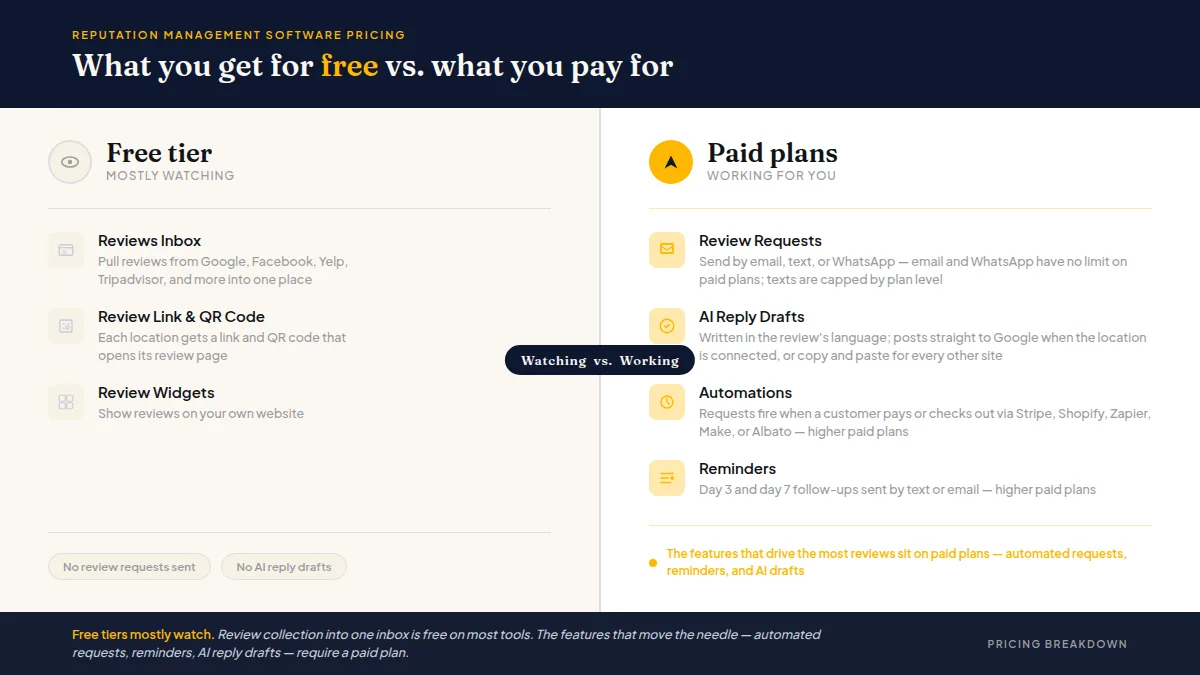
The features that drive the most reviews — automated requests, reminders, and AI drafts — sit on paid plans. Free tiers mostly watch.
Review collection — pulling reviews into one inbox from Google, Facebook, Yelp, Tripadvisor, and others — is free on most tools. You're not paying to read what customers already wrote publicly.
Review requests are where pricing starts to split. Email requests are cheapest to send, so most entry paid plans include them. Text requests cost more to deliver, so they're capped lower on entry plans, and sometimes very tightly. WhatsApp typically sits in the middle: often included but requiring a manual send step rather than full automation.
AI reply drafts almost always require a paid plan. Tools differ on whether the draft posts directly to Google or just puts text on your clipboard to paste yourself — a meaningful distinction.
Automations — requests that fire when a customer pays, books, or checks out — typically live on higher paid plans. So do multi-step reminders (day 3, day 7 follow-ups) and detailed insight reporting.
For a full side-by-side of tools at each tier, the Online Reputation Management Software: 10 Compared breakdown is worth reading before you commit.
Do this faster
HiFiveStar drafts a reply to any review in seconds — so your profile always looks cared for.
What the Free Plan Actually Gets You
A free-forever plan is a reasonable starting point if you want one place to monitor your online presence. It is not a system that grows your review count on its own.
HiFiveStar's free-forever plan reads reviews from nine sites — Google, Facebook, Tripadvisor, Yelp, Indeed, Glassdoor, Zillow, HomeAdvisor, and Thumbtack — into one inbox, gives each location a review link and QR code, and lets you post a 4- or 5-star review to a connected Facebook Page. What it does not include: sending review requests, AI reply drafts, or analytics. After the 14-day trial (which opens every feature except texting, with up to 250 email requests and no card required), you either upgrade or the requests stop.
If your goal is getting more reviews rather than just reading them, budget for a paid plan from the start.
Reputation Management Software Pricing for Small Businesses: What to Expect
The entry paid tier covers most single-location businesses: enough to send requests by email and text, draft replies, and see basic performance numbers.
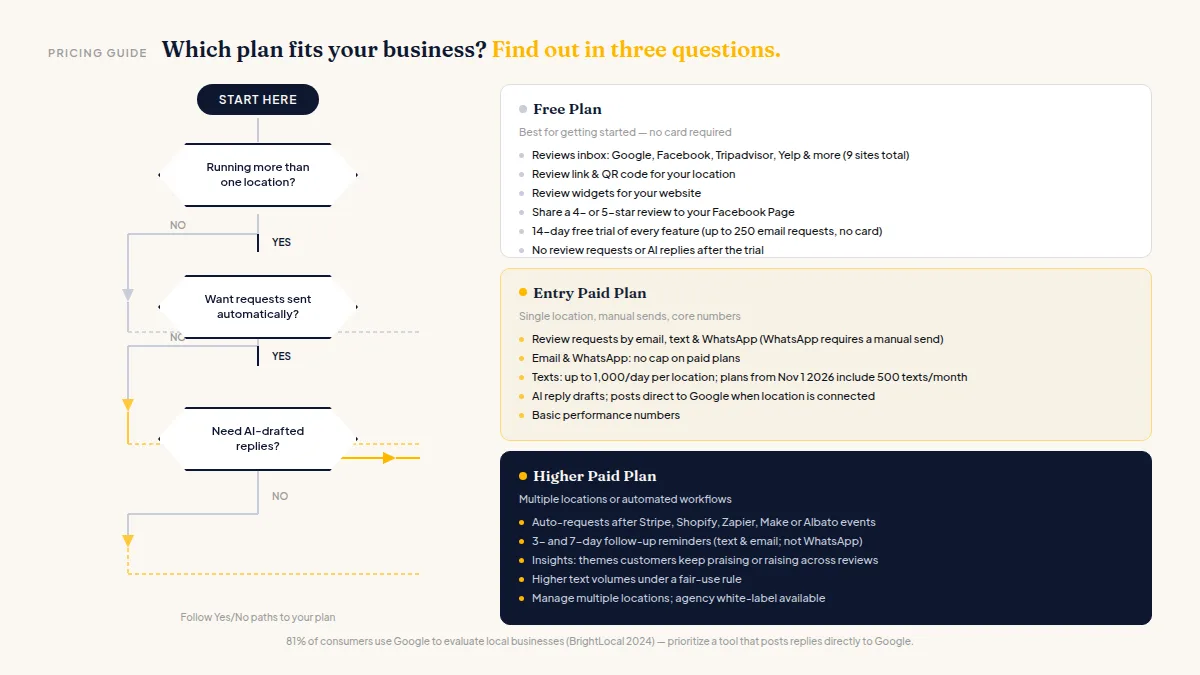
The jump to a higher paid plan makes sense when you want requests to go out automatically after a Stripe payment, a Shopify order, or a booking pushed through Zapier, Make, or Albato. It also makes sense when you want 3- and 7-day follow-up reminders to run without manual effort, and when you want Insights showing which themes customers keep raising across dozens of reviews.
Specific pricing details for HiFiveStar's review request plans:
- Email and WhatsApp: no cap on paid plans (WhatsApp requires a manual send, not automation)
- Texts: up to 1,000 a day per location on paid plans (200/day when the number or destination is outside the US); entry paid plans purchased on or after November 1, 2026 include 500 texts a month; higher paid plans have unlimited texts for normal business volume under a fair-use rule
- Automations and reminders: higher paid plans only; WhatsApp is never part of automated or reminder sends
According to BrightLocal's 2024 Local Consumer Review Survey, 81% of consumers use Google to evaluate local businesses — a strong reason to prioritize tools that post replies directly to Google rather than generating text you copy-paste yourself.
For specialized industries, the pricing calculus can shift. A clinic may need HIPAA-conscious workflows that some tools add as premium features. The Best Reputation Management Software for Medical Clinics comparison covers what to look for there.
Online Review Software Pricing Comparison: What to Watch For
When running an online review software pricing comparison, the number on the pricing page is rarely the full story. Watch for these:
Per-location fees. Many tools charge per location, not per account. A single-location hair salon pays very differently from a five-location dental group.
Texting add-ons. Some tools advertise a low base price, then charge separately for each text message. Know your monthly send volume before assuming the base price covers it.
Inbox depth. Not every tool reads the same sites. If Indeed and Glassdoor reviews matter to your hiring, confirm they're included at your tier.
Reply posting vs. reply drafting. An AI draft that posts straight to Google saves meaningful time compared to one you copy manually — but it usually requires connecting your Google login and may sit on a higher plan.
Contract length. Month-to-month costs more annually but protects you if the tool underdelivers. Annual billing is often cheaper — check each vendor's pricing page for the exact discount, since it varies.
The 13 Best Reputation Management Software Tools (2026) post maps out how the major tools compare across most of these dimensions.
The short version: pick the tier where review requests are included, confirm texts aren't a separate line item, and check that replies post directly to Google rather than landing on your clipboard. Those three decisions will determine whether the software earns its cost.
Frequently Asked Questions
How much does reputation management software cost for a small business?
Pricing varies by tool and plan tier. Most platforms charge per location, with entry paid plans covering review requests and basic analytics, and higher plans adding automations and deeper reporting. Check each vendor's current pricing page directly, since rates shift and differ significantly across tools. Most offer a free tier that monitors reviews but doesn't send requests.
Is there a free reputation management tool?
Yes — several tools, including HiFiveStar, offer a free-forever plan that pulls reviews from multiple sites into one inbox and gives you a review link and QR code. Free plans generally don't send review requests or generate AI reply drafts, so they're a starting point, not a growth engine.
What features require a paid plan?
Sending review requests (by text, email, or WhatsApp), AI reply drafts, and analytics require a paid plan on most tools. Automated requests triggered by payments or orders, plus 3- and 7-day follow-up reminders, typically require a higher paid plan.
Are texting costs included in reputation management software plans?
Sometimes, but check carefully. Some tools charge per text on top of the subscription. HiFiveStar includes texts within its paid plans (up to 1,000 a day per location, with higher paid plans offering unlimited texts for normal business use under a fair-use rule), so you're not paying per message.
Does reputation management software post replies to Google automatically?
Only for Google reviews, and only when the location is connected with its Google login. Most tools — including HiFiveStar — draft replies for other sites but require you to copy and paste them manually on those platforms.
Is reputation management software worth it for a single-location business?
For most single-location businesses, yes — specifically the entry paid plan. The ability to send a review request to every customer right after their visit, without doing it manually each time, is where most of the return comes from.
Ready to Take Control of Your Online Reputation?
Join thousands of local businesses using HiFiveStar to get more reviews and grow faster.