Best Local Rank Tracker for 2026: Top Tools to Monitor and Improve Your Local Search Rankings
Compare the best local rank trackers for 2026. Find the right tool to monitor Google Maps rankings, track local keywords, and boost local search visibility.
Our picks for 2026 are HiFiveStar, a review tool rather than a rank tracker, and the local rank trackers BrightLocal, Whitespark, Semrush, Moz Local, Local Falcon, GeoRanker, and Ahrefs. Each one helps you monitor how your business appears in Google's local search results and Google Maps — but they take very different approaches to getting you there. Choosing the right one depends on whether your biggest gap is review volume, citation accuracy, keyword rankings, or hyper-local grid visibility.
| Tool | Best For | Starting Price | Free Plan |
|---|---|---|---|
| HiFiveStar | More reviews for local rankings (not a rank tracker) | $0/mo | Yes |
| BrightLocal | Dedicated local rank tracking | $29/mo | Trial |
| Whitespark | Local citation + rank tracking | $33/mo | Limited free |
| Semrush | Full SEO suite with local add-on | $139.95/mo | Trial |
| Moz Local | Listing management + visibility | $14/mo | No |
| Local Falcon | Hyper-local grid tracking | $24/mo | Trial |
| GeoRanker | Multi-location geo targeting | $99/mo | Trial |
| Ahrefs | Backlink analysis + rank tracking | $99/mo | Trial |
Key Takeaways
- Google's local search algorithm weights reviews, proximity, and relevance. HiFiveStar directly improves the reviews factor — the most actionable lever most local businesses have — with a free plan to start and automated review request campaigns on Pro.
- Tracking your local rank without improving the underlying signals is a scorekeeping exercise. The most valuable tools combine monitoring with the ability to act on what they show you.
- BrightLocal and Whitespark are the gold standard for raw local rank tracking data — accurate, affordable, and purpose-built for local SEO.
- Semrush and Ahrefs add the most value when local SEO is part of a broader content and backlink strategy; their local features are secondary to their core power.
- Local Falcon is the tool to reach for when you need to visualize ranking performance across a geographic grid — essential for service-area businesses.
- Most local businesses get more ranking lift from 50 new reviews than from any additional tracking feature. Measure both.
What Is a Local Rank Tracker?
A local rank tracker is a tool that monitors where your business appears in Google's local search results and Google Maps for specific keywords. Unlike traditional rank trackers that measure website positions in organic search, local rank trackers focus on the local map pack — the three-business cluster that appears near the top of search results for queries like "plumber near me" or "best pizza in Chicago."
Local rankings behave differently from organic rankings. Your position can change based on the physical location of the searcher, the device they use, the time of day, and dozens of other signals. A person searching for "dentist near me" from a neighborhood two miles away may see a completely different set of businesses than someone searching from the other side of town. This geographic variability is what makes local rank tracking a distinct discipline.
What Good Local Rank Trackers Actually Measure
A reliable local rank tracker should monitor:
- Map Pack position — where you appear in the three-business cluster at the top of local results
- Organic position — where your website ranks in the standard blue-link results below the map
- Rank by location — how your position varies when the "virtual searcher" stands in different parts of your service area
- Competitor positions — where your top competitors rank for the same keywords
- Ranking trends — whether your positions are improving, declining, or holding steady over time
The best tools also connect ranking data to underlying signals so you know what to change, not just where you stand.
Do this faster
HiFiveStar gets local businesses more 5-star reviews and drafts a reply to any of them in seconds.
Why Local Rank Tracking Matters in 2026
Local search has become the primary way consumers discover businesses near them. 46% of all Google searches have local intent, and 76% of people who search for something nearby visit a business within a day. If your business isn't visible in the map pack for the keywords your customers use, those customers walk into a competitor's door instead of yours.
The Map Pack Controls Local Revenue
Appearing in the top three positions of Google's local map pack drives significantly more traffic than ranking in position four or below. Studies consistently show that the top map pack position receives 33% of all clicks from local searches, while businesses outside the pack receive almost none. The difference between ranking #2 and #4 in a competitive local market can translate to tens of thousands of dollars in annual revenue.
Tracking your local rank tells you exactly where you stand in this competition. Without a tracker, you have no systematic way to know whether your SEO efforts are working, whether a competitor is outpacing you, or whether you're losing ground in specific parts of your service area.
Google's Local Algorithm Is Not Static
Google updates its local search algorithm continuously. A ranking you held for months can shift overnight due to a competitor gaining more reviews, a change to your Google Business Profile, or an algorithm update. Businesses that track their local rankings can detect these changes early and respond before they lose significant traffic.
Reviews Are the Most Actionable Ranking Signal
Google has confirmed that reviews — specifically their quantity, recency, and star rating — are among the top signals it uses to rank local businesses. This is why review management platforms like HiFiveStar can help local rankings, not just customer experience. Every new five-star review you generate is a ranking signal that pushes your business higher in the map pack.
Businesses that automate review generation with platforms like HiFiveStar (on Pro) consistently see measurable ranking improvements within 60–90 days. If you are choosing between a pure rank tracker and a tool that helps you generate more reviews, the review generation tool will almost always produce better ranking results — because it improves the underlying signal, not just the readout.
The 8 Best Local Rank Trackers for 2026
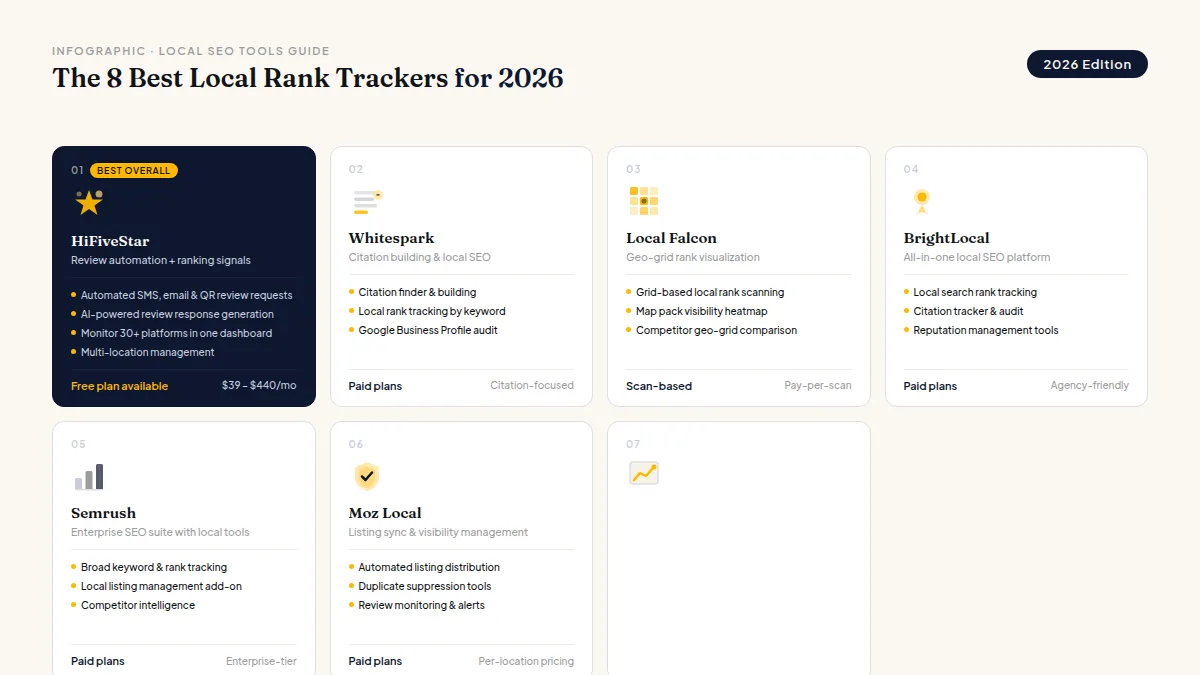
1. HiFiveStar — Best Overall for Improving Local Rankings
HiFiveStar is not a rank tracker; it takes a fundamentally different approach than traditional rank trackers. Instead of only showing you where you rank, it improves the signals that determine your rank — primarily your review volume, recency, and average star rating. Since Google has confirmed that reviews are a top local ranking factor, automating review generation is the single highest-leverage action most local businesses can take to improve their map pack position.
What HiFiveStar does:
On Pro, HiFiveStar can automate review requests by SMS and email, sending them soon after each customer interaction, and it always gives you a QR code to share too. Its AI Reply tool drafts a thoughtful reply to any review when you ask (Core and up), so you can respond quickly — a behavior that Google rewards in local rankings. The centralized dashboard aggregates reviews from Google, Yelp, TripAdvisor, and six other platforms, so you can monitor your reputation and your local ranking signals in one place.
Key features:
- Automated review requests by SMS and email (on Pro), plus a QR code to share anytime
- AI reply drafts for any review (Core and up)
- All-locations view that lists every location's reviews together
- Reviews come in from nine sites, and its review page links to 30+ more
- Analytics on review growth, average rating, and your review funnel (Core and up)
Pricing:
| Plan | Monthly Price |
|---|---|
| Forever Free | $0 |
| Core | $39 |
| Pro | $99 |
| Growth | $179 |
| Business | $249 |
| Enterprise | $440 |
Who it's best for: Local businesses and multi-location brands that want to improve their Google Maps rankings through review generation. The free plan makes it accessible to any business, and the paid tiers scale to agencies managing dozens of locations.
Limitation: HiFiveStar is not a keyword rank tracker — it does not show you your position for specific search terms. Pair it with BrightLocal or Whitespark if you also need keyword-level ranking data.
2. BrightLocal — Best Dedicated Local Rank Tracker
BrightLocal is the most purpose-built local SEO platform available. Its rank tracking is accurate, granular, and designed specifically for the nuances of local search — tracking positions in the local map pack, the local organic results, and Google Maps separately. You can set the geographic center point for your tracking and monitor rankings as if you were a searcher standing at that location.
Key features:
- Local rank tracking for Google Map Pack, organic, and Google Maps
- Track rankings from any geographic point in your market
- Competitor tracking — see where your top rivals rank for the same keywords
- Citation audit to find missing or inaccurate listings
- White-label reporting for agencies managing client accounts
Pricing: Starting at $29/month for single-location businesses. Agency plans start at $39/month.
Who it's best for: Small business owners who want accurate, affordable local rank tracking. Agencies that manage SEO for multiple clients will find the white-label reporting and multi-location management features especially valuable.
3. Whitespark — Best for Local Citation and Rank Tracking Combined
Whitespark is known primarily as the go-to tool for local citation building, but its Local Rank Tracker is a serious product in its own right. It tracks your position in the local map pack and organic results, lets you set the physical location of the virtual searcher, and surfaces competitor rankings alongside yours. Whitespark's particular strength is connecting citation health data with ranking data — so you can see whether missing or inconsistent citations are dragging down your rankings.
Key features:
- Local Rank Tracker for map pack and organic positions
- Searcher location override to track rankings from specific neighborhoods
- Citation Finder to identify missing listing opportunities
- Citation Audit to flag inconsistent NAP (name, address, phone) data
- Google Business Profile audit
Pricing: Local Rank Tracker starts at $33/month. Citation Finder and Citation Audit are priced separately.
Who it's best for: Local SEO practitioners and agencies who want tightly integrated citation and ranking data. If NAP consistency and citation completeness are priorities for your clients, Whitespark gives you both the diagnostic and the fix in one place.
4. Semrush — Best for Full SEO Suite with Local Capabilities
Semrush is the most comprehensive SEO platform available, and its Position Tracking tool can be configured to track local rankings by targeting specific zip codes or cities. For businesses running a full digital marketing strategy — combining local SEO with content marketing, backlink building, and paid search — Semrush provides a unified workspace that eliminates the need for multiple tools.
Key features:
- Position Tracking for local keywords filtered by city or zip code
- Map Pack tracking to monitor your appearance in local results
- Competitive gap analysis to find keywords your rivals rank for but you don't
- Backlink analytics and link building tools
- On-page SEO recommendations
Pricing: Core plan starts at $139.95/month. Local add-on available for managing listings across directories.
Who it's best for: Businesses and agencies that use SEO holistically — investing in content, backlinks, and local optimization simultaneously. If you only need local rank tracking, Semrush is overbuilt and overpriced for that purpose alone.
5. Moz Local — Best for Local Listing Management and Visibility
Moz Local focuses on ensuring your business information is accurate and consistent across every major directory and data aggregator — a critical foundation for local rankings. Its rank tracking is less granular than BrightLocal or Whitespark, but its listing sync and audit tools make it an excellent choice for businesses whose rankings are being dragged down by inconsistent NAP data across the web.
Key features:
- Automated listing sync across 70+ directories and data aggregators
- Duplicate listing detection and suppression
- Local rank tracking for Google and Bing
- Review monitoring across major platforms
- Google Business Profile insights integration
Pricing: Essential plan starts at $14/month per location.
Who it's best for: Local businesses that suspect inconsistent listings are hurting their rankings. Moz Local's listing sync feature can rapidly push accurate information to dozens of directories simultaneously.
6. Local Falcon — Best for Hyper-Local Grid Rank Tracking
Local Falcon introduced a visualization approach that has become a must-have for serious local SEO practitioners: the rank tracking grid. Instead of showing you a single ranking position, Local Falcon scans your position from dozens of geographic points across your service area and visualizes the results on a map. This reveals "ranking gaps" — areas where your business ranks poorly even though you serve them — with a clarity that traditional rank trackers cannot match.
Key features:
- Geographic grid tracking — scan rankings from a custom grid of locations
- Average rank score (ATOP) across your entire service area
- Competitor grid scans to compare your coverage vs. rivals
- Scheduled automated scans to track progress over time
- Share reports directly with clients
Pricing: Credit-based system starting around $24/month for basic usage.
Who it's best for: Service-area businesses (plumbers, HVAC, landscapers, cleaning services) who serve customers across a geographic area rather than at a fixed location. If you need to understand where you rank in each neighborhood of your city, Local Falcon is the clearest tool available.
7. GeoRanker — Best for Multi-Location and Multi-City Rank Tracking
GeoRanker specializes in tracking rankings at scale across many locations simultaneously. You can specify exact GPS coordinates, cities, or zip codes as your virtual searcher location, making it ideal for franchise businesses, multi-location brands, or agencies managing clients in multiple cities.
Key features:
- Geo-targeted rank tracking at city, zip, or GPS coordinate level
- Bulk rank checking for large keyword lists and multiple locations
- Local citation finder to identify top directories in any niche
- Real-time rank checks (versus scheduled scans in most competitors)
- API access for integrating ranking data into custom dashboards
Pricing: Plans start at $99/month. Usage-based pricing applies for large-scale rank checking.
Who it's best for: Multi-location businesses, franchise groups, and agencies managing SEO across multiple cities. The bulk rank checking and API access make GeoRanker especially valuable for teams that need to integrate ranking data into proprietary reporting systems. For a focused walkthrough of monitoring rankings city by city, see our city rank tracking guide.
8. Ahrefs — Best for Backlink Analysis Combined with Local Rank Tracking
Ahrefs is primarily known as the best backlink analysis tool in the SEO industry, but its Site Explorer and Rank Tracker tools include local keyword tracking capabilities. For businesses in competitive local markets where building authoritative local backlinks is a strategic priority, Ahrefs provides the deepest link intelligence of any tool on this list.
Key features:
- Rank Tracker with country and city-level targeting
- Backlink analysis — see which sites link to your competitors but not you
- Content gap analysis to find local keywords competitors rank for
- Site Audit to identify technical SEO issues
- Keywords Explorer with local search volume data
Pricing: Lite plan starts at $99/month.
Who it's best for: Established local businesses in competitive markets where link building is a core strategy. If your local rankings are plateauing and you suspect it's because competitors have stronger backlink profiles, Ahrefs gives you the data to close that gap.
How to Choose the Best Local Rank Tracker
With eight strong options on this list, the right choice depends on your specific situation. Ask yourself these four questions:
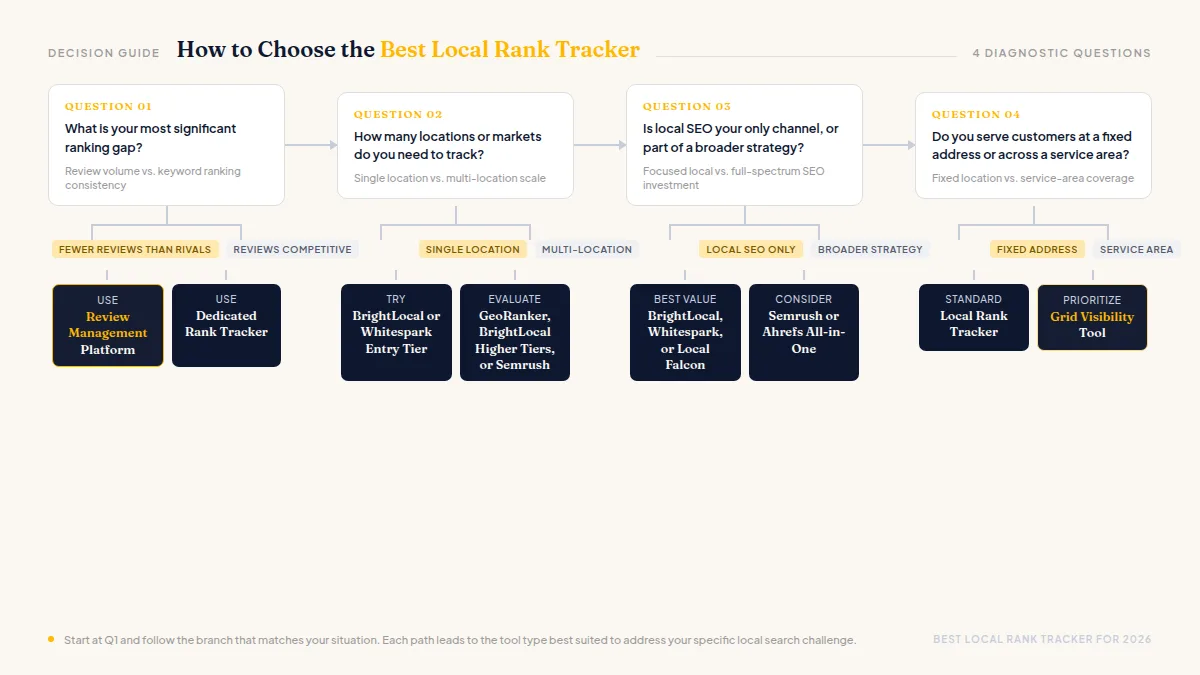
1. What is your most significant ranking gap?
If you have significantly fewer Google reviews than your top competitors, a review management platform like HiFiveStar can do more for your rankings than any rank tracker — because it goes after the root cause, your review count, rather than just measuring the symptom.
If your review count is competitive but your keyword rankings are inconsistent, a dedicated rank tracker like BrightLocal or Whitespark will help you identify which terms need work and whether your efforts are paying off.
2. How many locations or markets do you need to track?
Single-location businesses can get by with BrightLocal's $29/month plan or Whitespark's entry tier. Multi-location businesses and agencies should evaluate GeoRanker, BrightLocal's higher tiers, or Semrush for the scale and reporting flexibility they provide.
3. Is local SEO your only channel, or part of a broader strategy?
If local SEO is your primary and only SEO investment, purpose-built local tools (BrightLocal, Whitespark, Local Falcon) give you more value per dollar than enterprise platforms like Semrush or Ahrefs.
If you also invest in content marketing, backlink building, and organic SEO, the all-in-one platforms justify their higher cost by consolidating your toolset.
4. Do you serve customers at a fixed address or across a service area?
Fixed-location businesses (restaurants, retail stores, clinics) benefit most from tracking rankings in their immediate vicinity. BrightLocal and Whitespark handle this well.
Service-area businesses that travel to customers (electricians, roofers, pest control) need to understand how they rank across an entire geographic area. Local Falcon's grid tracking was built specifically for this use case and is worth the investment for service-area businesses.
What Results Should You Expect?
Local rank improvement is not instant, but the timeline is predictable when you address the right signals:
30 days: With automated review generation from HiFiveStar (on Pro), most businesses see a 30–50% increase in monthly review volume. Consistent listing information from Moz Local or Whitespark begins appearing across directories.
60–90 days: Ranking improvements in the map pack become measurable for keywords where you were close to the top three. BrightLocal or Whitespark tracking data will show an upward trend.
3–6 months: Businesses that run review campaigns consistently and fix citation issues typically move from outside the map pack into the top three for their primary local keywords. The compound effect of more reviews, consistent citations, and fresh engagement signals accumulates month over month.
6–12 months: Full competitive parity — and often dominance — is achievable in most local markets. Businesses with strong review velocity (10+ new reviews per month) and consistent local SEO activity reliably hold top-three positions over the long term.
Frequently Asked Questions
What is the best free local rank tracker?
HiFiveStar's free plan is not a rank tracker, but it is the best free option for businesses focused on improving their local rankings through reviews. For keyword-based rank tracking, BrightLocal offers a 14-day free trial, and Whitespark has a limited free search volume. No major local rank tracker offers a fully featured permanent free plan.
How accurate are local rank trackers?
Accuracy varies because Google personalizes results based on the searcher's exact location, search history, and device. The best tools — BrightLocal, Whitespark, and Local Falcon — use multiple data points and averaging across many simulated searches to reduce this noise. Treat the numbers as directional trends rather than exact counts, and focus on week-over-week and month-over-month movement rather than day-to-day position changes.
How often should I check my local rankings?
Weekly checks are the right cadence for most local businesses. Daily tracking creates noise that makes it hard to identify real trends. Monthly review is fine for stable markets but may be too slow to catch a competitor surge or a ranking penalty in competitive niches. Set up automated reporting in your rank tracker so trend data comes to you rather than requiring you to log in manually.
Can I rank locally without building backlinks?
Yes. For the majority of local businesses — especially those targeting queries with lower competition — reviews, citations, and an optimized Google Business Profile are sufficient to reach the top of the map pack without a dedicated link building campaign. Backlinks matter more in highly competitive local markets (attorneys, real estate, home services in large cities) where multiple well-established businesses compete for the same keywords.
What is the difference between map pack rankings and organic rankings?
Map pack rankings refer to your position in the three-business cluster that appears in local search results, which is powered by your Google Business Profile. Organic rankings refer to your position in the standard web page results that appear below the map. Most local businesses should prioritize their map pack position — it receives more clicks for local intent queries — before optimizing their organic ranking. The signals that drive each are related but distinct: map pack rankings weight reviews, citations, and Google Business Profile completeness most heavily, while organic rankings weight website authority, on-page SEO, and backlinks.
Is HiFiveStar a rank tracker?
HiFiveStar is a review management and reputation platform that helps you get more reviews — the most actionable local ranking signal available to most businesses — with automated review requests on Pro. It is not a rank tracker and does not show where you rank. For tracking keyword positions in the map pack, combine HiFiveStar with BrightLocal or Whitespark to get both the improvement engine and the measurement instrument.
Ready to Take Control of Your Online Reputation?
Join thousands of local businesses using HiFiveStar to get more reviews and grow faster.